
React component
Overview
The Radar Score component displays a clickable icon that opens a modal window containing a radar chart visualization. This component is useful for presenting multi-dimensional score data in an interactive format.
Visual Examples
Icon Display:

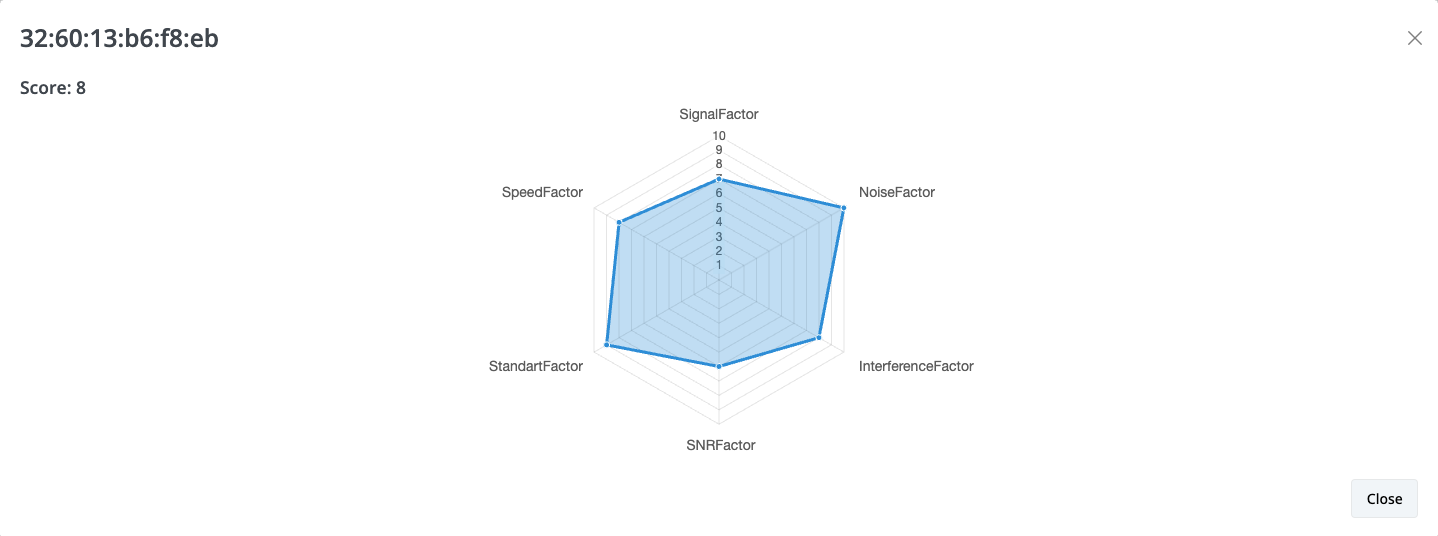
Modal with Radar Chart:
When the icon is clicked, a modal opens displaying the radar chart with the configured data.
Component Syntax
<radar-score paramid="string" score="int" labels="string" data="string"></radar-score>
Parameters
- paramid (String): Unique identifier for the radar-score element
- score (Integer): Total score value displayed on the icon and in the modal
- labels (String): Comma-separated list of labels for the chart axes
- data (String): Comma-separated list of numerical values corresponding to each label
Usage Example
<radar-score
  score="8"
  paramid="32:60:13:b6:f8:eb"
  labels="SignalFactor, NoiseFactor, InterferenceFactor, SNRFactor, StandartFactor, SpeedFactor"
  data="7,10,8,6,9,8">
</radar-score>
In this example:
- The icon displays a score of 8
- Six data points are plotted on the radar chart
- Each value in the
dataparameter corresponds to a label in thelabelsparameter
No comments to display
No comments to display