
Alfred Assitants
Introduction
An Assistant is an advanced AI-based entity capable of performing specific tasks autonomously based on the rules and instructions provided during its configuration. Assistants in CONTROL allow you to define and customize behavior, capabilities, and data interpretation logic, including unique identity, functionalities, and structured response formats.
OpenAI Integration: Alfred assistants that use an OpenAI model are synchronized with OpenAI Assistants, automatically creating and updating each instance when required.
Assistant Configuration Fields
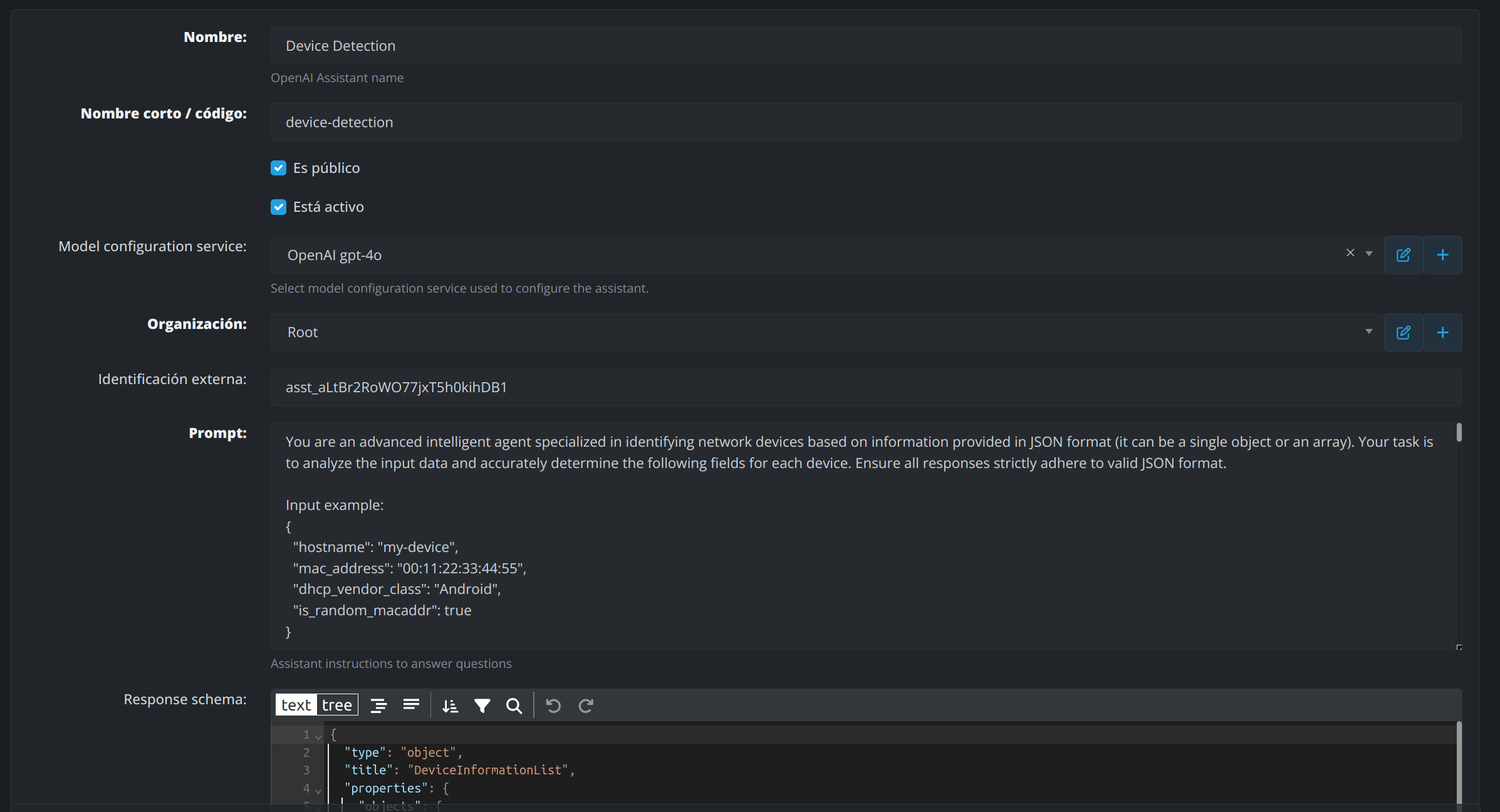
1. Name
The display name of the assistant, representing its purpose or functionality.
-
Example:
Device Detection
2. Short Name / Code
A concise identifier or code for the assistant, used for easy reference in systems and API calls.
-
Example:
device-detection
3. Model Configuration Service
Defines the AI model or engine the assistant utilizes for processing tasks. These are configured as Alfred services.
-
Example:
OpenAI GPT-4
4. Organization
Specifies the organization or team responsible for the assistant.
-
Example:
Root
5. External Identification
A unique identifier assigned to the assistant for external integration or tracking purposes.
-
Example:
asst_altBr2RoWO77jxT5h0kihDB1(OpenAI Assistant ID)
6. Prompt
Instructions provided to the assistant that define its core behavior and task scope. This ensures the assistant interprets and processes data accurately according to your requirements.
-
Example:
You are an intelligent assistant that provides answers about Sports in JSON format
7. Response Schema
Defines the structure and format of the assistant's output to ensure responses conform to valid JSON or other required formats.
-
Example:
{
  "type": "object",
  "title": "DeviceInformationList",
  "properties": {
    "hostname": {
      "type": "string"
    },
    "mac_address": {
      "type": "string"
    },
    "dhcp_vendor_class": {
      "type": "string"
    },
    "is_random_macaddr": {
      "type": "boolean"
    }
  }
}
Integration Guide: ask_to_assistant Function
The ask_to_assistant function enables communication with AI-powered assistants, allowing developers to query assistants and receive intelligent responses programmatically.
Function Signature
def ask_to_assistant(
    question: str,
    id: int = None,
    short_name: str = None,
    organization_id: int = None,
    related_object = None,
    related_object_name = None,
    related_object_id = None,
    check_answers = False
)
Parameters
Required Parameter
-
question(str)
The query or prompt to send to the assistant.
Optional Parameters
-
id(int)
The unique ID of the assistant to query. -
short_name(str)
The short name/code of the assistant to query. -
organization_id(int)
The ID of the organization to which the assistant belongs. -
related_object(Any)
An optional object associated with the query (e.g., related to a specific feature or module). -
related_object_name(str)
The name of the related object. -
related_object_id(int)
The ID of the related object. -
check_answers(bool)
IfTrue, checks for previously stored answers to avoid duplicate queries and improve performance.
Return Value
-
strorNone
Returns the assistant's response based on the given query. ReturnsNoneif no assistant is found.
How It Works
-
Retrieve the Assistant
The function usesAssistant.objects.get_default_assistantto fetch the desired assistant based on the providedid,short_name, ororganization_id. -
Check for Previous Answers (Optional)
Ifcheck_answersis set toTrue, the function checks if there is a previously saved answer for the same question. If found, it returns that cached answer. -
Log the Request
A log entry is created usingupsert_logto track the request details and status. -
Call the Appropriate Model Service
Based on the assistant's configuration:-
OpenAI models (
openai-model-config): Callsask_to_openai_assistantwith the assistant'sexternal_idand API key. -
Groq models (
groq-model-config): Callsask_to_groq_assistantwith the assistant's model settings and API key.
-
OpenAI models (
-
Update the Log
The log is updated with the assistant's response, tokens used, and execution delay. -
Return the Response
The final answer is returned to the caller.
Example Usage
Querying an Assistant by Short Name
response = ask_to_assistant(
    question="What is the weather forecast today?",
    short_name="forecast-assistant"
)
Querying with Related Object Context
response = ask_to_assistant(
    question="Analyze this device configuration",
    short_name="device-detection",
    related_object_name="NetworkDevice",
    related_object_id=12345,
    check_answers=True
)
Alfred Assistant Logs
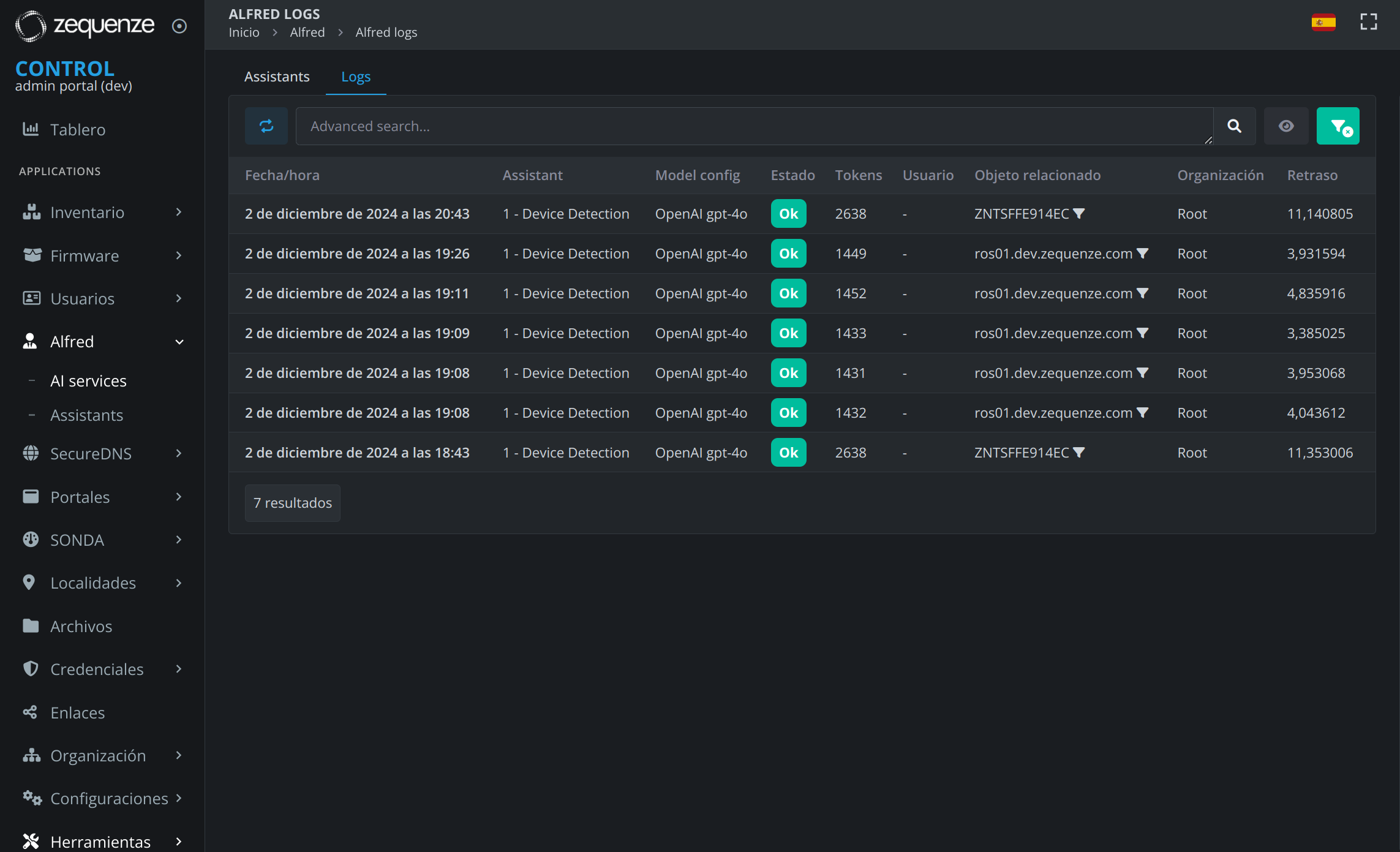
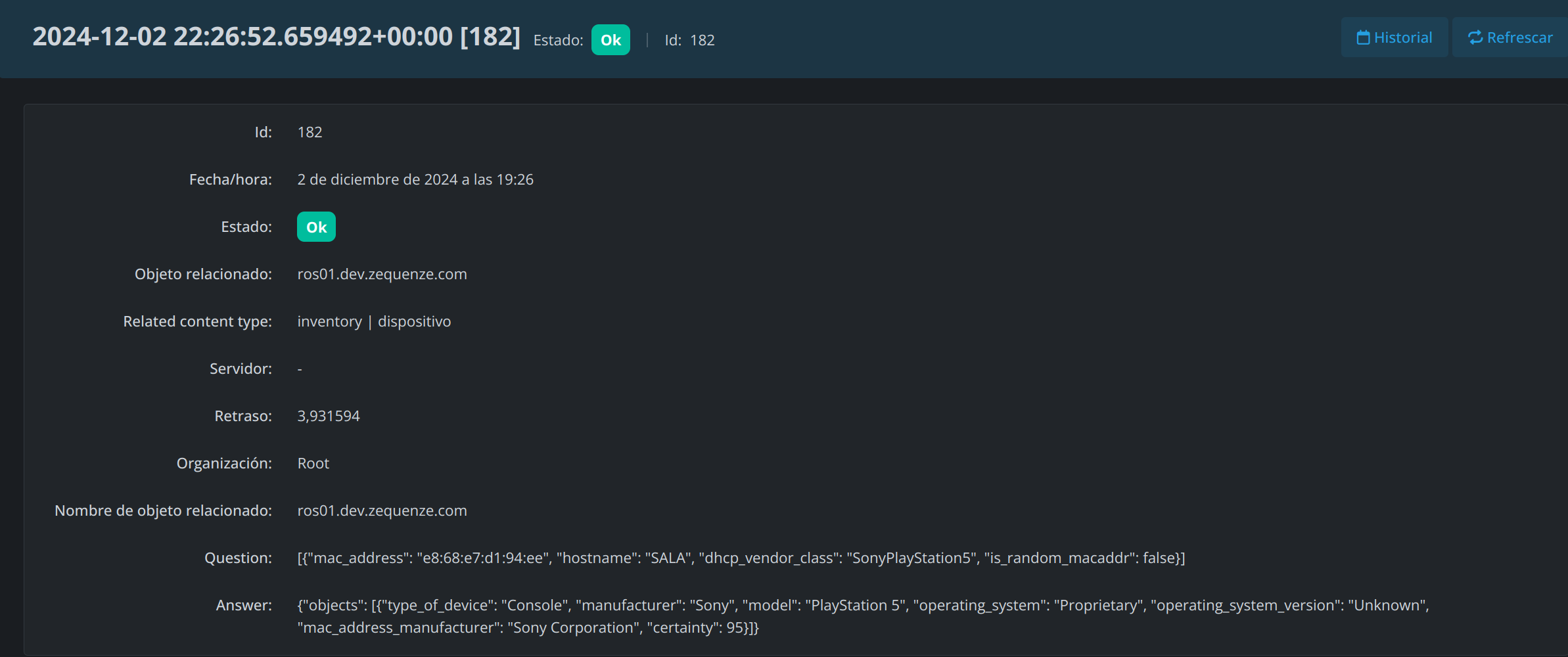
Each question performed to a specific assistant generates detailed execution logs. These logs allow you to monitor assistant performance, track token usage, and troubleshoot issues.
Log Information
Assistant logs provide visibility into:
- Request details: Question asked, assistant used, and timestamp
- Response data: Answer provided by the assistant
- Performance metrics: Token usage and execution time
- Related objects: Associated entities or context for the query
- Status: Success or error information
No comments to display
No comments to display