
How to onboard devices into zequenze CONTROL ACS
Overview
Onboarding devices into Zequenze CONTROL is a straightforward process. This guide provides the key considerations and steps to successfully connect your devices to the CONTROL Access Control Server (ACS).
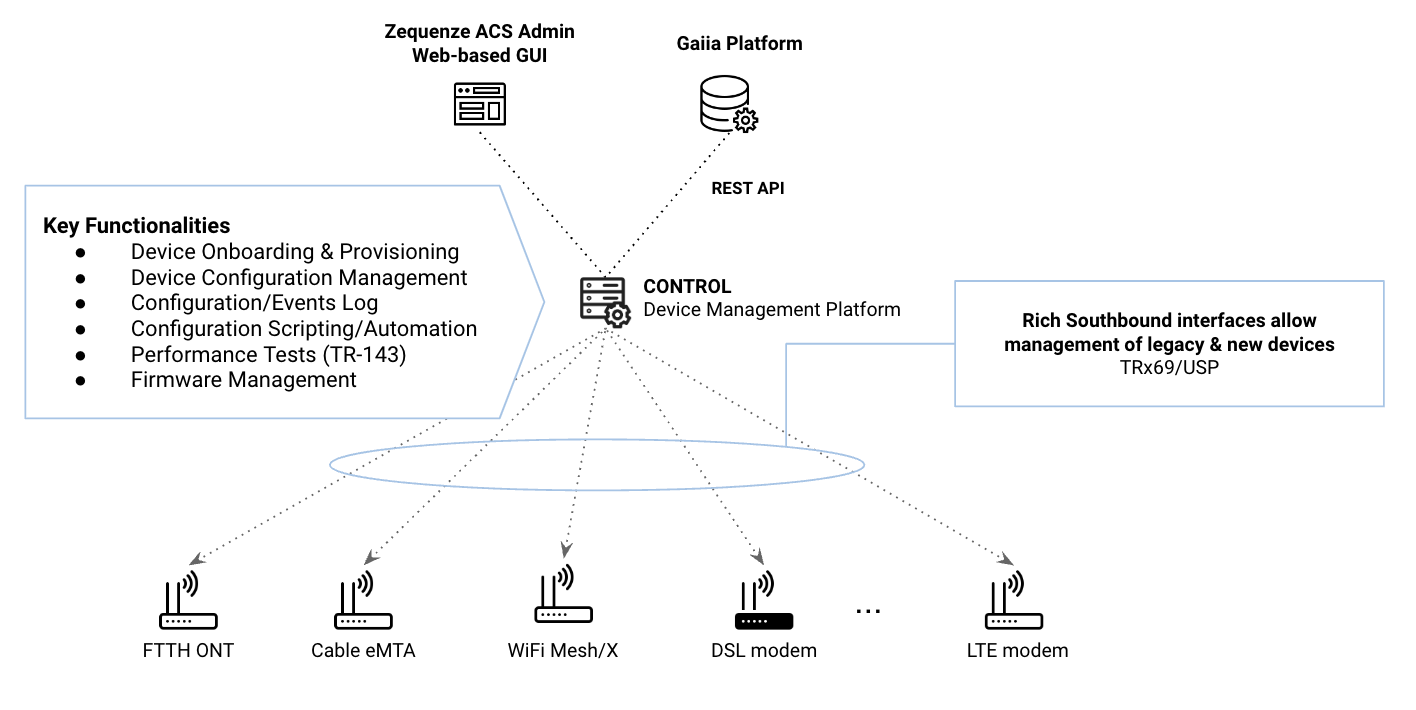
Key Concepts
Before beginning the onboarding process, understand these fundamental aspects:
-
Cloud-Based Architecture: Zequenze ACS is hosted in the Public Cloud (AWS/GCP), so all devices must have Internet connectivity to communicate with the platform.
-
TR-069 Protocol: The protocol follows a client-to-server model where devices (CPEs) periodically report to the ACS at intervals defined by the Report Interval parameter. For a comprehensive understanding of TR-069, refer to this tutorial.
-
Remote Management: Once successfully onboarded, the ACS enables remote configuration and management of CPEs using TR-069 variables supported by each device. These variables are defined in TR-098/TR-181 Data Models and can be managed through the ACS platform GUI or REST API.
Requirements
Mandatory Parameters
For a CPE to communicate with the ACS platform via TR-069, configure the following four (4) parameters:
-
ACS URL: The FQDN where devices will initiate TR-069 sessions.
-
Username & Password: Onboarding credentials used by the CPE to authenticate with the ACS platform.
-
Report Interval: Time interval (in seconds) for periodic Inform messages from the CPE to the ACS platform.
-
Internet Connectivity: Required for cloud-based ACS access. Note: Some CPEs, such as FTTH ONTs, may require specific WAN VLAN configuration to permit TR-069 traffic.
DNS Configuration
Internet Service Providers (ISPs) must define their own FQDN as a CNAME record pointing to the Zequenze ACS platform. For example:
acs.myISP.com CNAME A control.zequenze.com.
Configuration
Default TR-069 Parameters
Once DNS is configured, set up your devices with the following default TR-069 configuration:
-
URL:
https://acs.myISP.com/cwmp - Username: Provided by Zequenze (unique per device model)
- Password: Provided by Zequenze (unique per device model)
- Report Interval: Provided by Zequenze (typically 7200 seconds)
Configuration Methods
There are two (2) primary methods for mass-configuring default TR-069 settings on devices:
-
Vendor Integration: Request your CPE vendor to embed this information into the device's software default values.
-
DHCP Option 43: Use DHCP Option 43 to provision TR-069 parameters automatically.
For more details on ACS Discovery methods, consult this tutorial.
Important Considerations
CRITICAL: Verify that the default TR-069 configuration persists after a factory reset. This ensures devices remain under ACS management even after being reset to factory defaults.
Validation
Verifying Successful Onboarding
Once properly configured with Internet access, devices will automatically onboard to the platform. Successfully onboarded devices appear in the Inventory view of the CONTROL GUI:
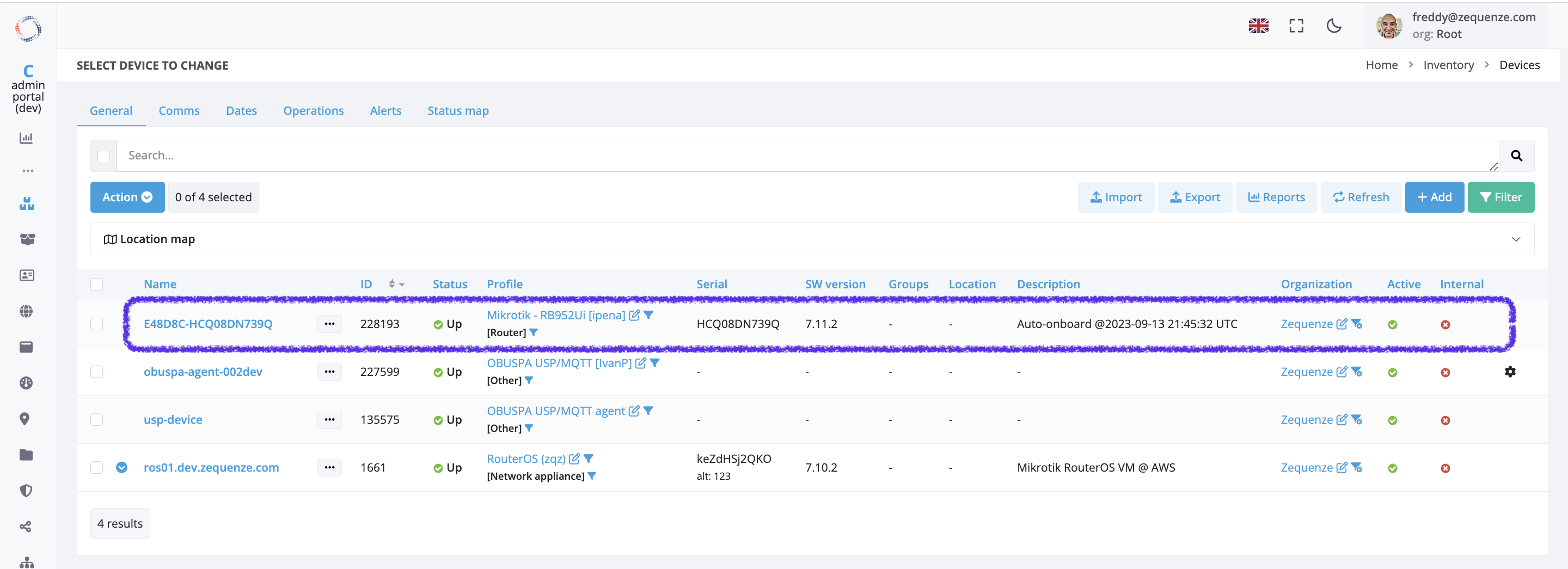
Inventory View Fields
The following table explains the information displayed in the Inventory view:
| Field | Description |
|---|---|
| Name | Unique device name in the platform. Automatically generated as the concatenation of Device OUI + Serial Number. Upon initial onboarding with model-specific credentials, the ACS assigns unique Username/Password credentials to each device. |
| ID | Device's unique identifier within the ACS platform. |
| Status | Indicates whether the device is currently reporting periodically to the platform. |
| Profile | CWMP (TR-069) profile assigned to this device. Each device model uses a specific profile based on its data model, which can be customized per customer requirements. |
| Serial | Device serial number. |
| Groups | Logical groups to which the device belongs. |
| Location | Physical location assigned to the device. |
| Description | Notes and metadata about the device. By default, the initial onboarding timestamp is recorded here. |
Troubleshooting
Common Issues
If a configured device does not automatically onboard, verify the following:
-
ACS URL Configuration: Confirm the ACS URL is correctly set on the device (check in the device's GUI or management interface).
-
Credentials: Verify that Username and Password are properly configured on the device (check in the device's GUI or management interface).
-
Internet Connectivity: Ensure the device has active Internet access. Note: Some CPEs, particularly FTTH ONTs, require specific WAN VLAN configuration to allow TR-069 traffic through the network.
Additional Support
If you continue experiencing onboarding issues after performing these checks, our team is available to assist with detailed troubleshooting. Please contact us for specialized support.
No comments to display
No comments to display