# How to onboard devices into zequenze CONTROL ACS
## Overview
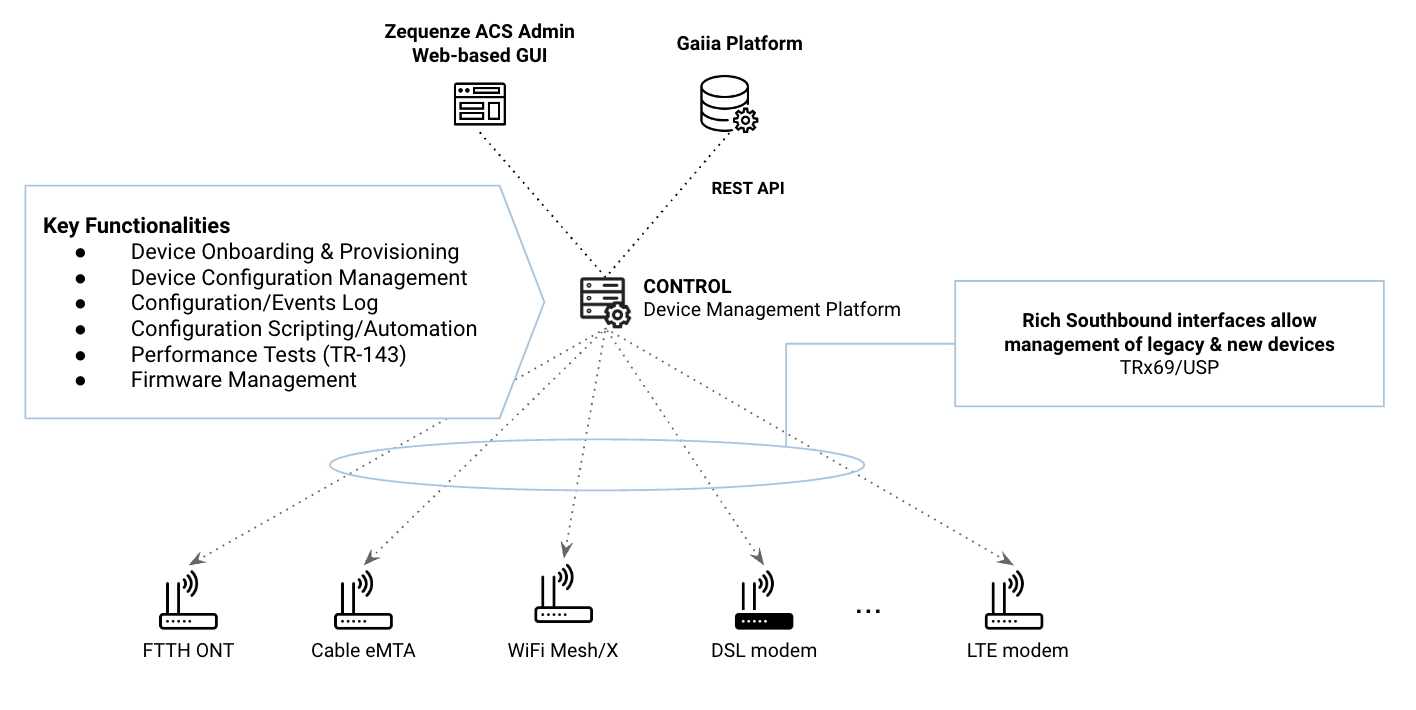
Onboarding devices into **Zequenze CONTROL** is a straightforward process. This guide provides the key considerations and steps to successfully connect your devices to the CONTROL Access Control Server (ACS).
[](https://docs.zequenze.com/uploads/images/gallery/2023-10/P9uySEm7vKDhBxHn-gaiia-zqz.png)
### Key Concepts
Before beginning the onboarding process, understand these fundamental aspects:
1. **Cloud-Based Architecture**: Zequenze ACS is hosted in the Public Cloud (AWS/GCP), so all devices must have Internet connectivity to communicate with the platform.
2. **TR-069 Protocol**: The protocol follows a *client-to-server* model where devices (CPEs) periodically report to the ACS at intervals defined by the *Report Interval* parameter. For a comprehensive understanding of TR-069, refer to this **tutorial**.
3. **Remote Management**: Once successfully onboarded, the ACS enables remote configuration and management of CPEs using TR-069 variables supported by each device. These variables are defined in TR-098/TR-181 Data Models and can be managed through the ACS platform GUI or REST API.
---
## Requirements
### Mandatory Parameters
For a CPE to communicate with the ACS platform via TR-069, configure the following four (4) parameters:
1. **ACS URL**: The FQDN where devices will initiate TR-069 sessions.
2. **Username & Password**: Onboarding credentials used by the CPE to authenticate with the ACS platform.
3. **Report Interval**: Time interval (in seconds) for periodic Inform messages from the CPE to the ACS platform.
4. **Internet Connectivity**: Required for cloud-based ACS access. **Note**: Some CPEs, such as FTTH ONTs, may require specific WAN VLAN configuration to permit TR-069 traffic.
### DNS Configuration
Internet Service Providers (ISPs) must define their own FQDN as a CNAME record pointing to the Zequenze ACS platform. For example:
```
acs.myISP.com CNAME A control.zequenze.com.
```
---
## Configuration
### Default TR-069 Parameters
Once DNS is configured, set up your devices with the following default TR-069 configuration:
- **URL**: `https://acs.myISP.com/cwmp`
- **Username**: *Provided by Zequenze (unique per device model)*
- **Password**: *Provided by Zequenze (unique per device model)*
- **Report Interval**: *Provided by Zequenze (typically 7200 seconds)*
### Configuration Methods
There are two (2) primary methods for mass-configuring default TR-069 settings on devices:
1. **Vendor Integration**: Request your CPE vendor to embed this information into the device's software default values.
2. **DHCP Option 43**: Use DHCP Option 43 to provision TR-069 parameters automatically.
For more details on ACS Discovery methods, consult this **tutorial**.
### Important Considerations
**CRITICAL**: Verify that the default TR-069 configuration persists after a factory reset. This ensures devices remain under ACS management even after being reset to factory defaults.
---
## Validation
### Verifying Successful Onboarding
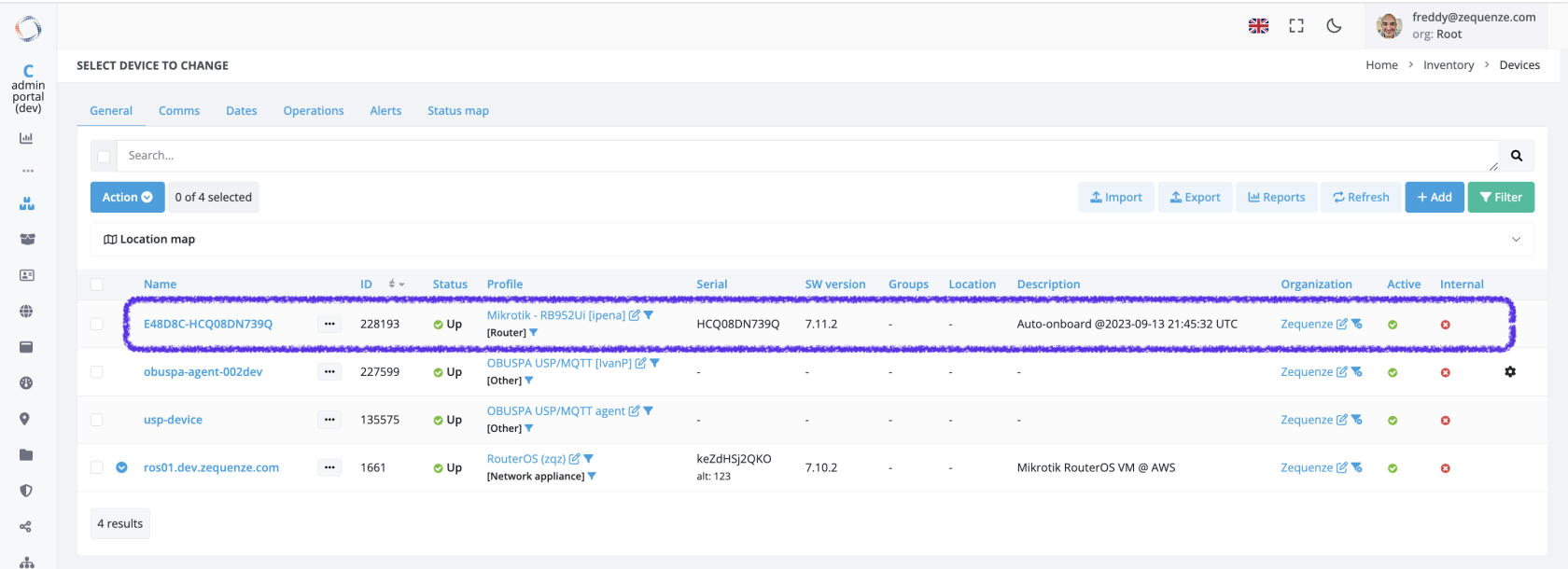
Once properly configured with Internet access, devices will automatically onboard to the platform. Successfully onboarded devices appear in the **Inventory** view of the CONTROL GUI:
[](https://docs.zequenze.com/uploads/images/gallery/2023-09/RhJUdS6KQVDKZ0Jy-control-gui-01.png)
### Inventory View Fields
The following table explains the information displayed in the Inventory view:
| Field | Description |
| ---: | :--- |
| **Name** | Unique device name in the platform. Automatically generated as the concatenation of Device OUI + Serial Number. Upon initial onboarding with model-specific credentials, the ACS assigns unique Username/Password credentials to each device. |
| **ID** | Device's unique identifier within the ACS platform. |
| **Status** | Indicates whether the device is currently reporting periodically to the platform. |
| **Profile** | CWMP (TR-069) profile assigned to this device. Each device model uses a specific profile based on its data model, which can be customized per customer requirements. |
| **Serial** | Device serial number. |
| **Groups** | Logical groups to which the device belongs. |
| **Location** | Physical location assigned to the device. |
| **Description** | Notes and metadata about the device. By default, the initial onboarding timestamp is recorded here. |
---
## Troubleshooting
### Common Issues
If a configured device does not automatically onboard, verify the following:
1. **ACS URL Configuration**: Confirm the ACS URL is correctly set on the device (check in the device's GUI or management interface).
2. **Credentials**: Verify that Username and Password are properly configured on the device (check in the device's GUI or management interface).
3. **Internet Connectivity**: Ensure the device has active Internet access. **Note**: Some CPEs, particularly FTTH ONTs, require specific WAN VLAN configuration to allow TR-069 traffic through the network.
### Additional Support
If you continue experiencing onboarding issues after performing these checks, our team is available to assist with detailed troubleshooting. Please **contact us** for specialized support.
---