
Dynamic value substitution
Overview
Dynamic value substitution allows you to use variables as placeholders in CONTROL configuration settings. Variables are enclosed in double curly braces (e.g., {{ variable_name }}) and are automatically replaced with their actual values when applied to devices.
You can use dynamic value substitution in the following contexts:
- Default values for Parameters in Device Profile/Type configurations
- Device Settings values in Device Profile/Type configurations
- Integration service configurations for event handlers and other integrations
How Variables Work
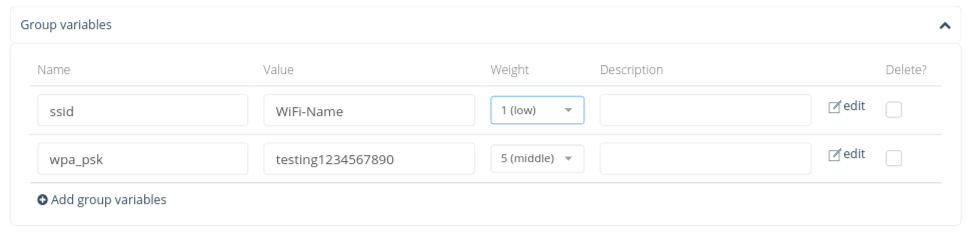
Variables and their values are defined under the Groups menu. They can be:
- Custom variables: Manually defined within Groups
- System variables: Dynamically generated from Device object information and settings
For detailed information about configuring Groups and their variables, see the Inventory Groups section.
Using Variables in Configuration
When a Device belongs to a Group that includes a defined variable, CONTROL automatically substitutes any matching variable placeholder with its actual value.
Example:
If a Device belongs to a Group with a variable named network_name set to Zequenze, then:
- Any setting configured as
{{ network_name }}will be replaced withZequenze - If a Parameter's default value in a Device Profile/Type is set to
{{ network_name }}, the platform will useZequenzewhen generating the device's default configuration
Variable Precedence and Weight
When multiple Groups define the same variable name, CONTROL uses the Weight value to determine precedence:
- Variables configured with higher weights take precedence over those with lower weights
- If a Device belongs to multiple Groups that define the same variable, the value from the variable with the highest weight will be used
System-Generated Device Variables
The following variables are automatically generated from Device object properties and are available for use in dynamic value substitution:
| Variable Name | Description |
|---|---|
device.name |
Name of the device |
device.description |
1st description of the device |
device.description2 |
2nd description of the device |
device.description3 |
3rd description of the device |
device.description4 |
4th description of the device |
device.serial_number |
Serial number of the device |
device.serial_number_alt |
Alternate serial number of the device |
device.organization |
Name of the Device's assigned Organization |
device.organization_id |
ID of the Device's assigned Organization |
device.type_id |
ID of the Device's Type/Profile |
device.type.name |
Name of the Device's Type/Profile |
device.type.short_name |
Short name configured on the Type/Profile |
device.type.klass |
Class of device configured on the Type/Profile |
device.manufacturer |
Manufacturer of the device |
device.unique_identifier |
Manufacturer Unique ID |
device.product_class |
Product class |
device.software_version |
Software version of the device |
device.hardware_version |
Hardware version of the device |
device.location_name |
Location name configured for the device (not normalized) |
device.location_id |
ID of the Location assigned to the device (normalized) |
device.location.name |
Name of the Location assigned to the device (normalized) |
device.location.short_name |
Short-name of the Location assigned to the device (normalized) |
device.longitude |
Longitude of the device |
device.latitude |
Latitude of the device |
device.username |
Device's management agent username |
device.password |
Device's management agent password |
device.update_frequency |
Update frequency interval configured on the device |
device.mac |
MAC address of the device |
device.address |
Management address of the device |
device.gateway_address |
Management gateway address or hostname |
Examples
Example 1: Device Settings Substitution
If a device is configured with the following settings:
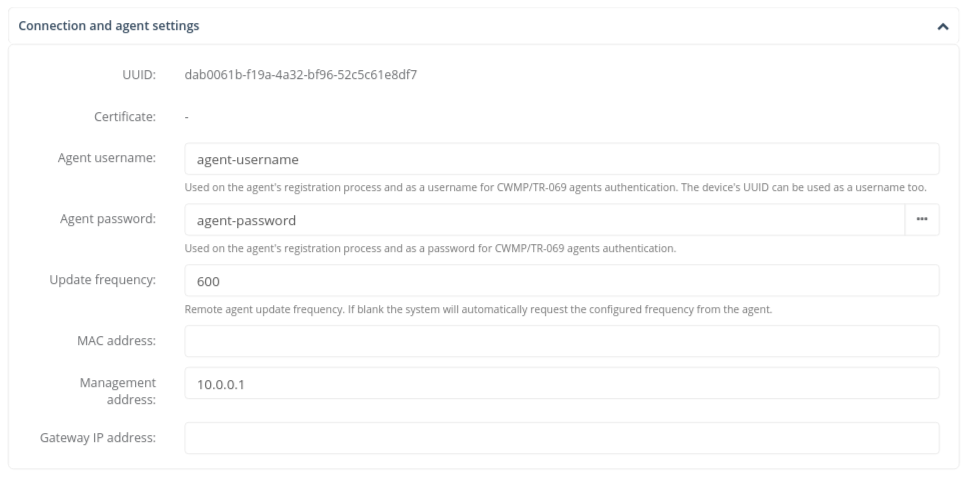
The following variable substitutions will be performed:
-
{{ device.username }}→agent-username -
{{ device.password }}→agent-password -
{{ device.update_frequency }}→600 -
{{ device.address }}→10.0.0.1
Example 2: Parameter Default Value
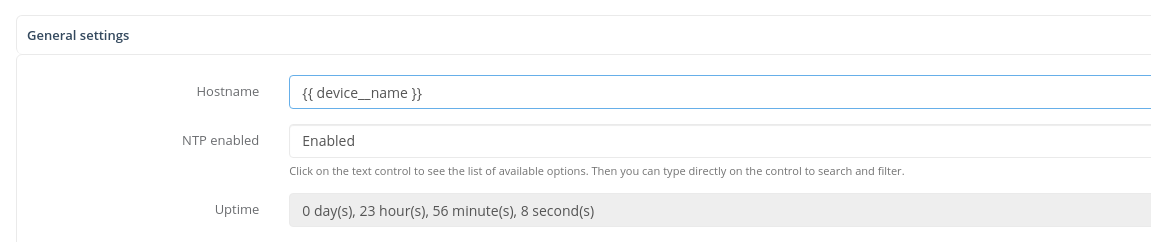
The following example shows dynamic value substitution configured as the default value of a Parameter:
No comments to display
No comments to display