
Service Status Cards
Service Status Cards
Overview
The Service Status Cards feature in CONTROL enables real-time monitoring of device services and WAN interface status through customizable dashboard cards. These cards display operational data retrieved from TR-181 or TR-098 parameters, providing instant visibility into your network infrastructure.
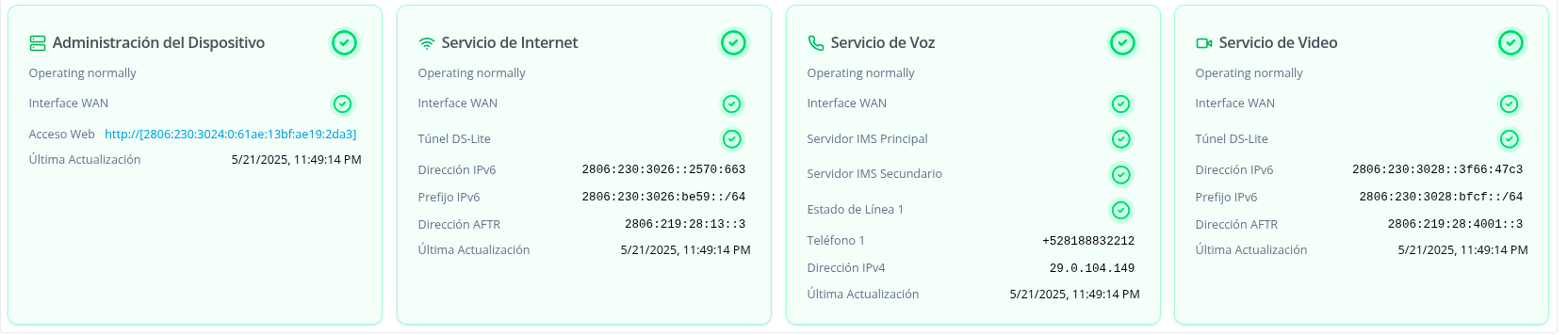 Figure: Services in healthy state
 Figure: Services in disabled state
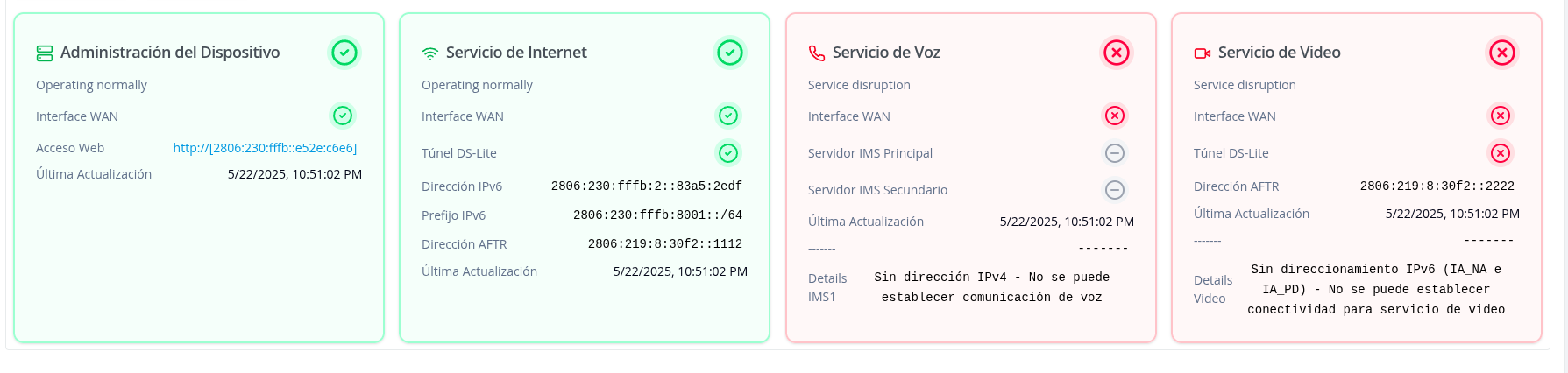 Figure: Services showing disruption or failure
Available Service Cards
The platform provides four types of service status cards:
-
Device Management — Displays device operational status and WAN interface connectivity. Shows IPv6 addressing for ACS communication and provides direct web access to the device interface.
-
Internet Service — Monitors internet connectivity status with detailed IPv6 addressing (IA_NA and IA_PD) and DS-Lite tunnel configuration for IPv4 connectivity.
-
Voice Service — Tracks VoIP service status including IMS server configuration (primary and secondary), telephony line registration, and SIP parameters.
-
Video Service — Monitors video streaming service status with dedicated DS-Lite tunnel and IPv6 configuration separate from internet service.
Configuration Guide
Step 1: Navigate to Device Profiles
Access the profiles section where you'll configure the monitoring script:
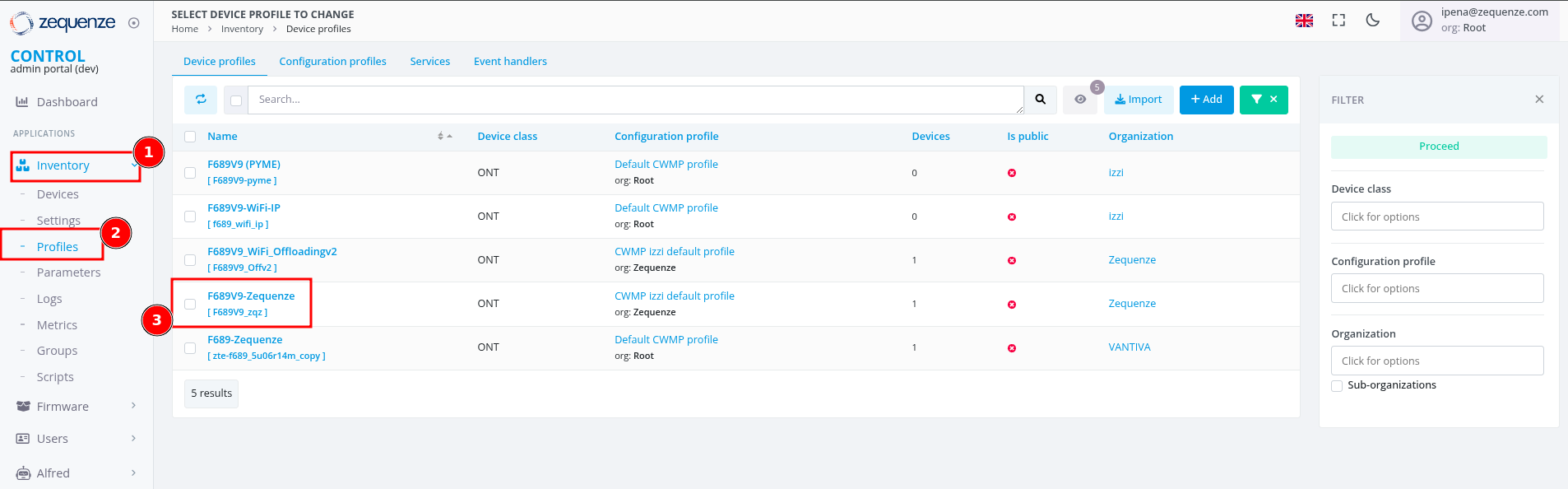 Figure 1: Device profile selection interface
Step 2: Access Profile Scripts
Locate the script configuration area within the profile:
- Scroll to the bottom of the profile configuration page
- Find the Profile scripts section
- Click the +Add button to create a new script entry
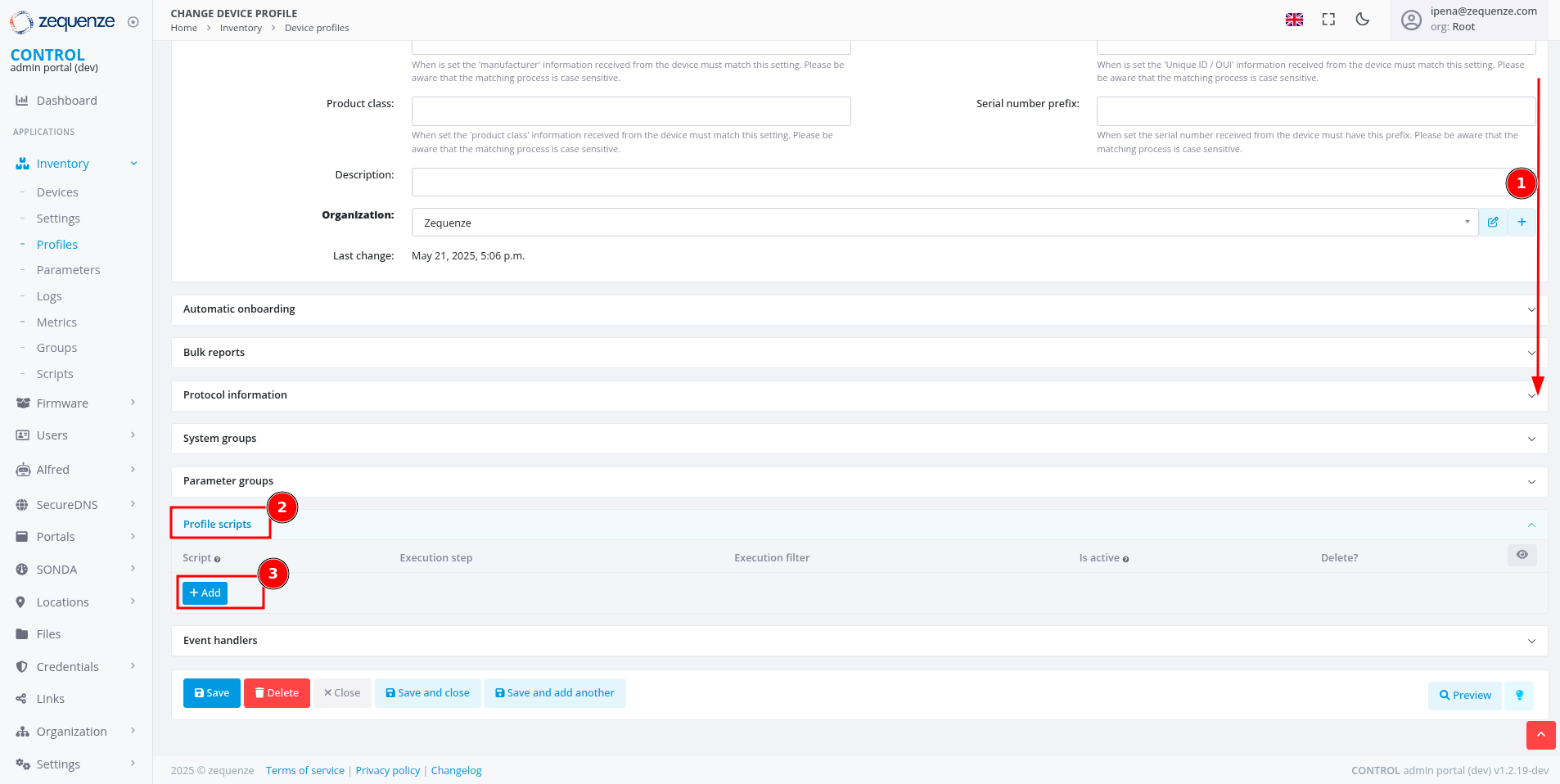 Figure 2: Profile scripts configuration section
Step 3: Create New Script Entry
Initialize a new script for service monitoring:
- In the new script line that appears, click the + icon
- The script creation dialog will open
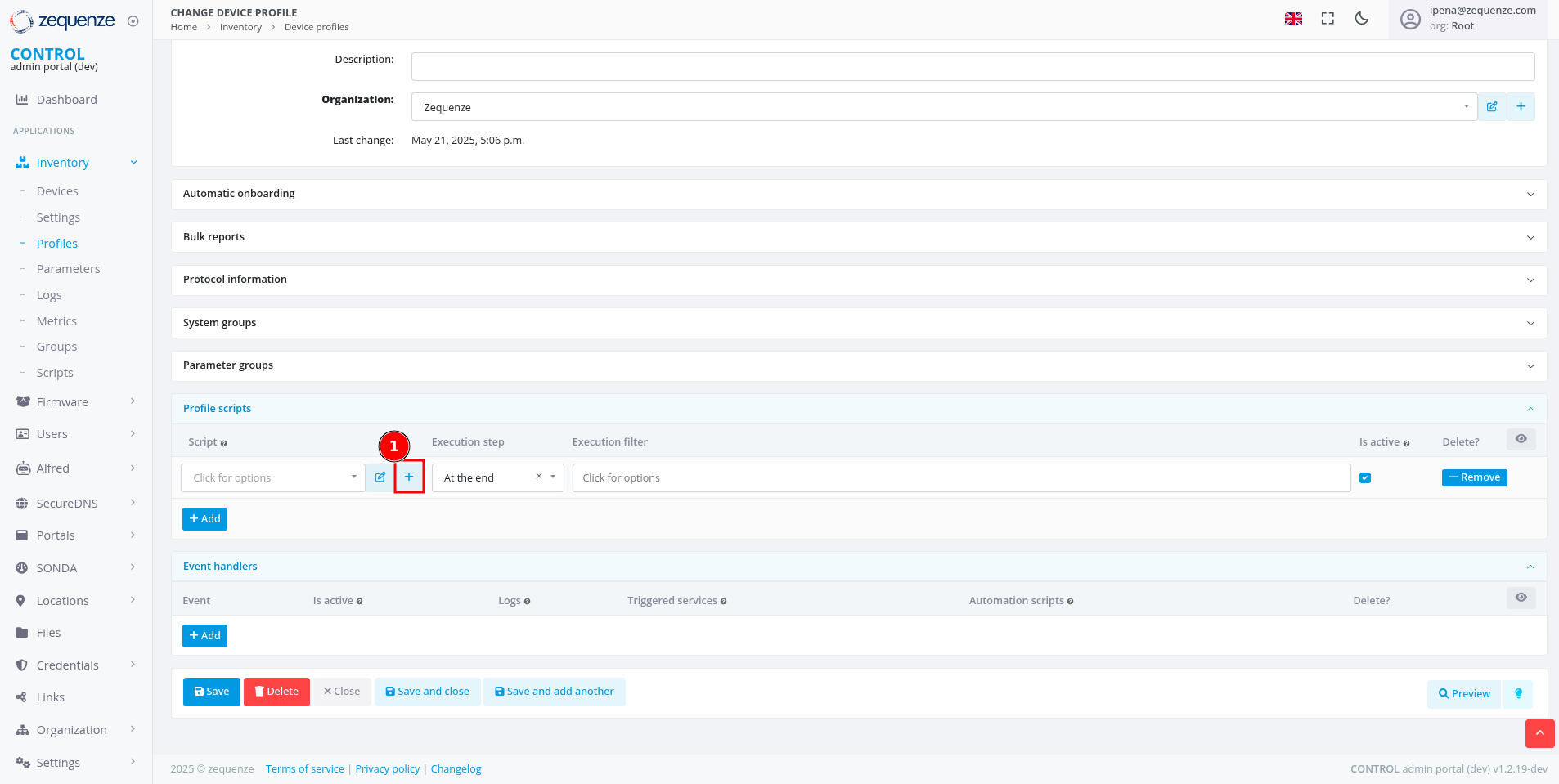 Figure 3: Creating a new script entry
Step 4: Configure Script Properties
Define the basic script parameters:
- Name: Enter a descriptive name (e.g., "Script_Global")
- Script type: Select Profile from the dropdown
- Organization: Verify the organization matches your profile
- Click Save and close
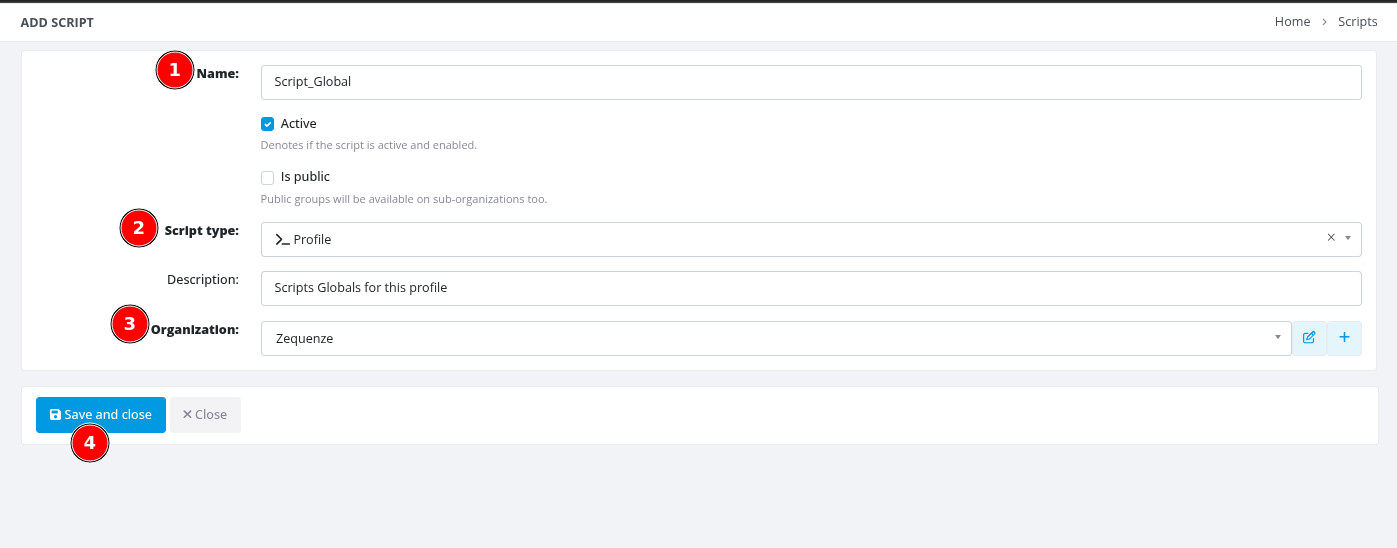 Figure 4: Script properties configuration dialog
Step 5: Save Profile Configuration
Apply the script association to the profile:
- Return to the main profile configuration page
- Click Save to apply the changes
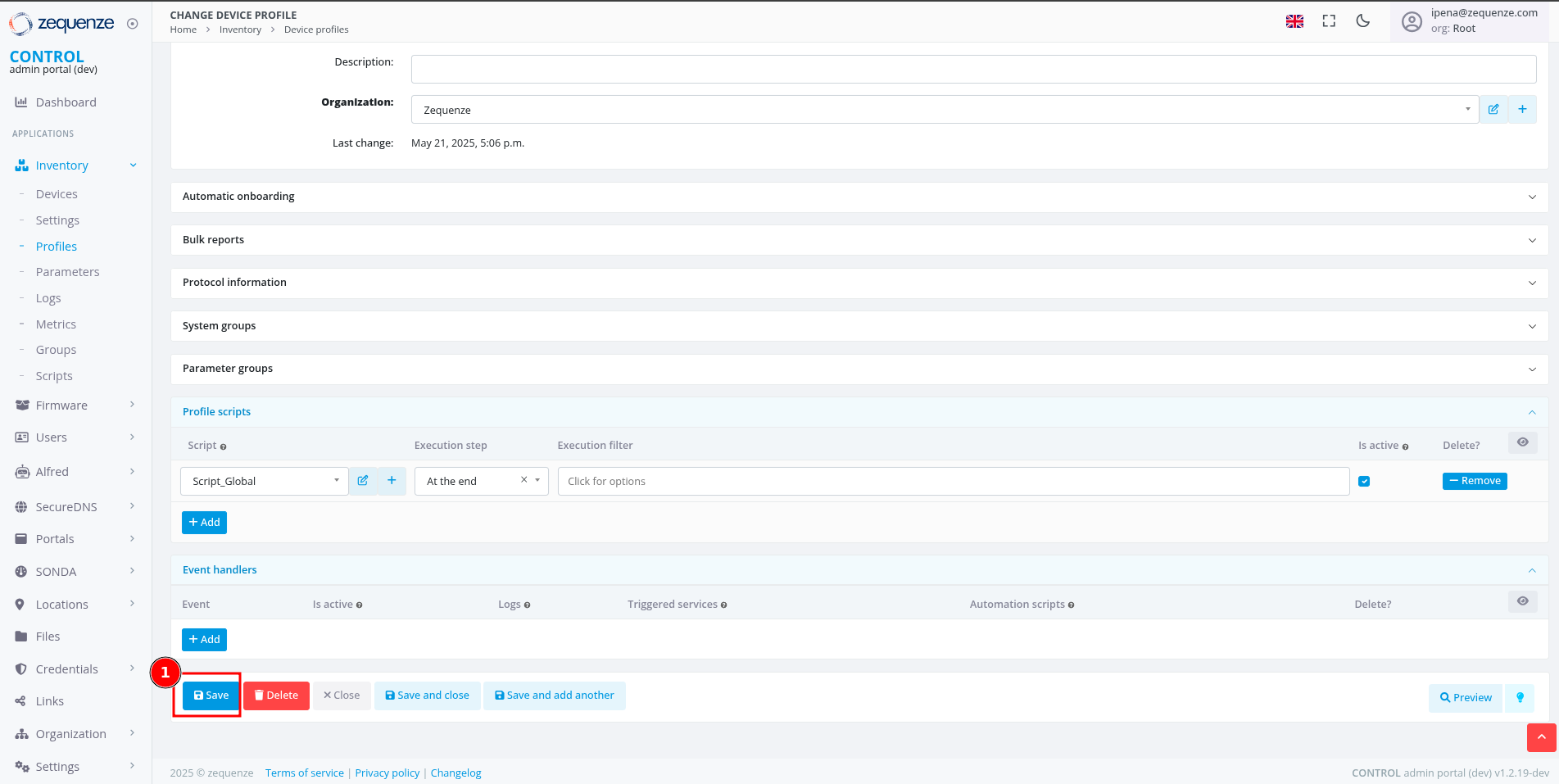 Figure 5: Saving profile configuration
Step 6: Access Script Editor
Open the script editor to implement the monitoring logic:
- Click the Edit button (pencil icon) next to your script
- The script editor interface will open
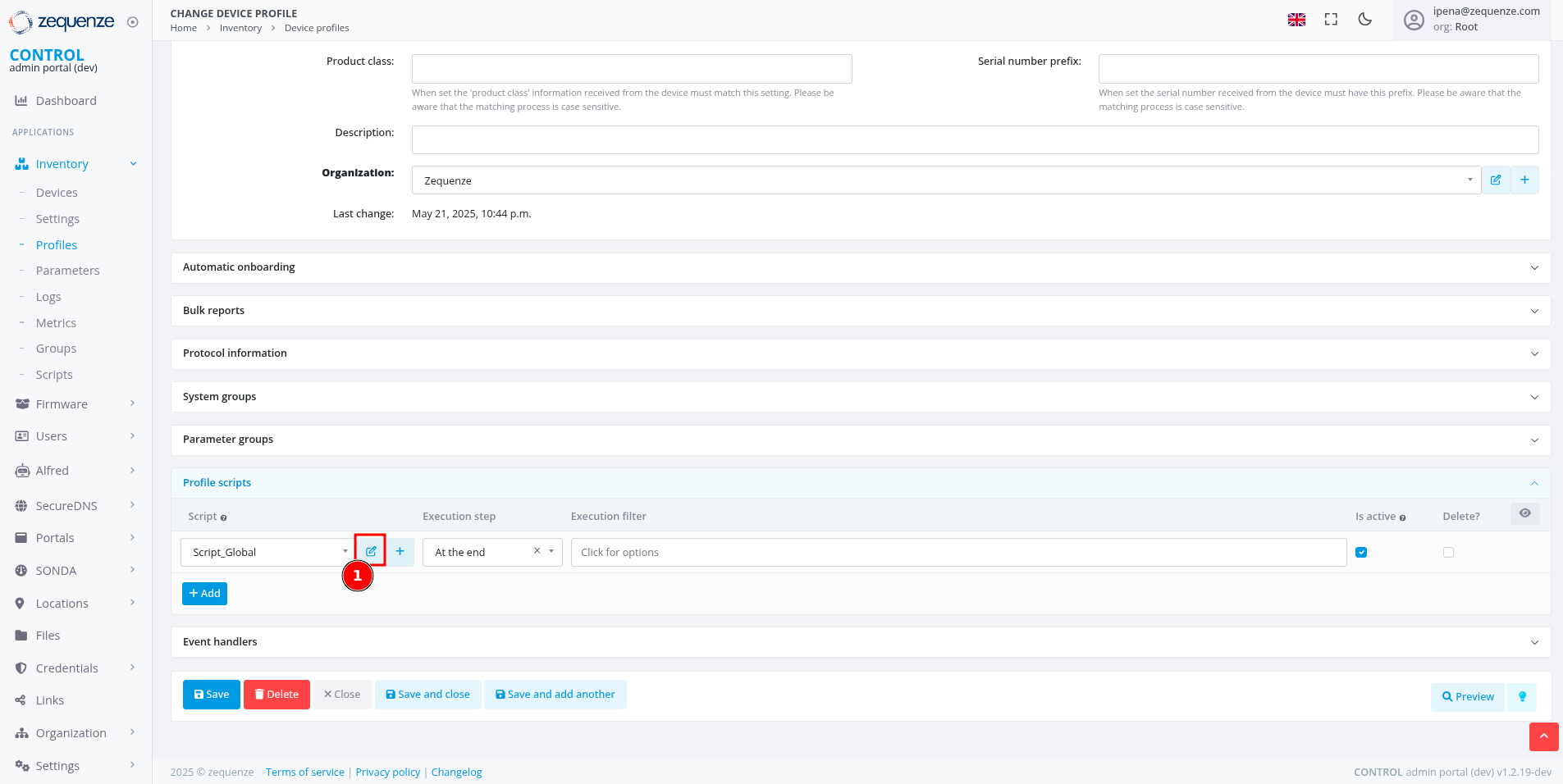 Figure 6: Accessing the script editor
Step 7: Implement Service Monitoring Script
Add the monitoring logic to the script editor:
- In the script editor text area, paste or write your service monitoring code
- The script should query TR-181/TR-098 parameters for service status
- Format output as JSON to display service cards with appropriate status indicators
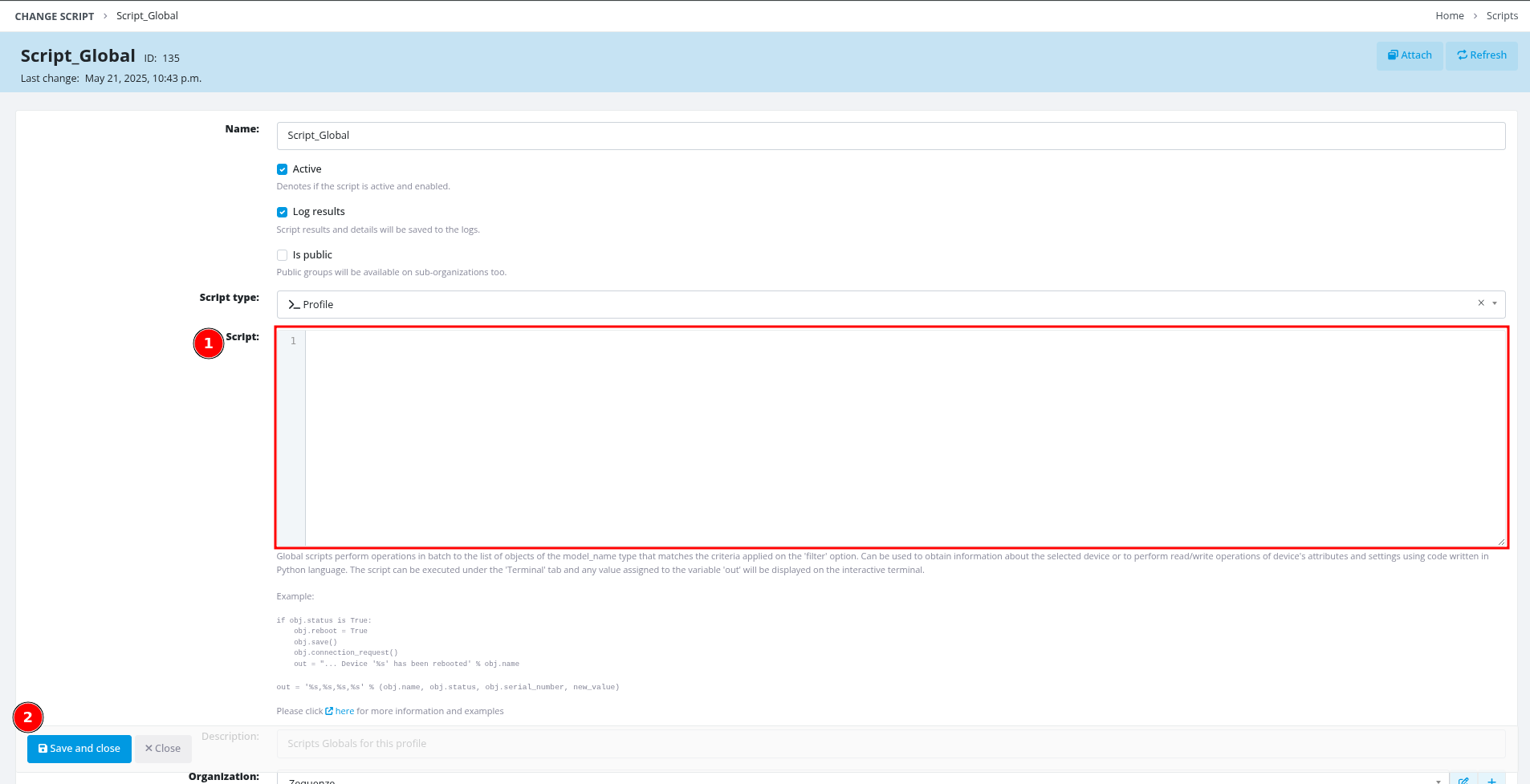 Figure 7: Script editor interface
Script Implementation
Core Helper Functions
The script uses utility functions to process device parameters safely and efficiently.
Parameter Processing Function
import json

def process_device_get(value, as_json=False):
    """
    Process device parameter values from TR-181 queries.

    Args:
        value: Tuple containing (value, success) from device.get()
        as_json: Boolean flag to parse value as JSON array

    Returns:
        Processed value as string, JSON object, or default value
    """
    if not isinstance(value, tuple) or len(value) != 2:
        return [] if as_json else "0"

    val, success = value
    if not success or val is None or val == "":
        return [] if as_json else "0"

    if as_json:
        try:
            return json.loads(val)
        except json.JSONDecodeError:
            return []

    return str(val)
TR-181 Parameter Query Methods
The platform supports two types of parameter queries with different return formats:
Single Value Parameters (ending with parameter name):
# Returns direct value as string
hsi_enable = process_device_get(
    device.get(variable_name='Device.IP.Interface.4.Enable')
)

dslite1_status = process_device_get(
    device.get(variable_name='Device.DSLite.InterfaceSetting.1.Status')
)
Array Parameters (ending with dot):
# Returns JSON array with multiple parameter objects
hsi_iana = process_device_get(
    device.get(variable_name='Device.IP.Interface.4.IPv6Address.'),
    as_json=True
)

voice_ipv4 = process_device_get(
    device.get(variable_name='Device.IP.Interface.5.IPv4Address.'),
    as_json=True
)
Service-Specific Implementation
1. Device Management Service
Monitors the management interface for ACS connectivity and device access.
Input Parameters
# Management interface IPv6 addressing
mgmt_iana = process_device_get(
    device.get(variable_name='Device.IP.Interface.3.IPv6Address.'),
    as_json=True
)
Analysis Function
def analyze_management_interface():
    """
    Analyze device management service status.
    Evaluates IPv6 connectivity for ACS communication.
    """
    iana = safe_json_loads(iana)
    has_iana = False
    iana_address = None
    iana_expired = False

    # Parse IPv6 address information
    if iana and isinstance(iana, list):
        for item in iana:
            if item.get('Origin') == 'DHCPv6' and item.get('IPAddress'):
                has_iana = True
                iana_address = item.get('IPAddress')
                valid_lifetime = item.get('ValidLifetime')
                if valid_lifetime:
                    iana_expired = is_lifetime_expired(valid_lifetime)
                break

    # Determine service status
    if not has_iana:
        service_status = "disabled"
        wan_status = "disabled"
    elif iana_expired:
        service_status = "warning"
        wan_status = "warning"
    else:
        service_status = "healthy"
        wan_status = "healthy"

    # Build metrics array
    metrics = [{
        "id": "wan_status",
        "label": "Interface WAN",
        "type": "status",
        "value": wan_status,
        "tooltip": "Interface WAN: Connected (you have device access)" if has_iana
                   else "Interface WAN: Disconnected"
    }]

    # Add web access link if IPv6 available
    if iana_address:
        metrics.append({
            "id": "ipv6_link",
            "label": "Web Access",
            "type": "link",
            "value": {
                "text": f"http://[{iana_address}]",
                "href": f"http://[{iana_address}]"
            },
            "linkTarget": "_blank",
            "tooltip": "Access device web interface"
        })

    return {
        "id": "management-service",
        "name": "Device Management",
        "type": "management",
        "status": service_status,
        "category": "management",
        "metrics": metrics,
        "iconSize": "tw-w-7 tw-h-7"
    }
Example Output
{
  "id": "management-service",
  "name": "Device Management",
  "type": "management",
  "status": "healthy",
  "category": "management",
  "metrics": [
    {
      "id": "wan_status",
      "label": "Interface WAN",
      "type": "status",
      "value": "healthy",
      "tooltip": "Interface WAN: Connected (you have device access)"
    },
    {
      "id": "ipv6_link",
      "label": "Web Access",
      "type": "link",
      "value": {
        "text": "http://[2806:230:fffb::16e2:6357]",
        "href": "http://[2806:230:fffb::16e2:6357]"
      },
      "linkTarget": "_blank",
      "tooltip": "Access device web interface"
    }
  ],
  "iconSize": "tw-w-7 tw-h-7"
}
2. Internet Service
Monitors internet connectivity including IPv6 addressing and DS-Lite tunneling for IPv4 support.
Input Parameters
# High-Speed Internet (HSI) interface parameters
hsi_enable = process_device_get(
    device.get(variable_name='Device.IP.Interface.4.Enable')
)
hsi_iana = process_device_get(
    device.get(variable_name='Device.IP.Interface.4.IPv6Address.'),
    as_json=True
)
hsi_iapd = process_device_get(
    device.get(variable_name='Device.IP.Interface.4.IPv6Prefix.'),
    as_json=True
)

# DS-Lite tunnel parameters for IPv4 connectivity
dslite1_enable = process_device_get(
    device.get(variable_name='Device.DSLite.InterfaceSetting.1.Enable')
)
dslite1_address = process_device_get(
    device.get(variable_name='Device.DSLite.InterfaceSetting.1.EndpointAddress')
)
dslite1_status = process_device_get(
    device.get(variable_name='Device.DSLite.InterfaceSetting.1.Status')
)
Analysis Function
def analyze_data_interface():
    """
    Analyze internet service status including IPv6 and DS-Lite configuration.
    Evaluates WAN connectivity, IPv6 addressing, and IPv4 tunneling.
    """
    # Parse IPv6 addressing information
    iana = safe_json_loads(iana)  # IPv6 addresses
    iapd = safe_json_loads(iapd)  # IPv6 prefixes

    has_iana = False
    has_iapd = False
    iana_address = None
    iapd_prefix = None

    # Check for valid IPv6 address (IA_NA)
    if iana and isinstance(iana, list):
        for item in iana:
            if item.get('Origin') == 'DHCPv6' and item.get('IPAddress'):
                has_iana = True
                iana_address = item.get('IPAddress')
                break

    # Check for valid IPv6 prefix delegation (IA_PD)
    if iapd and isinstance(iapd, list):
        for item in iapd:
            if item.get('Origin') == 'PrefixDelegation' and item.get('Prefix'):
                has_iapd = True
                iapd_prefix = item.get('Prefix')
                break

    # Analyze DS-Lite tunnel configuration
    default_dslite_addresses = {'INTERNET': 'fc00::1', 'VIDEO': 'fc00::2'}
    is_default_dslite = dslite_address == default_dslite_addresses.get(service)
    has_invalid_dslite = dslite_address and ("@" in dslite_address)

    # Determine service status based on all parameters
    service_status = "disabled"
    if not enable:
        service_status = "disabled"
    elif not (has_iana and has_iapd):
        service_status = "error"
    elif not dslite_enable:
        service_status = "error"
    elif is_default_dslite:
        service_status = "warning"
    elif has_invalid_dslite:
        service_status = "error"
    elif dslite_
No comments to display
No comments to display