
Automatic Onboarding
Overview
Many agent-based standard protocols used to manage networking devices recommend using unique credentials (username/password, keys, etc.) for each managed device. This recommendation enhances security and enables individual device identification during message exchanges. However, it introduces additional complexity, as each managed device must be pre-provisioned with unique credentials before deployment.
The Automatic Onboarding feature in CONTROL simplifies this pre-configuration process. It allows devices to initially connect using a common set of credentials, which are then automatically replaced with individual credentials after the first successful connection.
Accessing Automatic Onboarding Settings
Automatic Onboarding options are configured per Device Profile / Type and can be accessed through:
Inventory > Profile / type
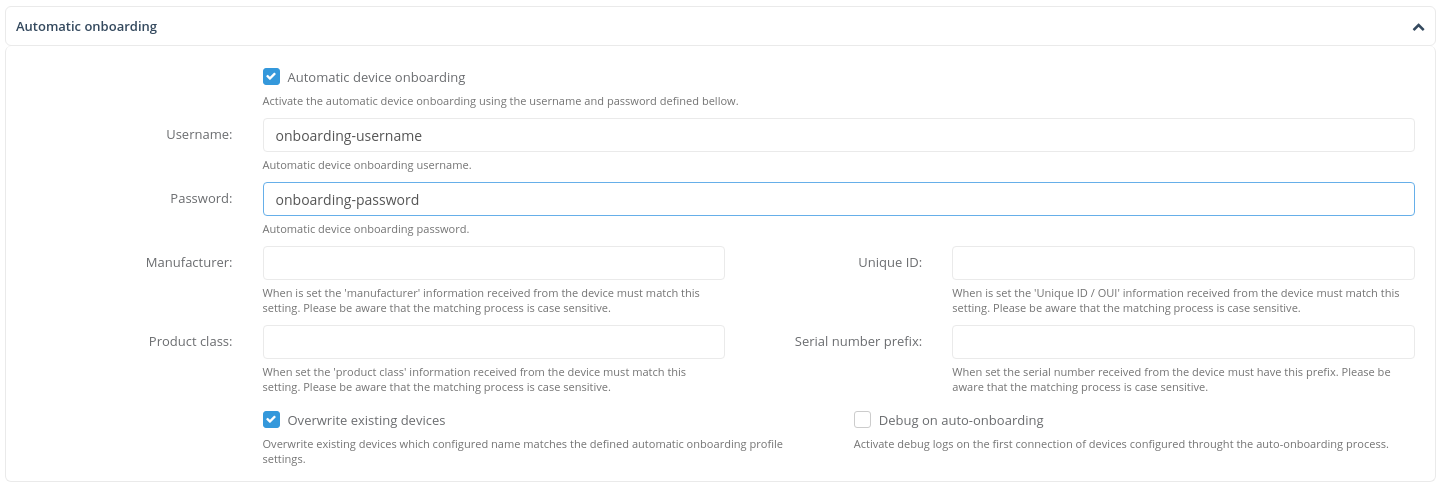
For detailed information about accessing Device Profile / Type configuration screens, refer to the Device Profile / Type configuration section.
Configuration
Enabling Automatic Onboarding
To configure and activate Automatic Onboarding for a specific Device Profile / Type:
Once configured, any device connecting to the platform with these credentials will be automatically onboarded and assigned to the corresponding Device Profile / Type.
Device Identification Fields
The following optional fields provide additional validation and identification criteria for connecting devices:
- Manufacturer: Filters devices by manufacturer name
- Unique ID: Specifies a unique identifier for device matching
- Product class: Filters devices by product class designation
- Serial number prefix: Matches against the beginning characters of the device serial number
Identification Rules
- Case sensitivity: All identification field matching is case-sensitive
- Prefix matching: For Serial number prefix, the system matches the specified text against the left-most characters of the received serial number
- Protocol dependency: Identification fields are management protocol-dependent and must be provided in the first message from the managed device (e.g., the Inform message for devices managed through TR-069)
Example
If the Manufacturer field is set to Zequenze, the Automatic Onboarding process for this Device Profile / Type will only apply to devices that identify themselves with Zequenze in their manufacturer field.
Advanced Configuration
Additional Automatic Onboarding configurations can be customized through:
- Connection Profile objects for each Device Profile / Type
- Connection service objects for each Device Profile / Type
TBC
No comments to display
No comments to display