# React component
## Overview
The Radar Score component displays a clickable icon that opens a modal window containing a radar chart visualization. This component is useful for presenting multi-dimensional score data in an interactive format.
## Visual Examples
**Icon Display:**
[](https://docs.zequenze.com/uploads/images/gallery/2024-09/VWaQ5uKC1g2EcwSl-screenshot-2024-09-25-at-11-32-14-a-m.png)
**Modal with Radar Chart:**
When the icon is clicked, a modal opens displaying the radar chart with the configured data.
[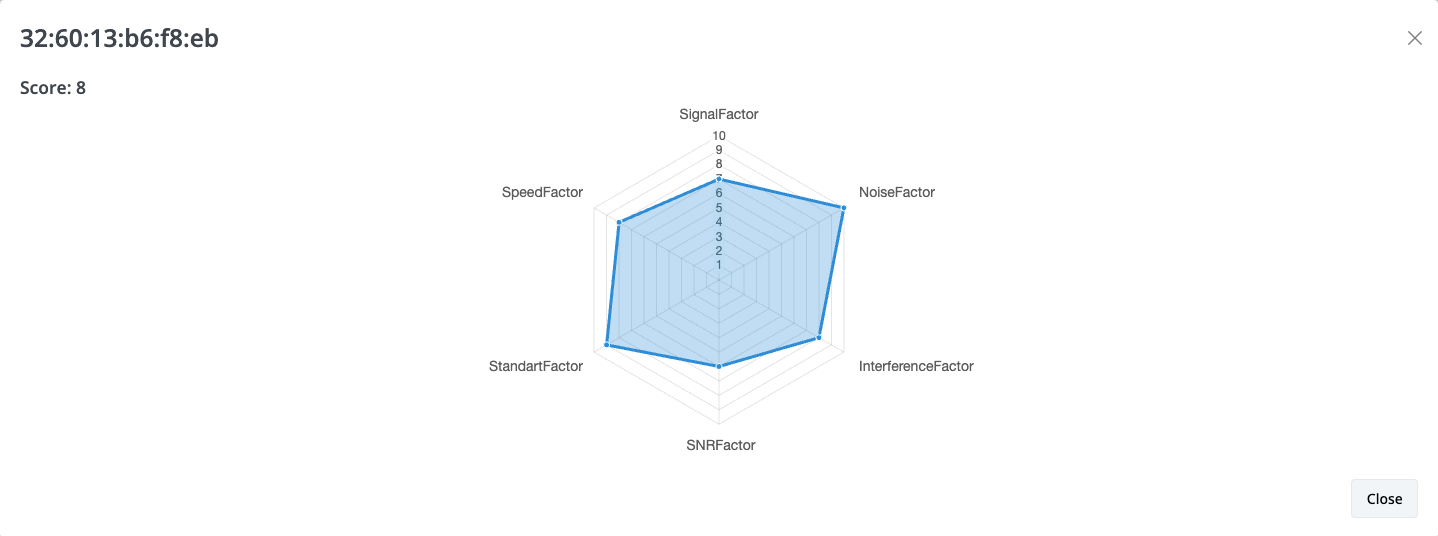](https://docs.zequenze.com/uploads/images/gallery/2024-09/Aqdl1c70HTOa03cd-screenshot-2024-09-25-at-11-34-10-a-m.png)
## Component Syntax
```html
```
## Parameters
- **paramid** (String): Unique identifier for the radar-score element
- **score** (Integer): Total score value displayed on the icon and in the modal
- **labels** (String): Comma-separated list of labels for the chart axes
- **data** (String): Comma-separated list of numerical values corresponding to each label
## Usage Example
```html
```
In this example:
- The icon displays a score of **8**
- Six data points are plotted on the radar chart
- Each value in the `data` parameter corresponds to a label in the `labels` parameter