
Reports Page Reference
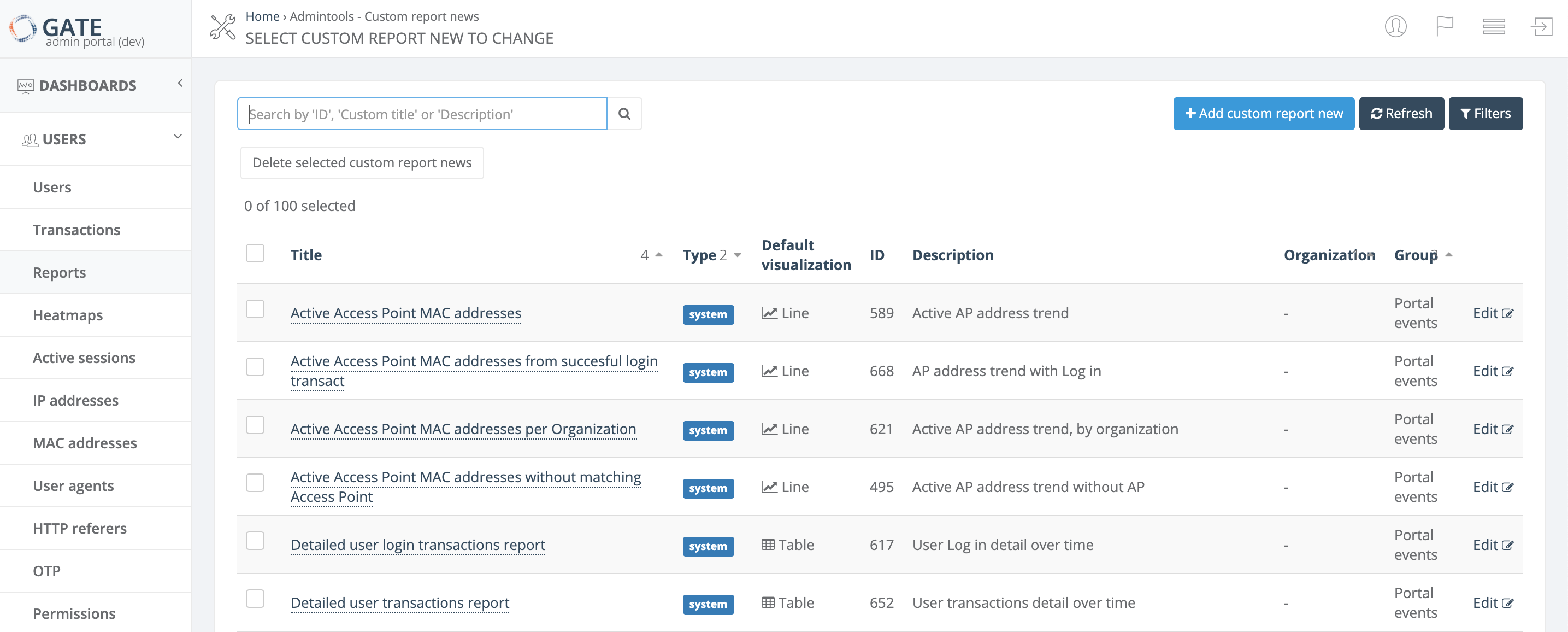
The Reports page in GATE provides a comprehensive view of all available reports with powerful search, filtering, and management capabilities. This page serves as your central hub for accessing both system reports and custom reports.
Report List Columns
The reports list displays the following information for each report:
| Column | Description |
|---|---|
| Title | The report name. See detailed reference for naming conventions |
| Type | Indicates whether the report is a system report or custom report |
| Default visualization | The default chart type used when displaying the report: Table, Line, Bar, Pie, or Heatmap |
| ID | Unique report identifier |
| Description | Brief description of the report's purpose and content. See detailed reference |
| Organization | The organization associated with the report |
| Group | Report category grouping. See detailed reference |
Available Actions
Search and Navigation
- Search - Find reports by Title, Description, Group, or ID. You can search using partial text matches or by a single word included in any of these fields
- Refresh - Update the current list to display the latest reports
-
Filters - Narrow down the report list using multiple criteria:
- Group
- Report type (system or custom)
- Default visualization type
- Organization
Report Management
- Add new custom report - Create a new custom report from scratch
- Edit - Modify an existing custom report (only available for custom reports)
- Delete selected custom report - Remove a custom report by selecting it using the checkbox on the left side of the row
Note: System reports cannot be edited or deleted, only custom reports can be modified or removed.
No comments to display
No comments to display