
Meraki Cloud Controller Integration
Overview
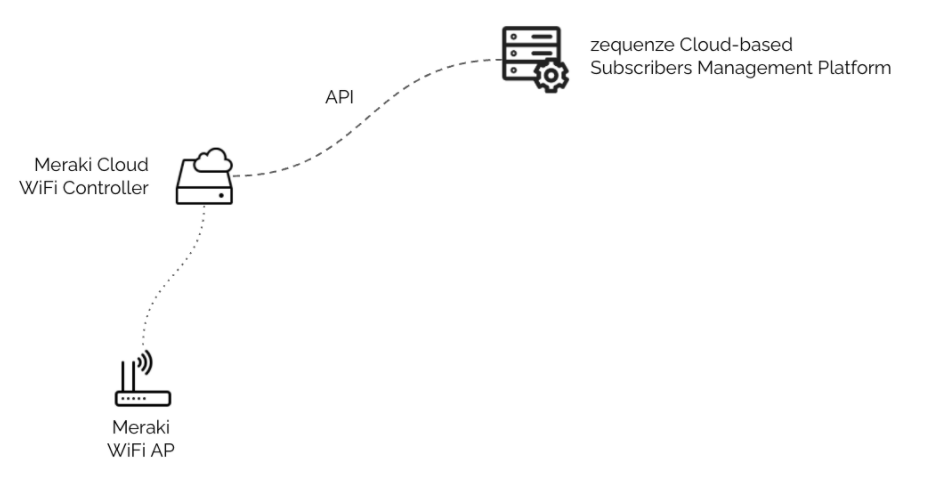
Zequenze's Subscribers Management Platform (SMP) enhances WiFi subscriber experiences when using Meraki's WiFi Solutions. The platform provides comprehensive subscriber management capabilities through seamless integration with Meraki's Cloud Controller.
Key Features
Zequenze's SMP delivers the following functionalities:
Fully Customizable Captive Portal
- Public WiFi: Collect subscriber information (name, email, phone, etc.)
- Private WiFi: Username/password authentication
Integrated Ad-Server
- Advertisement campaigns delivered through captive portals
- Customizable targeting by date/time, location (AP), and other parameters
NAC | 802.1x/EAP AAA Server
- Seamless device onboarding
- Integration with user databases and directories
WiFi Offload (EAP-AKA/SIM)
- Seamless authentication using SIM credentials
- Integration with Mobile Core (RADIUS/DIAMETER)
Comprehensive Analytics
- Login Activity: Track location, device type, OS, and other metadata
- Advertisement Campaigns: Monitor visualization, location, and engagement metrics
- Traffic Analysis: Per subscriber, location, and group reporting
Integration Process
Zequenze's SMP is pre-integrated with Meraki's Cloud WiFi Controller using the Captive Portal API. Configuration requires only updating your Meraki WiFi network settings to use Zequenze's SMP Captive Portal.
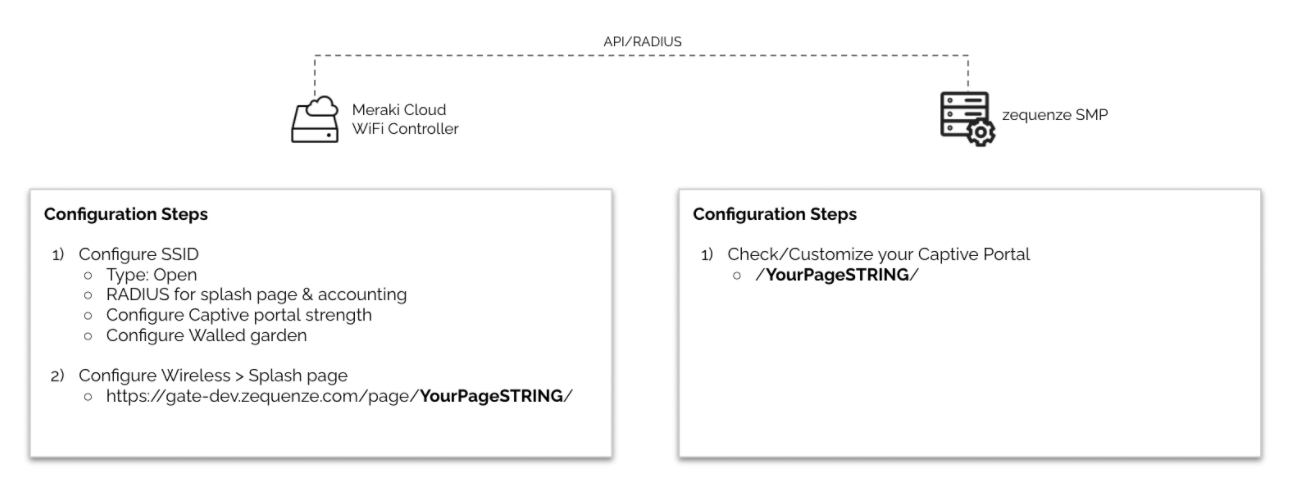
The following example demonstrates the configuration steps to configure an Open SSID in your Meraki WiFi network to use Zequenze's SMP for Captive Portal:
Configuration Steps
Configuring the SSID
-
Access Controller: Log in to your Meraki Cloud Controller
-
Navigate to SSID Settings: Select Wireless > SSID from the menu
-
Select SSID: Choose an available Unconfigured SSID
-
Configure SSID Name: Use Rename to set your desired SSID name
-
Configure SSID Settings: Click Edit Settings and apply the following configuration:
Basic Settings:
- Association requirements: Open
- Splash page: Sign-on with my RADIUS server
RADIUS Configuration:
-
RADIUS for splash page: Add a server
- Host:
aaa01.dev.zequenze.com - Port:
1812 - Secret:
ultrasecure
- Host:
-
RADIUS accounting: RADIUS accounting is enabled
-
RADIUS accounting servers: Add a server
- Host:
aaa01.dev.zequenze.com - Port:
1813 - Secret:
ultrasecure
- Host:
Access Controls:
- Enable data-carrier detect: DCD is disabled
- Network access controls: Disabled
- Assign group policies by device type: Disabled
Captive Portal Settings:
- Captive portal strength: Block all access until sign-on is complete
- Walled garden: Walled garden is enabled
-
Walled garden ranges:
104.196.122.141/32 - Simultaneous logins: Allow simultaneous devices per user
-
Save Configuration: Leave all remaining options at default settings and click Save Changes
Configuring the Splash Page
Verification
After completing this configuration, users connecting to the configured SSID will be automatically redirected to the captive portal (e.g., https://gate-dev.zequenze.com/page/YourPageSTRING/) for registration, validation, and network access.
The integration enables seamless subscriber management while maintaining the familiar Meraki WiFi infrastructure.
No comments to display
No comments to display