
User Scripts
Overview
User Scripts are Python-based automation tools that execute operations on a predetermined list of users. Users can be selected either through custom filters configured by the administrator or by importing rows from a CSV file. These scripts enable you to:
- Retrieve information about users in bulk
- Perform batch operations on selected users
- Automate repetitive user management tasks
Note: User Scripts must be executed manually by the administrator.
Accessing User Scripts
To access the User Scripts configuration screen:
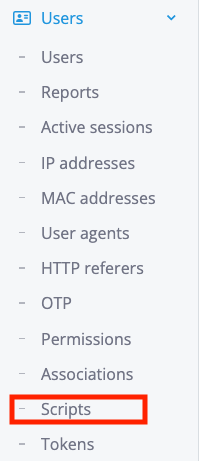
The Users scripts configuration screen can be found under the Scripts sub-menu on the Users main menu:
User Object Reference
Overview
The script execution context provides access to a special User object, referenced as either user or obj. This object allows you to:
- Read and modify user attributes
- Perform operations on the managed user
- Execute special actions related to the user
Attributes
The user object exposes the following attributes:
| Name | Type | Description |
|---|---|---|
obj_id |
integer | Numeric unique identification of the current user |
username |
string | Used to read or change the username field of the current user (read/write) |
username_length |
integer | Used to read or change the username_length field of the current user (read/write) |
first_name |
string | Used to read or change the first_name field of the current user (read/write) |
last_name |
string | Used to read or change the last_name field of the current user (read/write) |
email |
string | Used to read or change the email field of the current user (read/write) |
external_id |
string | Used to read or change the external_id field of the current user (read/write) |
klass |
string | Used to read or change the klass field of the current user (read/write) |
is_active |
boolean | Used to activate or deactivate the current user (read/write) |
date_joined |
datetime | Date/time of user joined (read-only) |
first_login |
datetime | Date/time of user first login (read-only) |
last_login |
datetime | Date/time of user last login (read-only) |
expiration |
datetime | Date/time of user expiration (read/write) |
last_update |
datetime | Date/time of user last update (read/write) |
organization_id |
integer | Numeric identification of the user organization |
avatar_url |
string | Used to read or change the avatar_url field of the current user (read/write) |
description |
string | Used to read or change the description field of the current user (read/write) |
Methods
The user object provides the following methods for managing profiles and attributes:
profile_add()
Adds a specific profile to the user. You can add using the id or the short name of the profile.
Parameters:
id(integer) - Profile ID to addshort_name(string) - Profile short name to add
Note: Use either id OR short_name, not both.
Returns:
updated(boolean) - Whether the operation succeededmessage(string) - Status or error message
Examples:
# Add profile by ID
updated, message = user.profile_add(id=12)

# Add profile by short name
updated, message = user.profile_add(short_name="aaa-01")
profile_remove()
Removes a specific profile from the user. You can remove using the id or the short name of the profile.
Parameters:
id(integer) - Profile ID to removeshort_name(string) - Profile short name to remove
Note: Use either id OR short_name, not both.
Returns:
updated(boolean) - Whether the operation succeededmessage(string) - Status or error message
Examples:
# Remove profile by ID
updated, message = user.profile_remove(id=12)

# Remove profile by short name
updated, message = user.profile_remove(short_name="aaa-01")
attribute_add()
Adds a specific attribute to the user. You must provide the attribute name, value, and optionally an operation.
Parameters:
attr(string, required) - Attribute name to addvalue(string, required) - Value to assign to the attributeoperation(string, optional) - Operator to use (default:=)- Available options:
=,+=,:=
- Available options:
Returns:
updated(boolean) - Whether the operation succeededmessage(string) - Status or error message
Example:
updated, message = user.attribute_add(
    attr='Username',
    value="zequenze",
    operation='+='
)
attribute_remove()
Removes a specific attribute from the user. You must provide the attribute name, value, and optionally an operation.
Parameters:
attr(string, required) - Attribute name to removevalue(string, required) - Value to remove from the attributeoperation(string, optional) - Operator to use (default:=)- Available options:
=,+=,:=
- Available options:
Returns:
updated(boolean) - Whether the operation succeededmessage(string) - Status or error message
Example:
updated, message = user.attribute_remove(
    attr='Username',
    value="zequenze",
    operation='+='
)
check_attribute_add()
Adds a specific check attribute to the user. You must provide the attribute name, value, and optionally an operation.
Parameters:
attr(string, required) - Check attribute name to addvalue(string, required) - Value to assign to the check attributeoperation(string, optional) - Operator to use (default:=)- Available options:
=,+=,:=
- Available options:
Returns:
updated(boolean) - Whether the operation succeededmessage(string) - Status or error message
Example:
updated, message = user.check_attribute_add(
    attr='Max-Daily-Session',
    value=4,
    operation='=='
)
check_attribute_remove()
Removes a specific check attribute from the user. You must provide the attribute name, value, and optionally an operation.
Parameters:
attr(string, required) - Check attribute name to removevalue(string, required) - Value to remove from the check attributeoperation(string, optional) - Operator to use (default::=)- Available options:
:=,+=,==,!=,>,>=,<,<=,=*
- Available options:
Returns:
updated(boolean) - Whether the operation succeededmessage(string) - Status or error message
Example:
updated, message = user.check_attribute_remove(
    attr='Max-Daily-Session',
    value=4,
    operation='=='
)
No comments to display
No comments to display