
Sequential flow designer basics
The Scripts configuration allows you to execute Python code with the option of using a visual representation, as shown in the screenshot below:
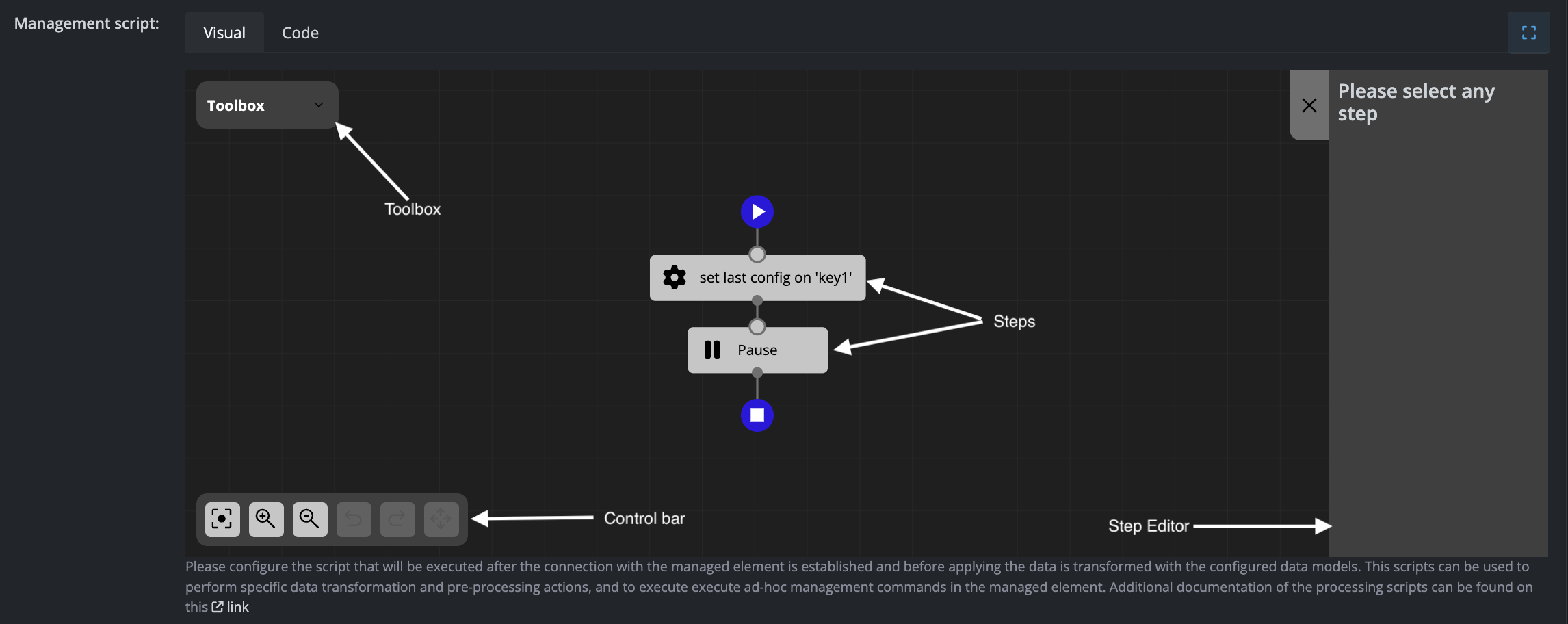
Interface Components
The sequential flow designer consists of four main components:
Toolbox
Contains all available steps that can be added to your flow. Simply drag and drop steps from the toolbox into the steps diagram to build your sequence.
Control Bar
Provides viewport and editing controls:
- Reset viewport
- Zoom in or zoom out
- Undo or redo changes
- Delete the selected step
Steps Diagram
Displays the flow of steps to be executed in sequence. Click on any step to view and modify its settings in the Step Editor panel.
Step Editor
Shows the configuration settings for the currently selected step. This panel updates dynamically based on which step you have selected in the diagram.
No comments to display
No comments to display