
Automation tasks
Overview
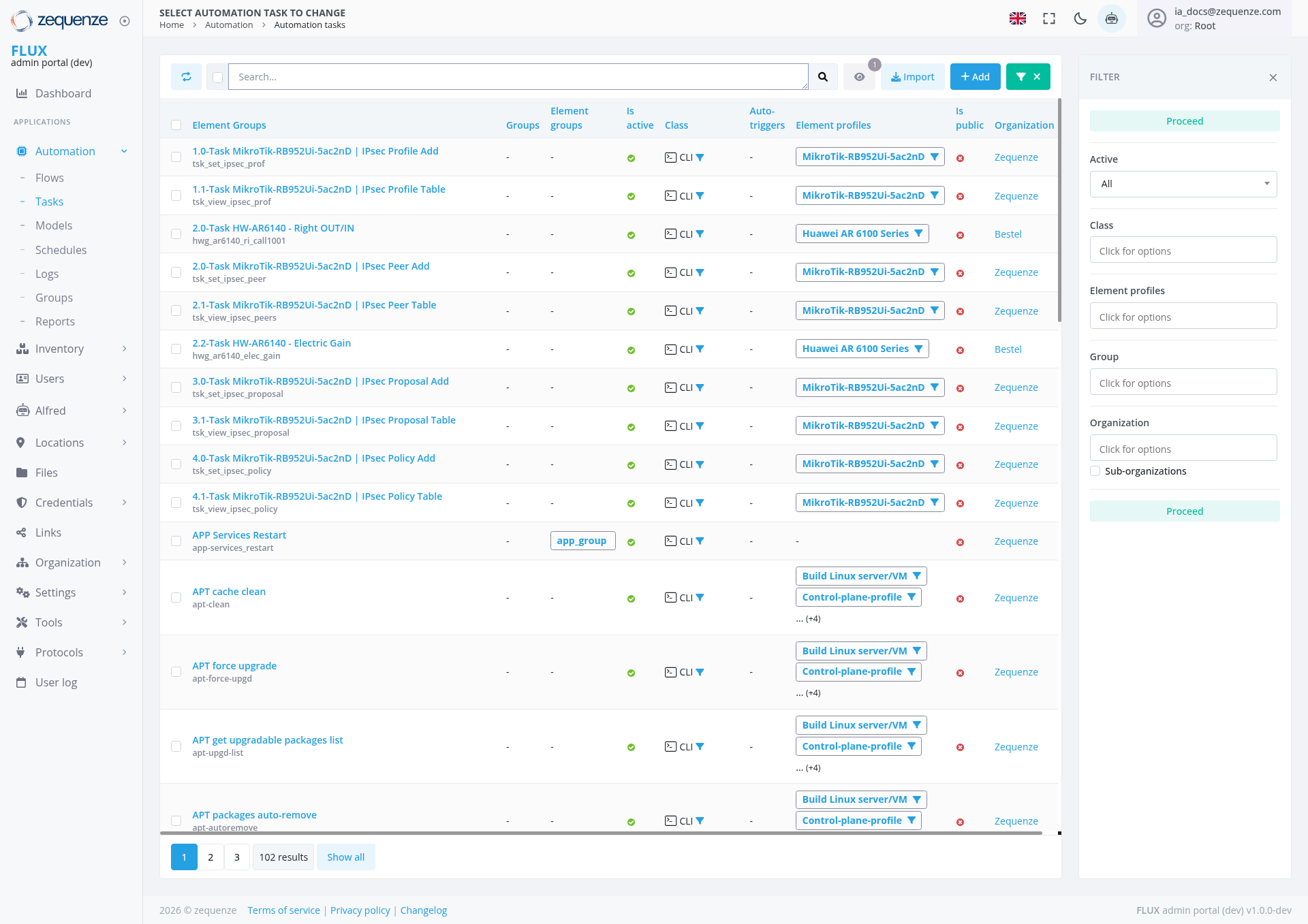
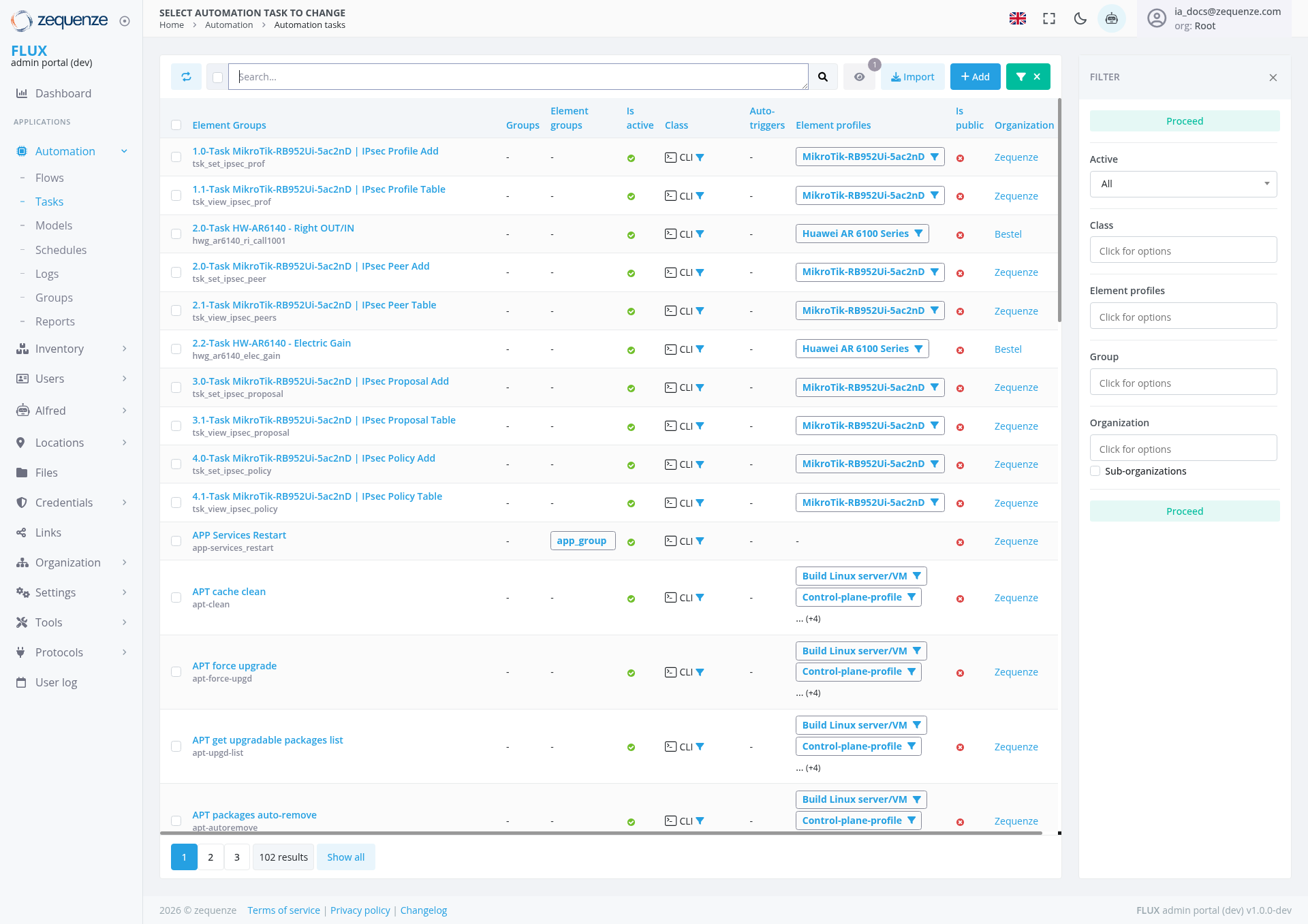
The Automation Tasks page in the Zequenze Control Portal provides a comprehensive interface for managing and monitoring automated tasks across your network infrastructure. This page displays a detailed list of all automation tasks including MikroTik router configurations, Huawei device management, and APT package operations.
Key Features
- Task Management Dashboard: Centralized view of all automation tasks with real-time status monitoring
- Multi-Device Support: Handles various device types including MikroTik routers and Huawei equipment
- Profile-Based Configuration: Tasks are organized by device profiles for efficient management
- Bulk Operations: Import and add multiple tasks simultaneously
- Advanced Filtering: Filter tasks by status, organization, class, and element profiles
- Real-time Status Tracking: Visual indicators show task execution status and health
UI Elements
Header Section
- Search Bar: Located at the top for quick task filtering and discovery
-
Action Buttons:
- Import: Blue button for importing task configurations
- Add: Green "+" button for creating new automation tasks
- X Button: Green "X" button next to the Add button for additional actions
- Filter Toggle: "FILTER" button with "X" icon to show/hide filter panel
Main Task Table
The table displays the following columns:
- Element Groups: Shows task categorization and grouping
- Groups: Organizational grouping of related tasks
- Element groups: Secondary grouping level
- Is Device: Indicates if the task targets a specific device
- Class: Task classification (CLI, etc.)
- Auto. Filters: Automated filtering rules applied
- Element profiles: Associated device profiles (MikroTik, Huawei, etc.)
- Is public: Visibility status of the task
- Organization: Organization assignment (Zequenze, Bestel, etc.)
- Proceed: Task execution status
Filter Panel (Right Side)
The filter panel shows the following filtering options:
- Proceed Filter: Located at the top of the filter panel for task execution status filtering
- Active Filter: "All" dropdown for filtering active/inactive tasks
- Class Filter: "Click for options" dropdown for task classification filtering
- Element profiles: Profile-specific filtering with "Click for options" dropdown
- Group: Task group filtering with "Click for options" dropdown
- Organization: Organization-based filtering with "Click for options" dropdown
- Sub-organizations: Hierarchical organization filtering option
User Interactions
Task Management
- View Tasks: Browse through paginated list of automation tasks
- Search Tasks: Use the search bar to find specific tasks by name or description
- Filter Tasks: Apply multiple filters to narrow down task visibility
- Import Tasks: Bulk import automation tasks from external sources
- Add New Tasks: Create individual automation tasks using the Add button
Task Configuration
- Profile Selection: Tasks can be assigned to specific device profiles (MikroTik-RB952Ui-5ac2nD, Huawei AR 6100 Series, etc.)
- Organization Assignment: Tasks can be assigned to specific organizations
- Access Control: Configure public/private visibility for tasks
Navigation
Current Location
Related Sections
- Flows: Automation workflow management
- Models: Device and configuration models
- Schedules: Task scheduling interface
- Logs: Task execution history
- Groups: Task group management
- Reports: Automation reporting and analytics
Data Displayed
Task Categories Visible
-
MikroTik Router Tasks:
- IPsec Profile operations (Add, Table view)
- IPsec Peer management (Add, Table view)
- IPsec Proposal configuration (Add, Table view)
- IPsec Policy management (Add, Table view)
-
Huawei Device Tasks:
- Right OUT/IN configuration
- Electric Gain settings
-
System Maintenance Tasks:
- APP Services Restart
- APT cache clean
- APT force upgrade
- APT packages auto-remove
- APT get upgradable packages list
-
Linux Server Tasks:
- Build Linux server/VM operations with Control-plane-profile configurations
Status Indicators
- Green Checkmarks: Indicate active/healthy tasks
- CLI Icons: Show command-line interface tasks
- Profile Dropdowns: Display assigned device profiles including "Build Linux server/VM" and "Control-plane-profile" configurations
- Organization Labels: Show task ownership and assignment
Actions Available
Primary Actions
- Import Tasks: Bulk import automation configurations
- Add Task: Create new automation task
- X Action: Additional action available via the green X button in the header
Secondary Actions
- Profile Management: Assign and modify device profiles including Linux server/VM profiles
- Organization Assignment: Change task ownership
- Status Management: Monitor and control task execution
- Pagination: Navigate through multiple pages of results (currently showing page 1 of 102 results total with "Show all" option available)
Notes/Tips
- Device Profile Matching: Ensure tasks are assigned to appropriate device profiles for successful execution, including Linux server/VM profiles for system maintenance tasks
- Organization Permissions: Task visibility and execution may be restricted based on organization membership
- Status Monitoring: Green indicators generally represent healthy/active tasks - monitor for any status changes
- Pagination: Use page navigation to view all 102 automation tasks or click "Show all" to display all results at once
- Filter Combinations: Multiple filters can be applied simultaneously for precise task management
- Task Naming: Tasks follow a structured naming convention (e.g., "1.0-Task MikroTik-RB952Ui-5ac2nD | IPsec Profile Add") for easy identification
- Linux Server Management: Control-plane-profile tasks are available for managing Linux server operations and VM deployments