
DjangoQL syntax help
Search conditions
A search condition is a basic search query building block. It always
consists of 3 elements: field,
comparison operator and value, placed exactly
in this order from left to right.
Here's an example - looking for users with first name "John". In the
example below first_name is a field,
= is a comparison operator and
"John" is a value:
first_name = "John"
Another example, looking for users who registered in 2017 or later:
date_joined >= "2017-01-01"
One more example, looking for super-users:
is_superuser = True
And one more - finding all users whose names are in a given list:
first_name in ("John", "Jack", "Jason")
Multiple search conditions
You can combine multiple search conditions together using the logical
operators and (both conditions must be true) and
or (at least one of the conditions must be true, no matter
which one). Important - logical operators must be written in lowercase:
and and or is correct, and AND or
OR is incorrect and will cause an error.
Example: looking for users with first name "John" and
registered in 2017 or later. Please note that we have 2 search
conditions here, joined with and:
first_name = "John" and date_joined >= "2017-01-01"
One more example, looking for users who are either super-users
or marked with "Staff" flag:
is_superuser = True or is_staff = True
Logical operators can be quite powerful, as they let you to build
complex search queries. If you're building a complex query there's an
important tip to keep in mind: if your query contains both
and and or operators, we strongly encourage
you to use parenthesis to specify the precedence of operators. Here's
an example to illustrate why this is important. Let's assume that you
want to pull users who are either super-users or marked
with Staff flag, and registered in 2017 or later. It
might be tempting to write a query like this:
is_superuser = True or is_staff = True and date_joined > "2017-01-01"
The problem with the query above is that it won't do what you expect,
because the and operator is evaluated first. In fact it pulls
users who are either super-users (no matter when they registered)
or users who are both Staff and registered
after 2017. This problem can be fixed with parentheses, just put them
around the search conditions that must be evaluated first, like this:
(is_superuser = True or is_staff = True) and date_joined > "2017-01-01"
Using parenthesis is recommended only when your query mixes both
and and or operators. If your query contains
multiple logical operators of only one kind (either and
or or) you can safely omit parenthesis and it will work
as expected.
Fields
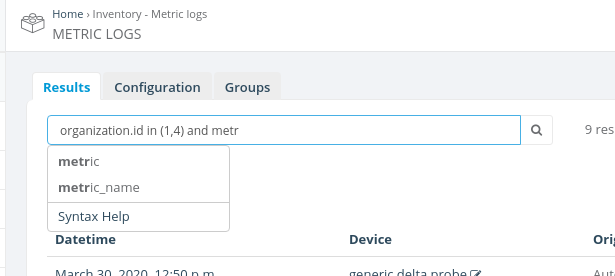
In a search query, you should reference the current model's fields exactly as they're defined in Python code for that particular Django model. Search query input has an auto-completion feature that pops up automatically and suggests all available options. If you're not sure what the field name is, then pick one of the options displayed (example):
In most cases, internal Django model fields look similar to what you see
in Django admin interface, just in lowercase and with _
instead of spaces. For example, in the standard Users admin interface,
the internal first_name field is displayed as
First name, email field is displayed as
Email address and so on. However there could be exceptions
to this, if developers have defined custom display names that look
very different from their internal representation. In such cases it
might be a good idea to ask developers to override this help template
and provide an "internal name -> display name" fields mapping right
here.
Note that some fields that you see in Django admin may not be searchable. This includes computed fields, i.e. fields which are not stored in the database as a plain value, but rather calculated from other values in the code.