
Access points
Overview
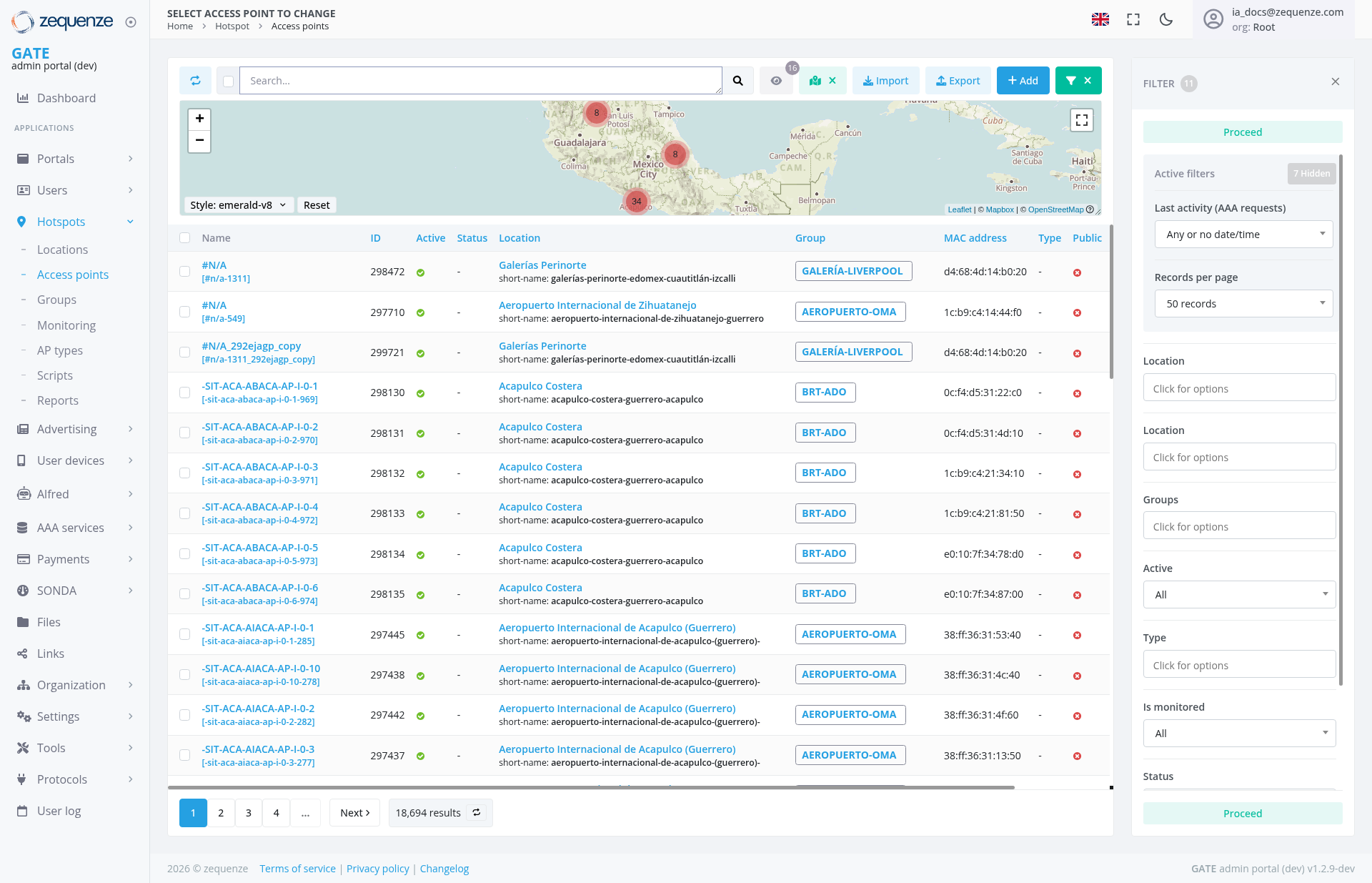
The Access Points page in the Zequenze Control Portal provides a comprehensive view and management interface for all wireless access points in your network infrastructure. This page displays real-time information about access point status, locations, configurations, and performance metrics across multiple sites including airports, shopping centers, and other venues.
Key Features
- Real-time Access Point Monitoring: View live status of all access points with active/inactive indicators
- Geographic Visualization: Interactive map showing physical locations of access points
- Multi-site Management: Support for various location types including airports (Acapulco Costera, Aeropuerto Internacional) and shopping centers (Galerías Perinorte)
- Advanced Filtering: Comprehensive filter options for location, groups, activity status, and monitoring state
- Bulk Operations: Import/export functionality for access point configurations
- Detailed Device Information: MAC addresses, IP addresses, and technical specifications for each device
UI Elements
Navigation Bar
Main Interface
- Search Bar: Global search functionality across all access points
-
Action Buttons:
- Import: Upload access point configurations
- Export: Download current access point data
- Add: Create new access point entries
- Green Filter Toggle: Active filter indicator showing applied filters with "X" button for clearing
Filter Panel (Right Side)
- Filter Toggle: "FILTER" button with counter badge showing "7" applied filters, with "X" close button in top-right corner
Data Displayed
The main table shows critical access point information:
- Name: Device identifier with technical specifications
- ID: Unique numerical identifier for each access point
- Active Status: Green checkmarks indicate operational devices
-
Location: Detailed venue information including:
- Galerías Perinorte (shopping center)
- Aeropuerto Internacional de Zihuatanejo
- Acapulco Costera (coastal area)
- Aeropuerto Internacional de Acapulco (Guerrero)
- Group Assignment: Organizational categories (GALERÍA-LIVERPOOL, AEROPUERTO-OMA, BRT-ADO)
- MAC Address: Hardware identification for network management
- Type: Device classification and capabilities
- Public Access: Configuration status for guest networks
User Interactions
Primary Actions
- Search and Filter: Use the search bar and filter panel to locate specific access points
-
Filter
Panel ToggleManagement: - Click the "FILTER" button
in the top-right cornerto show or hide the filter panel (currently showing 7 applied filters)
Table Operations
- Sorting: Click column headers to sort data
- Pagination: Navigate through results using page controls (showing 18,694 total results)
- Selection: Choose specific access points for bulk operations
Navigation
- Access Path: Dashboard → Hotspots → Access points
- Breadcrumb Navigation: Visible in left sidebar menu
- Related Sections: Quick access to Locations, Groups, Monitoring, and AP types
Actions Available
Management Actions
- Add New Access Point: Configure new devices for network deployment
- Import Configuration: Bulk upload access point settings from external files
- Export Data: Download current access point inventory and configurations
-
Filter
and SearchManagement:Locatespecific - Apply
devicesand manage filters usingmultiple criteria with enhanced dropdown selections
Configuration Options
- Group Assignment: Organize access points by operational groups
- Location Mapping: Assign geographic and venue-specific locations using dual location filter dropdowns
- Monitoring Setup: Configure performance tracking and alerting
- Network Settings: Manage IP addressing and MAC address assignments
Notes/Tips
- Performance Optimization: Use filters to reduce data load when managing large networks with 18,000+ access points
- Location Accuracy: The map view provides visual context for troubleshooting connectivity issues in specific areas with customizable map styles (emerald-v8)
- Status Indicators: Green checkmarks in the Active column indicate properly functioning devices requiring no immediate attention
- Group Organization: Access points are logically grouped by venue type (airports, shopping centers, transportation hubs) for easier management
- Real-time Updates: The interface provides live status information for immediate network health assessment
-
Filter
EfficiencyManagement: - The filter counter badge shows the number of active filters (currently 7)