Device type models
Generating documentation...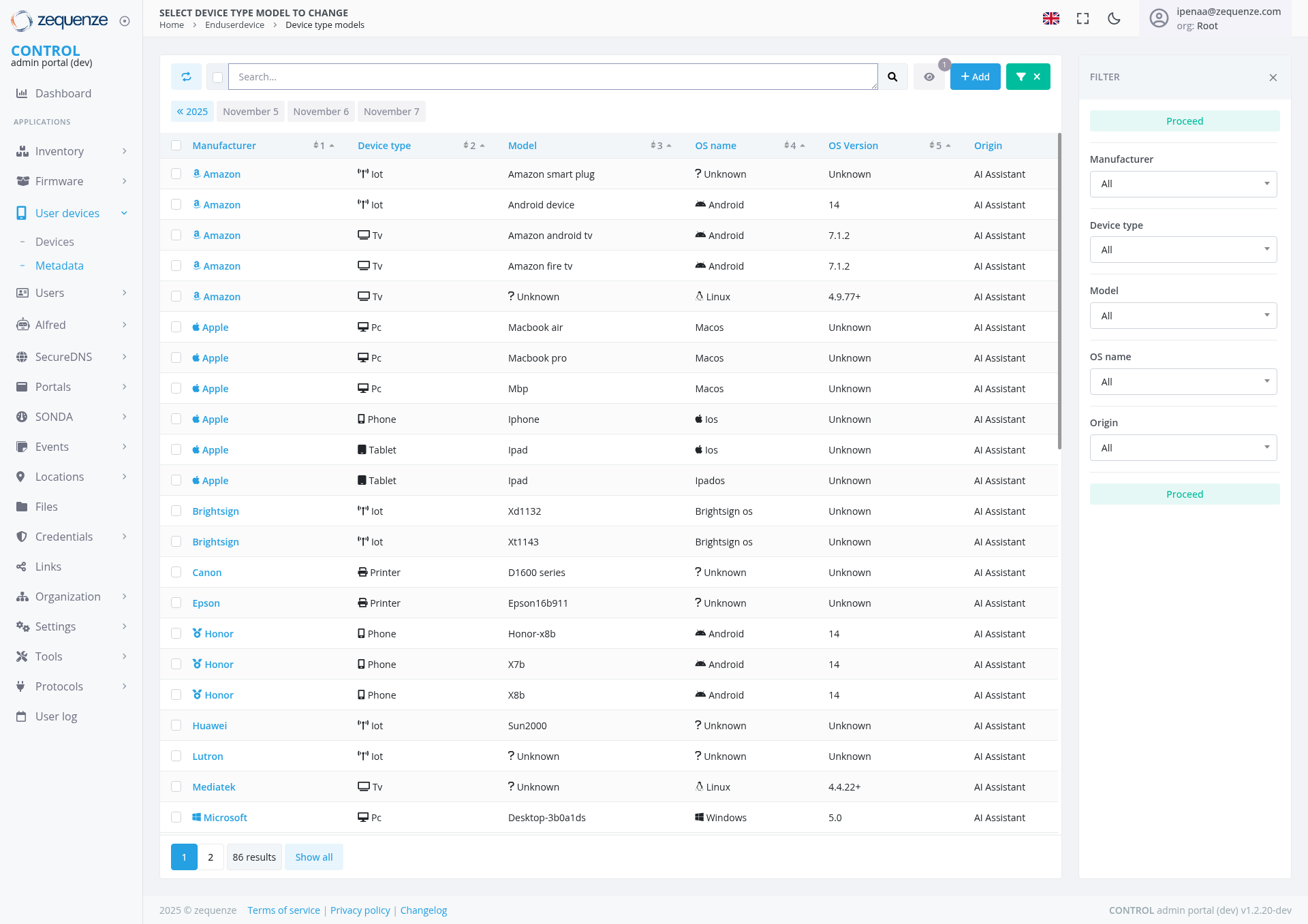
Overview
The Device Type Models page in the Zequenze Control Portal provides administrators with a comprehensive view and management interface for all device type models in the system. This page allows users to browse, filter, and manage various device models from different manufacturers, displaying detailed information about each device's specifications and characteristics.
Key Features
Comprehensive Device Catalog: View all registered device type models across multiple manufacturers
Advanced Filtering System: Filter devices by manufacturer, device type, model, OS name, and origin
Multi-Manufacturer Support: Supports devices from major manufacturers including Amazon, Apple, Canon, Epson, Honor, Huawei, Microsoft, and more
Device Type Classification: Categorizes devices into types such as IoT devices, TVs, PCs, phones, tablets, and printers
Operating System Information: Displays OS details including Android, iOS, macOS, Windows, and Linux variants
Bulk Operations: Add and manage multiple device models simultaneously
UI Elements
Search Bar: Located at the top for quick device model searches
Action Buttons:
"Add" button (blue) for adding new device models
"X" button (green) for bulk operations
Filter Panel: Expandable right sidebar with filtering options
Main Data Table
The central table displays device information with sortable columns:
Manufacturer: Company name with brand logos/icons
Device Type: Visual icons representing device categories (IoT, TV, PC, Phone, Tablet, Printer)
Model: Specific device model names and identifiers
OS Name: Operating system information with OS icons
OS Version: Version numbers and release information
Origin: Source attribution (typically "AI Assistant")
Manufacturer Filter: Dropdown to select specific manufacturers
Device Type Filter: Category-based filtering options
Model Filter: Search and filter by model names
OS Name Filter: Filter by operating system
Origin Filter: Filter by data source
User Interactions
Searching and Filtering
Use the search bar to find specific device models by name or keyword
Click the "FILTER" button to open the filtering sidebar
Select desired filters from dropdown menus in the sidebar
Click "Proceed" to apply filters or reset to clear all filters
Data Management
Click column headers to sort data in ascending/descending order
Use checkboxes to select multiple device entries for bulk operations
Click the "Add" button to register new device type models
Navigate through pages using the pagination controls at the bottom
Navigation
Access this page through: Home → Enduser device → Device type models
Use the left navigation menu under "User devices" → "Metadata"
Breadcrumb navigation shows the current location in the portal hierarchy
Data Displayed
The page displays comprehensive device information including:
Device Categories
Smart Home Devices: Amazon smart plugs, IoT sensors
Entertainment Devices: Amazon Fire TV, Android TV, various smart TVs
Computing Devices: MacBook Air/Pro, desktop computers, tablets
Mobile Devices: iPhones, iPads, Android phones from various manufacturers
Peripherals: Printers from Canon and Epson
IoT Devices: BrightSign digital signage, Huawei sensors
Operating system versions (Android 14, iOS versions, macOS, Windows 5.0, Linux variants)
Device model numbers and specifications
Manufacturer branding and categorization
Actions Available
Primary Actions
Add New Models: Register new device type models in the system
Filter and Search: Locate specific devices using multiple criteria
Sort and Organize: Arrange data by any column for better organization
Bulk Selection: Select multiple entries for batch operations
Data Management
View detailed specifications for each device model
Export device information for reporting purposes
Manage device categorization and classification
Update device metadata and specifications
Navigation Context
Current Location: User devices → Metadata → Device type models
Parent Sections: Accessible through the CONTROL admin portal navigation
Related Pages: Links to other device management sections and inventory views
Notes/Tips
The page shows 86 total results with pagination controls for easy navigation
Device icons provide quick visual identification of device types
The "Unknown" entries indicate devices that may need additional metadata configuration
AI Assistant origin indicates automatically detected or classified devices
Use the date navigation (November 5-7, 2025) to view historical device data
The system supports real-time filtering and search without page refreshes
This interface is essential for administrators managing large device inventories and ensuring proper device classification and metadata management across the Zequenze platform.
