
Dashboard: Main
Overview
The Zequenze Control Portal Dashboard provides a comprehensive real-time overview of device management and monitoring capabilities. This main dashboard serves as the central hub for administrators to monitor device status, track performance metrics, and access various system management tools.
Key Features
Real-Time Device Monitoring
- Devices Up Chart: Visual bar chart showing device availability over a 24-hour period
- Device Logs Graph: Line chart displaying device activity and log patterns over time
- Devices Per Status: Pie chart visualization showing the distribution of device statuses
-
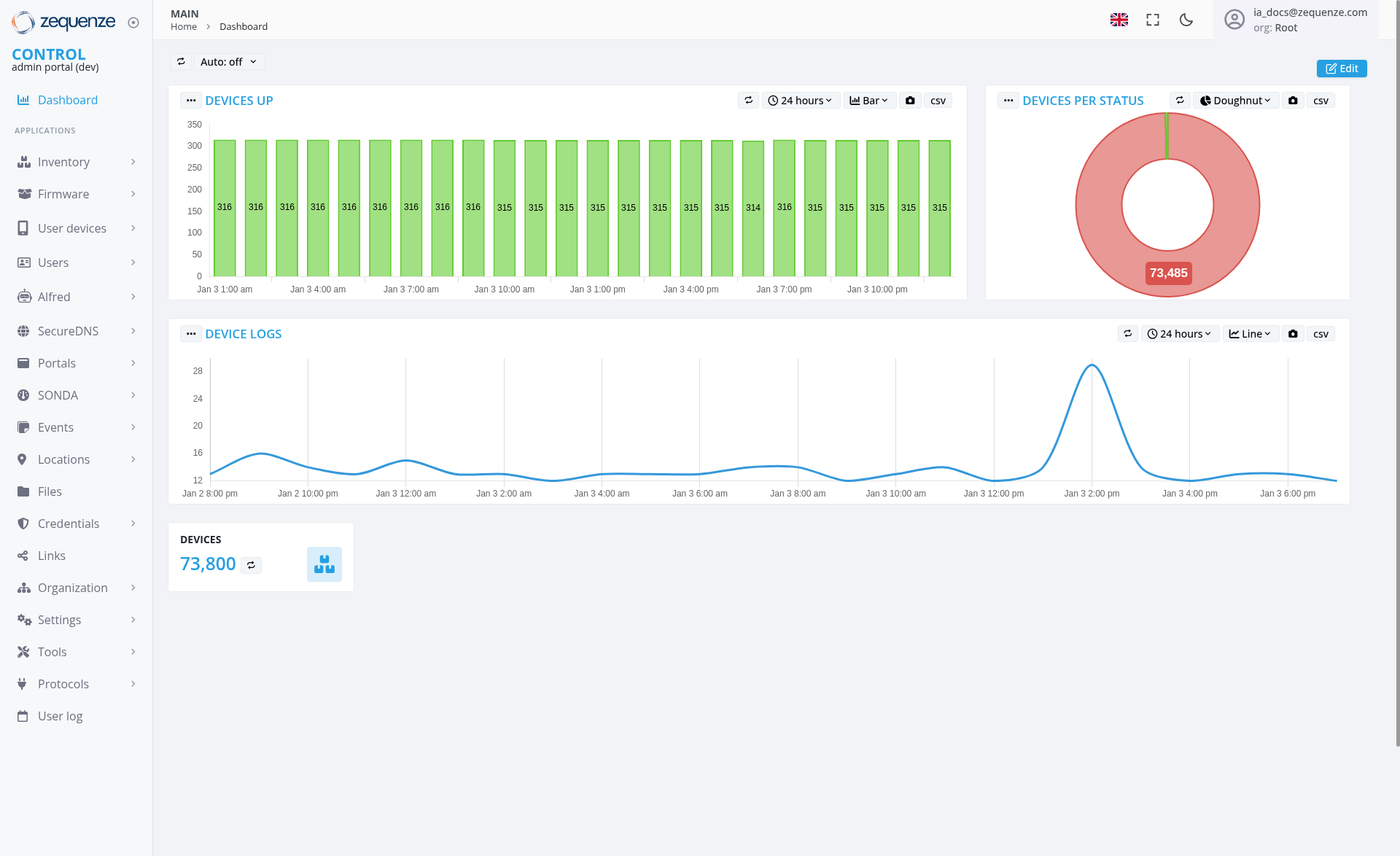
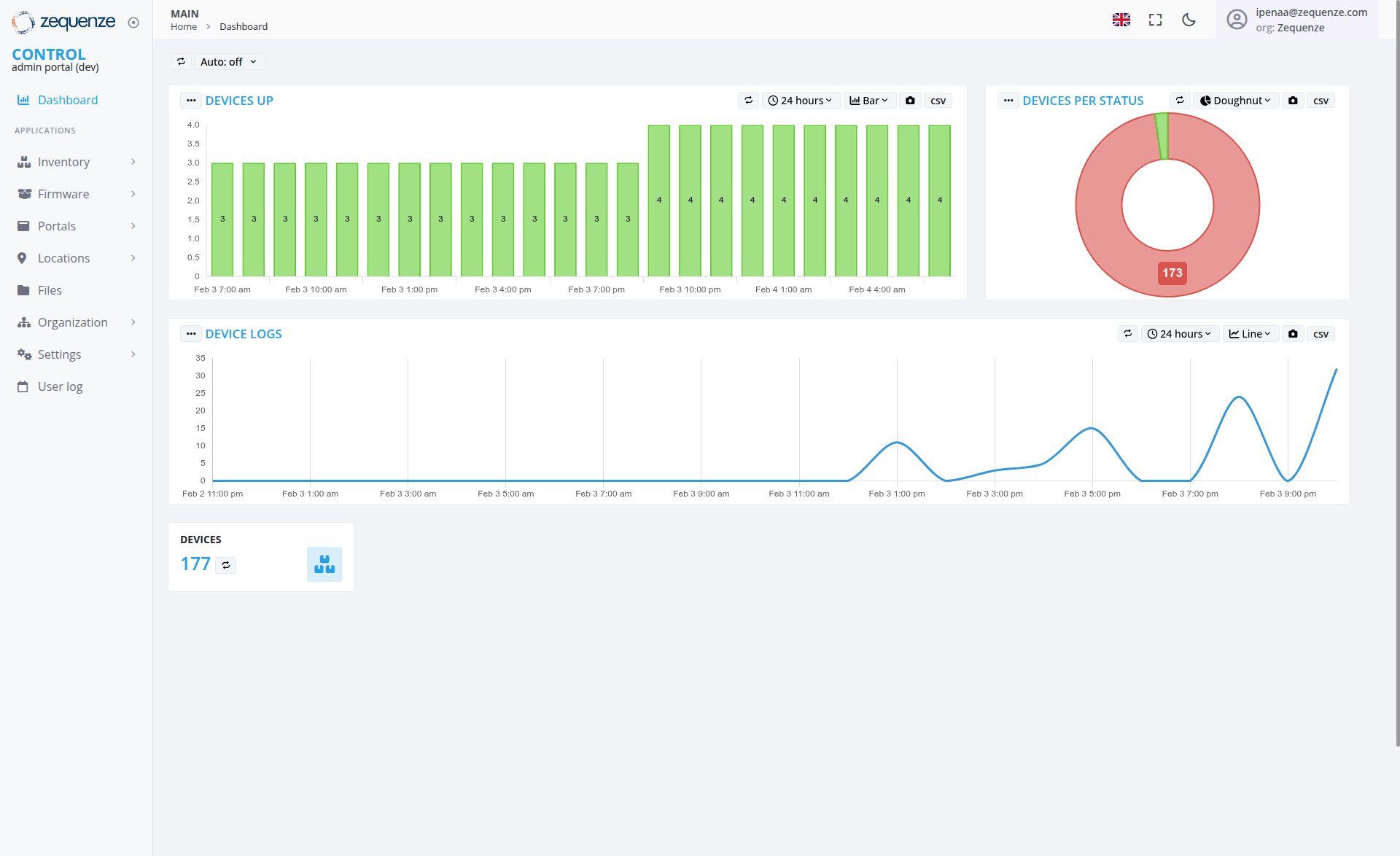
Live Device Count: Real-time counter showing total devices (
73,800)177)
Navigation & Access Control
UI Elements
Dashboard Widgets
-
Devices Up Widget: Green bar chart
withshowing consistent valuesaroundwith314-3163-4devices,devices up across time periods, displayinghourlydata points fromJanFeb 31:7:00 am throughJanFeb3410:4:00 pm -
Device Logs Widget: Blue line graph showing activity patterns spanning from
JanFeb 28:11:00 pm throughJanFeb656:9:00 pm, with anotable largesignificant spikeoccurring around Jan 3 12:00 pmreaching approximately3035events,eventswitharoundmostFebother3periods7:00maintainingpm, and lower baseline activity levelsaroundthroughout10-15theeventsmonitoring period -
Devices Per Status Widget: Donut chart with prominent red section showing
73,485173 devices -
Device Counter: Large numeric display (
73,800)177) with refresh icon
Navigation Sidebar
- Control Section: Dashboard (currently active)
-
Applications Menu:
- Inventory
- Firmware
User devices
Users
Top Navigation
- Home and Dashboard breadcrumb navigation
- Auto-refresh toggle (currently set to "Auto: off")
- User account display in top-right corner showing "
ia_docs@zequenze.penaa@zequenze.com" with organization "Root"Zequenze"
User Interactions
Widget Controls
- Time Range Selection: 24-hour view with dropdown options
- Data Export: CSV export functionality available for all widgets
- Chart Type Toggle: Line view option available for Device Logs widget
- Chart View Options: Doughnut view selection available for Devices Per Status widget
- Refresh Controls: Manual refresh and auto-refresh settings
Navigation
Navigation
Access Path
-
URL:
https://control-dev.zequenze.com/admin/ - Primary Navigation: MAIN > Home > Dashboard
-
User Level:
RootZequenze organization access required
Related Sections
- Device management via Inventory
and User devices - System configuration through Settings and Organization
- Monitoring and logging via
Events andUser log sections
Data Displayed
Performance Metrics
-
Device Uptime: Consistent
highavailability (314-3163-4 devices up) -
Activity Patterns: Device logs show a
singlesignificant spike aroundJanFeb 312:7:00 pm reaching approximately3035 events, with lower activity levels maintained throughout theremainderrest of the4-daymonitoring periodmaintaining steady baseline levels around 10-15 events -
Status Distribution:
Large-Small-scaledevicedeployment (73,800177 total devices) - Time Series Data: Extended time window showing multi-day patterns with hourly granularity
System Information
-
Total Devices:
73,800177 managed devices - Active Monitoring: Real-time status tracking
- Historical Data: Time-based trend analysis showing multi-day patterns
-
Status Categories: Multiple device states tracked in pie chart with
73,485173 devices in the primary status category
Actions Available
Dashboard Management
- Export Data: Download CSV reports for all widgets
- Refresh Data: Manual or automatic data updates
- Time Range Adjustment: Modify monitoring time windows
- Chart View Customization: Toggle between different chart types (Line view for Device Logs, Doughnut view for status charts)
System Navigation
- Quick Access: Direct links to all major system functions
-
User Management: Access to user and device administration
Notes/Tips
Best Practices
- Monitor the "Devices Up" chart for consistent availability patterns
- Use the Device Logs graph to identify unusual activity spikes or anomalies such as the significant spike observed around
JanFeb 312:7:00 pm - Export data regularly for compliance and reporting purposes
- Enable auto-refresh for real-time monitoring scenarios
- Utilize chart view options (Line view toggle, Doughnut view) for optimal data visualization
Performance Considerations
- The dashboard displays data for
73,800177 devices, indicatingenterprise-small to medium-scale deployment - Time-series data updates hourly for optimal performance
- CSV export functionality available for detailed analysis
- Dashboard widgets are optimized for real-time updates
Access Requirements
RootZequenze organization privileges required for full dashboard access- Development environment URL suggests testing/staging deployment
- User authentication via email-based accounts (
ia_docs@zequenze.penaa@zequenze.com shown)