You can combine multiple search conditions together using the logical
operators and (both conditions must be true) and
or (at least one of the conditions must be true, no matter
which one). Important - logical operators must be written in lowercase:
and and or is correct, and AND or
OR is incorrect and will cause an error.
Example: looking for users with first name "John" and
registered in 2017 or later. Please note that we have 2 search
conditions here, joined with and:
first_name = "John" and date_joined >= "2017-01-01"
One more example, looking for users who are either super-users
or marked with "Staff" flag:
is_superuser = True or is_staff = True
Logical operators can be quite powerful, as they let you to build
complex search queries. If you're building a complex query there's an
important tip to keep in mind: if your query contains both
and and or operators, we strongly encourage
you to use parenthesis to specify the precedence of operators. Here's
an example to illustrate why this is important. Let's assume that you
want to pull users who are either super-users or marked
with Staff flag, and registered in 2017 or later. It
might be tempting to write a query like this:
is_superuser = True or is_staff = True and date_joined > "2017-01-01"
The problem with the query above is that it won't do what you expect,
because the and operator is evaluated first. In fact it pulls
users who are either super-users (no matter when they registered)
or users who are both Staff and registered
after 2017. This problem can be fixed with parentheses, just put them
around the search conditions that must be evaluated first, like this:
(is_superuser = True or is_staff = True) and date_joined > "2017-01-01"
Using parenthesis is recommended only when your query mixes both
and and or operators. If your query contains
multiple logical operators of only one kind (either and
or or) you can safely omit parenthesis and it will work
as expected.
In a search query, you should reference the current model's fields exactly as they're defined in Python code for that particular Django model. Search query input has an auto-completion feature that pops up automatically and suggests all available options. If you're not sure what the field name is, then pick one of the options displayed (example):
[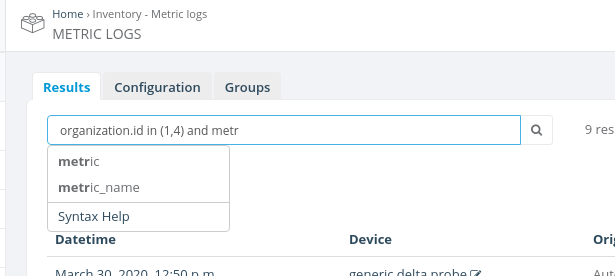](https://docs.zequenze.com/uploads/images/gallery/2020-03/jYkmoEblfaJz0diz-Screenshot-from-2020-03-30-17-45-55.png)
In most cases, internal model fields look similar to what you see
in Django admin interface, just in lowercase and with _
instead of spaces. For example, in the standard Users admin interface,
the internal first_name field is displayed as
First name, email field is displayed as
Email address and so on. However there could be exceptions
to this, if developers have defined custom display names that look
very different from their internal representation. In such cases it
might be a good idea to ask developers to override this help template
and provide an "internal name -> display name" fields mapping right
here.
Note that some fields that you see in the admin interface may not be searchable. This includes computed fields, i.e. fields which are not stored in the database as a plain value, but rather calculated from other values in the code.
### Related models
Advanced search allows you to search by related models as well (it
automatically converts relations to database joins under the hood). Use the
. dot separator to designate related models and their
fields. For example:
groups.name in ("Marketing", "Support")
See the . in the example above? It means that
groups is a related model and name is a field
of that model. As usual, DjangoQL auto-completion provides suggestions
for all available related models and their fields. For complex data
structures you can use multiple levels of relation, i.e. specifying a
related model, then its related model, and so on.
In most cases the search condition with a related model must specify the
exact field of that model, but not a related model itself. For example,
groups in ("Marketing", "Support") won't work, because
groups is a model and not a field. Models can have many
fields, and the server doesn't know against which field you would like
to perform a comparison. However there's one notable exception to
this - when you'd like to find records that are linked (or not linked)
to any related models of that kind. In such a case, you should compare
the related model to a special None value, like this:
groups = None
The example above would search for users that don't belong to any
groups. If you'd like to find all users that belong to at least any
group instead, use != None:
groups != None### Comparison operators
| Operator | Meaning | Example |
|---|---|---|
| = | equals | first_name = "John" |
| != | does not equal | id != 42 |
| ~ | contains a substring | email ~ "@gmail.com" |
| !~ | does not contain a substring | username !~ "test" |
| > | greater | date_joined > "2017-02-28" |
| >= | greater or equal | id >= 9000 |
| < | less | id < 9000 |
| <= | less or equal | last_login <= "2017-02-28 14:53" |
| in | value is in the list | first_name in ("John", "Jack", "Jason") |
| not in | value is not in the list | id not in (42, 9000) |
| startswith | value starts with the provided argument | name startswith "te" |
| endswith | value ends with the provided argument | name endswith "st" |
Notes:
~, !~, startswith and endswith operators can be applied only to
string fields;
True, False and None values can
be combined only with = and !=;
in and not in operators must be written in
lowercase. IN or NOT IN is incorrect and
will cause an error.
| Type | Examples | Comments |
|---|---|---|
| string | "this is a string" |
Strings must be enclosed in double quotes, like
"this". If your string contains double quote
symbols in it, you should escape them with a backslash,
like this: "this is a string with \"quoted\" text".
|
| int | 42, 0, -9000 |
Integer numbers are just digits with optional unary minus. If you're typing big numbers please don't use thousand separators, DjangoQL doesn't understand them. |
| float |
3.14, -0.5, 5.972e24
|
Floating point numbers look like integer numbers with optional
fractional part separated with dot. You can also use
e notation to specify power of ten. For example,
5.972e24 means 5.972 * 1024.
|
| bool |
True, False
|
Boolean is a special type that accepts only two values:
True or False. These values are
case-sensitive, you should write True or
False exactly like this, with the first letter in
uppercase and others in lowercase, without quotes.
|
| date |
"2017-02-28"
|
Dates are represented as strings in "YYYY-MM-DD"
format.
|
| datetime |
"2017-02-28 14:53""2017-02-28 14:53:07"
|
Date and time can be represented as a string in
"YYYY-MM-DD HH:MM" format, or optionally with seconds
in "YYYY-MM-DD HH:MM:SS" format (24-hour clock).
Please note that comparisons with date and time are performed in
the server's timezone, which is usually UTC.
|
| null |
None
|
This is a special value that represents an absence of any value:
None. It should be written exactly like this, with
the first letter in uppercase and others in lowercase, without
quotes. Use it when some field in the database is
nullable (i.e. can contain NULL in SQL terms) and you'd like to
search for records which either have no value
(some_field = None) or have some value
(some_field != None).
|