# Overview
# What is GATE?
## Overview
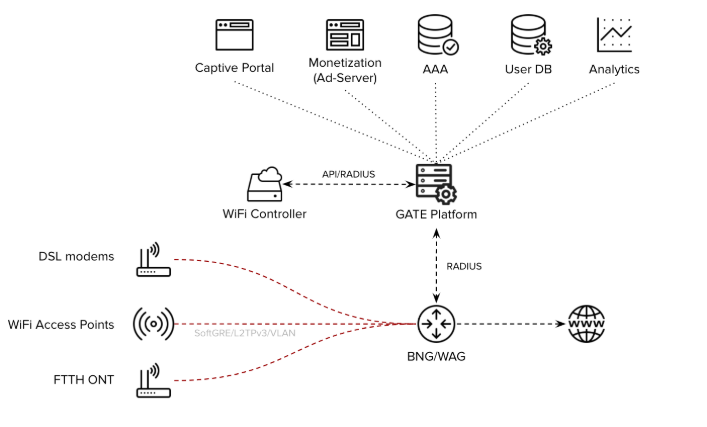
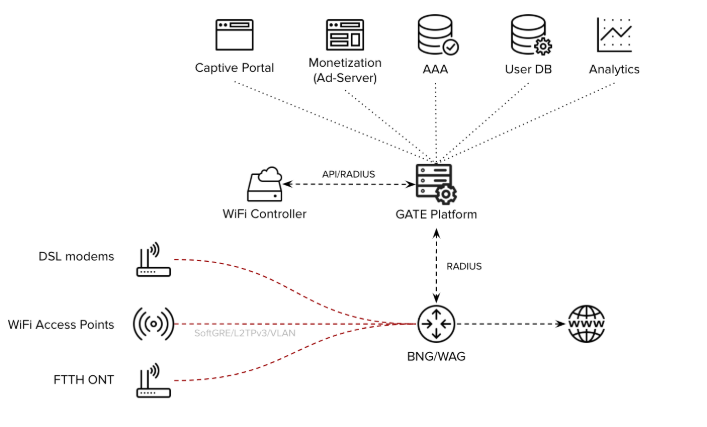
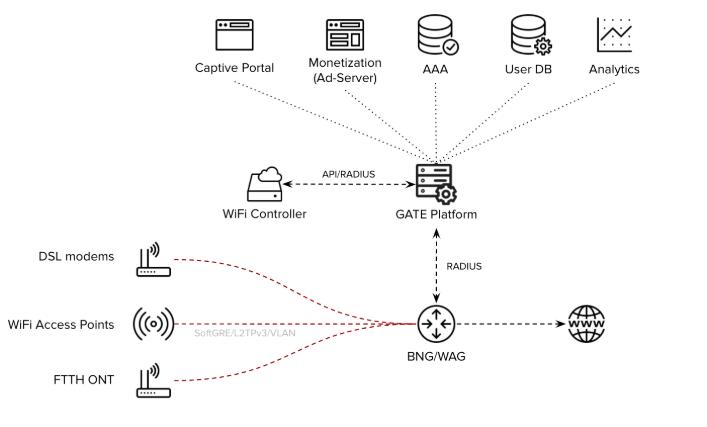
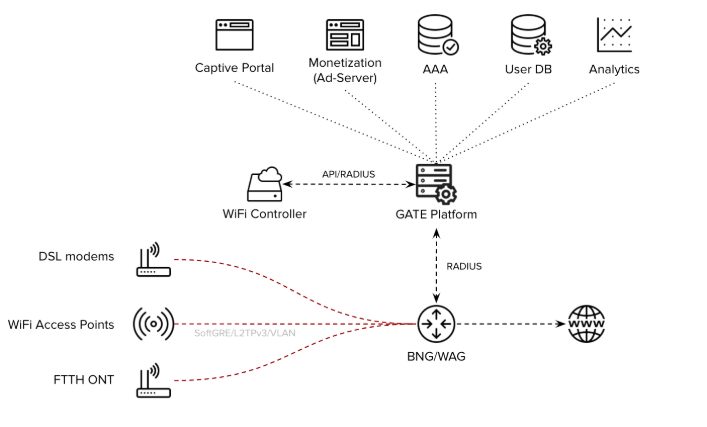
GATE is a carrier-grade Access Control platform designed specifically for telecommunications service providers. It delivers enterprise-level authentication, authorization, and user management capabilities through an integrated suite of components.
The platform has been created to address key specifications and requirements from Telecom Service Providers in terms of features, scalability and flexibility, consequently, it allows Service Providers to implement carrier-grade services at scale.
## Core Components
### Authentication, Authorization & Accounting (AAA)
A fully functional AAA server providing comprehensive user authentication, access authorization, and transaction accounting services.
### Captive Portal
Complete captive portal solution for service providers implementing portal-based access control, featuring:
- **Ad-Server**: Configure and manage advertisement campaigns within the user journey through the captive portal login process
### User Database
Highly scalable user database system that seamlessly integrates with AAA functionality to store:
- User profiles and account information
- AAA transaction records and logs
### Analytics & Reporting
Comprehensive analytics platform delivering extensive reports and insights through:
- Intuitive graphical user interface (GUI)
- RESTful API for programmatic access
## Use Cases
The GATE platform addresses critical telecommunications requirements for features, scalability, and flexibility, enabling service providers to deploy carrier-grade services:
### Broadband Internet Access
- AAA services for BNG-based broadband access networks
- Captive portal integration when required
- Support for FTTH, DSL, and wireless technologies
### Public WiFi
- Captive portal and AAA services for large-scale public WiFi deployments
- Integration with WiFi controllers and/or WAG platforms
- Carrier WiFi-based architecture support
### Mobile Offload
- AAA services for mobile-to-WiFi offload scenarios
- Direct integration with Mobile Network Operator core systems
- HSS/SIM-based EAP-AKA authentication support
### Community WiFi
- Captive portal and AAA services for massive community WiFi networks
- Seamless WAG platform integration
## Deployment Options
GATE offers flexible deployment models to meet diverse infrastructure requirements:
- **Platform as a Service (PaaS)**: Cloud-hosted service model
- **On-Premises**: Self-hosted deployment option
## Industry Integration
GATE has been extensively tested and integrated with industry-leading solutions:
- BNG (Broadband Network Gateway) platforms
- WAG (Wireless Access Gateway) systems
- Carrier-grade WiFi solutions
## Further Reading
- [Architecture](https://docs.zequenze.com/books/gate/page/architecture)
- [Specifications](https://docs.zequenze.com/books/gate/page/specifications)
# Architecture
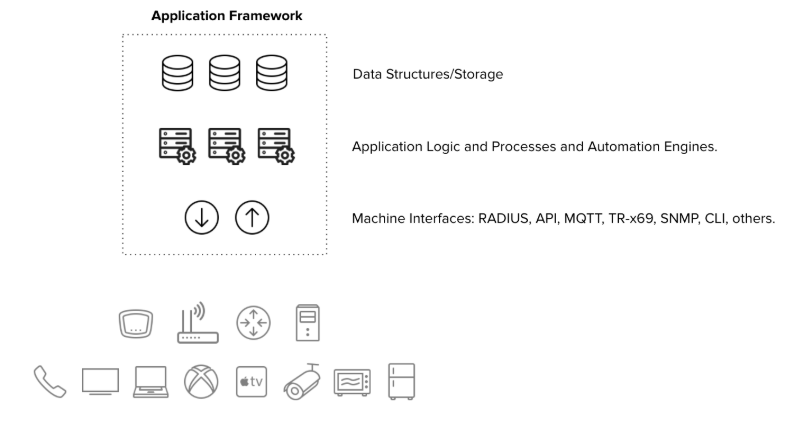
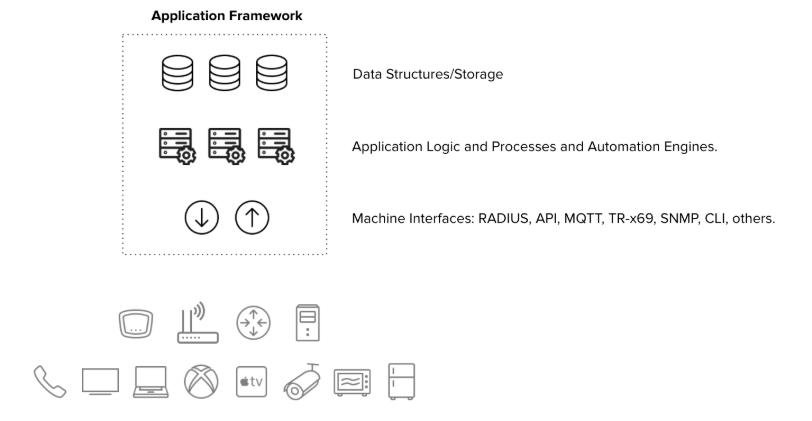
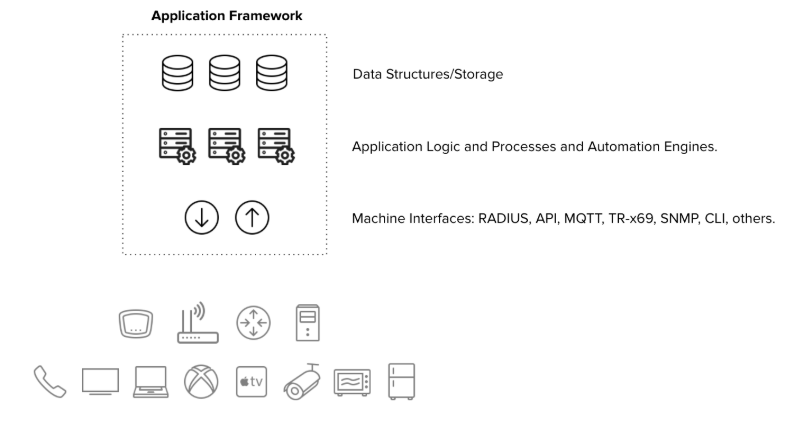
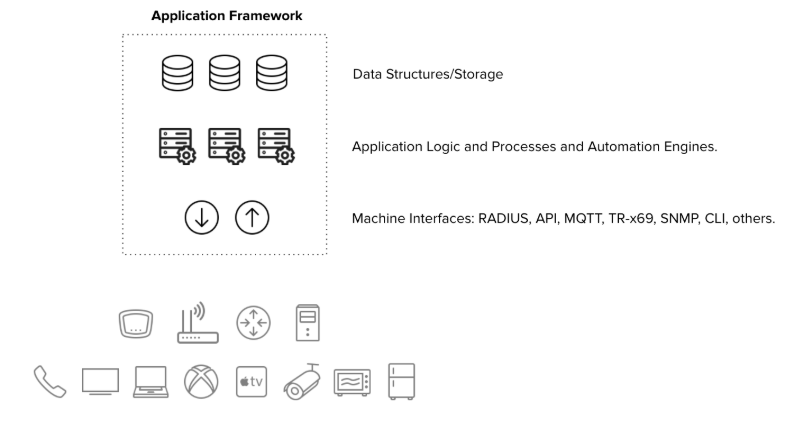
The GATE platform shares Zequenze's robust framework architecture, providing a scalable and reliable foundation for portal management and authentication services.
## Core Components
The GATE architecture consists of three primary layers:
### Machine Interfaces
- **RADIUS**: Remote Authentication Dial-In User Service protocol support
- **DIAMETER**: Next-generation AAA protocol implementation
- **Web Server**: HTTP/HTTPS interface for web-based interactions
### Application Layer
- **AAA Server**: Authentication, Authorization, and Accounting services
- **Captive Portal**: User authentication and access control interface
- **Ad Server**: Advertising content management and delivery
- Additional service applications
### Database Layer
- **User Records Database**: Storage for user accounts and profiles
- **Transaction Records Database**: Logging of authentication and access events
- **Metrics Database**: Performance and usage analytics storage
- Additional specialized databases for various operational data
## Architecture Diagram
## Scalability
Each architectural layer supports horizontal scaling to accommodate varying operational requirements and can be easily scaled depending on specific needs:
- **Traffic-based scaling**: Scale components based on network traffic volume
- **Activity-based scaling**: Adjust resources according to user activity levels
- **Size-based scaling**: Expand capacity based on database size and storage requirements
This flexible architecture ensures optimal performance across different deployment scenarios and growth patterns.
## Further Reading
- [Overview](https://docs.zequenze.com/books/gate/chapter/overview)
- [Specifications](https://docs.zequenze.com/books/gate/page/specifications)
# Specifications
## GATE Captive Portal
### Key Characteristics
**Carrier-Grade Platform**
- High-availability 1+1 architecture with carrier-grade scalability
- Seamless integration with WAG/BNG for large-scale architectures
**User Experience**
- Fully customizable end-user experience and customer journey
- Responsive design optimized for mobile, tablet, and desktop devices
- Integrated advertising server capabilities
### Access Control Features
**Authentication Methods**
The captive portal supports multiple authentication options through a customizable landing/splash window:
- **Credential-based login** — Username/password validation against Service Provider database
- **Email/Mobile verification** — Real-time validation with email or mobile number
- **Social network integration** — Login through social media platforms
- **Soft-token authentication** — Token-based access control
**Quality of Service (QoS) Profiling**
End-user QoS profiling with signaling to WiFi Controller or WAG/BNG systems:
- **Free access** — Time-limited with reduced speed/QoS parameters
- **Premium access** — Unlimited usage with higher speed/QoS allocation
- **Sponsored access** — Advertisement-supported connectivity
**Additional Capabilities**
- Payment gateway integration (Braintree and other providers)
- Self-managed and customizable HTML code for complete control over end-user experience
### Integrated Ad Server
**Campaign Management**
- Complete ad server functionality with banner, video, and campaign inventory management
- Advanced campaign programming and enforcement tools
**Targeting and Segmentation**
Rich segmentation capabilities based on login-generated metadata:
- Location, time, and date information
- Device specifications (type, brand, operating system)
- User demographics (gender, age, and other attributes)
**Reporting and Analytics**
Comprehensive and customizable reporting for advertising campaigns:
- Activity tracking per campaign, banner, and video content
- Detailed breakdowns by location, time, date, device specifications, and user demographics
### Reports and Analytics
**Data Visualization**
- Location and group-based reporting capabilities
- Interactive heatmaps for spatial analysis
- Historical data tracking for all captive portal and ad server metrics
**Data Export Options**
- One-click data export functionality
- Multiple formats: live reports, CSV files, API integration, and other standard formats
---
## GATE AAA Server
### Key Characteristics
**Enterprise-Grade Infrastructure**
- Carrier-grade platform with high-availability 1+1 architecture
- Horizontal scalability through cloud-based architecture
- Integration capabilities with WAG/BNG for large-scale deployments
**Protocol Compliance**
- Full RADIUS RFC compliance ensuring industry standard compatibility
- Flexible VSA (Vendor-Specific Attributes) integration
- Service Provider database integration via RADIUS/LDAP or API
### Database Integration
**Scalable Database Architecture**
- Database-driven configuration and subscriber record management
- Fully integrated database solution with optional external database support
- Multiple user provisioning methods: GUI interface, bulk provisioning, or external API
### Advanced AAA Features
**Proxy Capabilities**
- Comprehensive proxy AAA support
- RADSec support (RFC 6614) enabling direct peering with third-party AAA systems
**Configuration Management**
Easy and flexible configuration through graphical user interface:
- Scriptable Option 82 support
- Extensive manipulation capabilities for any RADIUS/VSA attributes
### Reports and Analytics
**Comprehensive Reporting**
- Location and group-based analytical reports
- Interactive heatmaps for network usage visualization
- Historical data retention and analysis for all AAA metrics
**Export Capabilities**
- One-click data export functionality
- Multiple output formats: live reports, CSV files, API integration, and additional standard formats
---
## Further Reading
- [Overview](https://docs.zequenze.com/books/gate/chapter/overview)
- [Architecture](https://docs.zequenze.com/books/gate/page/architecture)
# User Groups & Permissions Guide
## Overview
GATE implements a **role-based access control (RBAC)** model that ensures secure and organized user management. Permissions are never assigned directly to individual users. Instead, users inherit their permissions from one or more **groups**, allowing you to tailor user experiences while maintaining platform security.
Every group provides access to a specific **functional area** (such as AAA, payments, or advertising) at a defined **privilege level** (full admin, read-only admin, or reports-only). You can assign multiple groups to a single user to grant cross-functional responsibilities.
```mermaid
flowchart LR
U[User] -->|member of| G1[Group A
e.g. AAA admins]
U -->|member of| G2[Group B
e.g. Payment reports]
G1 -->|grants| P1[Permissions on AAA]
G2 -->|grants| P2[Permissions on Payment reports]
P1 --> UI[GATE admin UI]
P2 --> UI
```
> ✅ **Key Concept:** Groups are additive. A user belonging to multiple groups receives the **union** of all their permissions. This allows you to compose roles rather than creating new groups for every possible combination.
## Permission Levels
Most functional areas provide three standard permission levels. Always select the lowest level that enables users to complete their tasks effectively — this follows the **principle of least privilege**.
### Standard Permission Levels
| Level | Indicator | Access Granted | Typical Use Cases |
|-------|-----------|----------------|-------------------|
| **Admin** | 🟢 | Full CRUD operations (create, view, update, delete) on area resources | Day-to-day feature configuration and management |
| **Read-only Admin** | 🟡 | Browse all objects in the area without modification or deletion capabilities | Auditors, trainees, support staff conducting investigations |
| **Reports** | 🔵 | Access to dashboards, charts, and transaction listings without configuration access | Business analysts, finance teams, marketing personnel |
### Special Cross-Cutting Roles
Beyond the standard levels, GATE includes two important cross-cutting roles:
| Role | Indicator | Access Granted |
|------|-----------|----------------|
| **End User** | ⚫ | Personal profile access, password changes, and preference settings (non-administrative) |
| **Expert Mode** | 🟣 | Unlocks hidden "Expert Mode" toggle revealing advanced menus and **destructive operations** (bulk deletes, internal settings) |
> ⚠️ **Expert Mode Warning:** Only grant Expert Mode access to senior operators who understand the consequences of destructive operations.
## Functional Areas
GATE organizes functionality into distinct areas, each with its own group hierarchy using the three standard permission levels where applicable.
| Area | Scope |
|------|-------|
| 🌐 **Global Administration** | Cross-cutting operations, organization-wide configuration, and platform health monitoring |
| 🛡 **AAA** | Authentication, Authorization, and Accounting — profiles, realms, clients, home servers, session logs |
| 📇 **Account** | Tenant/account configuration including plans, services, lists, parameters, and site settings |
| 📣 **Advertisement** | Campaign management, banner configuration, segmentation rules, and advertising transaction logs |
| 📝 **API Logs** | Platform API request history inspection for debugging and auditing purposes |
| 📱 **Devices & Applications** | Mobile/desktop app registrations, device metadata, connection logs, and app subscriptions |
| 📡 **Hotspot Monitoring** | Real-time access point health monitoring including reachability, uptime, coverage, and availability reports |
| 💳 **Payments** | Payment plan management, gateway configuration, transaction processing, and refund handling |
| 👥 **Users** | End-user account management, social login configuration, and user-level activity logs |
| 📊 **Reports & Dashboards** | Cross-area analytics, KPI tracking, and exportable report generation |
| 🔎 **SONDA / User Experience** | Real-world user experience monitoring including latency, throughput, and client-side reachability measurements |
## Group Catalog
The following tables detail every built-in group shipped with GATE, organized by functional area. Group names are stable identifiers that you can search for in the group administration interface.
### Global Administration
| Group | Level | Description |
|-------|-------|-------------|
| `GATE admins` | 🟢 Admin | Comprehensive platform administration access for day-to-day operations across most areas |
| `GATE read-only admins` | 🟡 Read-only | Platform-wide browsing access without modification capabilities |
| `GATE reports` | 🔵 Reports | Access to dashboards, KPIs, and transaction listings across the platform |
> 💡 **Usage Recommendation:** These general-purpose roles serve as excellent starting points for most operators. Combine them with area-specific groups when users require deeper access to particular modules.
### AAA (Authentication, Authorization, Accounting)
| Group | Level | Description |
|-------|-------|-------------|
| `GATE AAA admins` | 🟢 Admin | Complete AAA administration including profiles, realms, clients, home servers, and accounting |
| `GATE AAA admins w/o Portals` | 🟢 Admin | Full AAA administration **excluding** captive portal builder access |
| `GATE AAA admins w/o Portals RO` | 🟡 Read-only | Read-only AAA administration without captive portal builder access |
| `GATE AAA read-only admins` | 🟡 Read-only | Read-only access to the complete AAA functional area |
| `GATE AAA reports` | 🔵 Reports | AAA accounting reports, session analytics, and traffic dashboard access |
| `GATE AAA user admins` | 🟢 Admin | Specialized role for managing AAA **end-users only** (profiles, attributes, credentials) without infrastructure access |
> 🎯 **Selection Guidelines:**
> - Use `AAA admins` for complete AAA stack ownership
> - Use `AAA admins w/o Portals` when captive portal design is managed separately
> - Use `AAA user admins` for support desk personnel who only reset credentials or adjust user attributes
> - Use `AAA reports` for analytics roles that must not access configuration
### Account Management
| Group | Level | Description |
|-------|-------|-------------|
| `GATE account admins` | 🟢 Admin | Complete account administration including plans, services, lists, parameters, and site settings |
| `GATE account read-only admins` | 🟡 Read-only | Read-only account administration access for audit and review purposes |
> 🎯 **Selection Guidelines:** `account admins` represents the closest equivalent to a tenant "owner" role — grant sparingly. `account read-only admins` is ideal for auditors and onboarding verification.
### Advertisement Management
| Group | Level | Description |
|-------|-------|-------------|
| `GATE advertisement admins` | 🟢 Admin | Complete advertisement administration including campaigns, banners, and segmentation rules |
| `GATE advertisement read-only admins` | 🟡 Read-only | Read-only advertisement administration for audit purposes |
| `GATE advertisement reports` | 🔵 Reports | Advertisement reporting and transaction access including impressions, clicks, and conversions |
> 💡 **Team Separation:** Assign `advertisement admins` to marketing teams, `advertisement reports` to analytics teams, and `advertisement read-only admins` to finance auditors.
### API Logs
| Group | Level | Description |
|-------|-------|-------------|
| `GATE API Logs read-only` | 🟡 Read-only | API request log browser access for debugging and auditing |
> 💡 **Usage Recommendation:** Ideal for integration teams and third-party partners who need API call troubleshooting capabilities without broader platform access.
### Devices & Applications
| Group | Level | Description |
|-------|-------|-------------|
| `GATE device admins` | 🟢 Admin | Device and application administration including registrations, subscriptions, and configuration |
> 💡 **Usage Recommendation:** Designed for mobile/desktop application operations teams responsible for registered device lifecycle management.
### Hotspot Monitoring
| Group | Level | Description |
|-------|-------|-------------|
| `GATE hotspots monitoring` | 🟢 Admin | Hotspot monitoring administration including monitoring profiles, thresholds, and alert configuration |
| `GATE hotspots monitoring read-only` | 🟡 Read-only | Read-only access to hotspot monitoring dashboards and availability reports |
> 💡 **Usage Recommendation:** Essential for network operations center (NOC) teams monitoring access point health and coverage.
### Payment Management
| Group | Level | Description |
|-------|-------|-------------|
| `GATE payment admins` | 🟢 Admin | Complete payments and plans administration including pricing, gateways, and plan lifecycle |
| `GATE payment read-only admins` | 🟡 Read-only | Read-only payment area access for audit and compliance |
| `GATE payment reports` | 🔵 Reports | Payment reporting and transaction access including revenue dashboards and reconciliation exports |
> 🎯 **Selection Guidelines:** Finance teams typically need `payment reports` for reconciliation **plus** `payment read-only admins` for transaction investigation. Reserve `payment admins` for billing operations personnel only.
### User Management
| Group | Level | Description |
|-------|-------|-------------|
| `GATE users admins` | 🟢 Admin | User account and user log administration |
| `GATE users RO` | 🟡 Read-only | Read-only access to user lists and user activity logs |
| `Users` | ⚫ End user | Standard end-user role providing profile access and password change capabilities |
| `Users: Expert mode` | 🟣 Expert | Enables **Expert Mode** toggle in admin UI, unlocking advanced menus and destructive operations |
> ⚠️ **Expert Mode Security Notice:** Expert Mode reveals advanced and destructive operation menus (bulk accounting record deletion, low-level configuration, internal tooling). Grant `Users: Expert mode` exclusively to trained senior operators who understand operational consequences.
### Reports & Dashboards
| Group | Level | Description |
|-------|-------|-------------|
| `Report admins` | 🟢 Admin | Report and dashboard administration including creation, editing, and sharing of custom reports |
> 💡 **Usage Recommendation:** Designed for business intelligence teams responsible for building and maintaining organizational dashboards.
### SONDA / User Experience
| Group | Level | Description |
|-------|-------|-------------|
| `SONDA admins` | 🟢 Admin | SONDA probing and user experience measurement system administration |
| `SONDA reports` | 🔵 Reports | SONDA reporting and transaction access including latency, throughput, and reachability metrics |
> 💡 **Usage Recommendation:** Essential for quality-of-experience (QoE) teams monitoring real user service perception.
## Access Matrix
This visual summary shows available group combinations for each functional area and permission level. Empty cells indicate no pre-built group exists for that combination — use the closest available level or combine multiple groups.
| Area | 🟢 Admin | 🟡 Read-only | 🔵 Reports | Notes |
|------|:----------:|:------------:|:----------:|-------|
| **Global** | `GATE admins` | `GATE read-only admins` | `GATE reports` | Starting point for most operators |
| **AAA** | `GATE AAA admins` | `GATE AAA read-only admins` | `GATE AAA reports` | `w/o Portals` variants available |
| **AAA (user-level)** | `GATE AAA user admins` | — | — | Support/helpdesk focused |
| **Account** | `GATE account admins` | `GATE account read-only admins` | — | Tenant configuration |
| **Advertisement** | `GATE advertisement admins` | `GATE advertisement read-only admins` | `GATE advertisement reports` | Complete coverage |
| **API logs** | — | `GATE API Logs read-only` | — | Integration/debug role |
| **Devices & apps** | `GATE device admins` | — | — | Limited coverage |
| **Hotspot monitoring** | `GATE hotspots monitoring` | `GATE hotspots monitoring read-only` | — | NOC teams |
| **Payments** | `GATE payment admins` | `GATE payment read-only admins` | `GATE payment reports` | Complete coverage |
| **Users** | `GATE users admins` | `GATE users RO` | — | See also `Users` and `Users: Expert mode` |
| **Reports & dashboards** | `Report admins` | — | — | BI team role |
| **SONDA / UX** | `SONDA admins` | — | `SONDA reports` | QoE role |
## Common User Profiles
These ready-to-apply group combinations cover most real-world operational requirements.
### 🧑💼 Platform Operator (Day-to-Day Admin)
**Group Assignment:**
- `GATE admins`
- `GATE AAA admins`
- `GATE account admins`
- `GATE device admins`
**Role Description:** Handles platform configuration, service onboarding, and operational issue resolution across all areas. Expert Mode is **not** included by default.
### 🛠 Helpdesk / Tier-1 Support
**Group Assignment:**
- `GATE read-only admins`
- `GATE AAA user admins`
- `GATE users RO`
- `GATE API Logs read-only`
**Role Description:** Platform browsing, user credential resets, and API log inspection without configuration modification or data deletion capabilities.
### 📊 Business Analyst / BI
**Group Assignment:**
- `GATE reports`
- `GATE AAA reports`
- `GATE advertisement reports`
- `GATE payment reports`
- `SONDA reports`
- `Report admins` *(optional, for dashboard creation)*
**Role Description:** Dashboard-focused access without configuration capabilities, eliminating accidental change risks.
### 💰 Finance / Billing
**Group Assignment:**
- `GATE payment read-only admins`
- `GATE payment reports`
- `GATE read-only admins` *(optional, for context)*
**Role Description:** Transaction reconciliation and payment configuration auditing without modification capabilities.
### 📣 Marketing Operator
**Group Assignment:**
- `GATE advertisement admins`
- `GATE advertisement reports`
**Role Description:** Campaign creation and measurement with isolated functional scope.
### 🌐 Network Operations (NOC)
**Group Assignment:**
- `GATE hotspots monitoring`
- `GATE AAA reports`
- `SONDA reports`
**Role Description:** Real-time access point health monitoring with session analytics and user experience correlation capabilities.
### 🎛 Senior Operator (with Destructive Tooling)
**Group Assignment:**
- `GATE admins`
- `GATE AAA admins`
- `Users: Expert mode`
**Role Description:** Standard operator capabilities enhanced with Expert Mode access. Reserve for trusted operators exclusively.
### 👤 End User (Self-Service)
**Group Assignment:**
- `Users`
**Role Description:** Personal profile and password management without administrative area access.
## Best Practices
### 🛡 Principle of Least Privilege
Always assign the **minimum permission level** required for job function completion. Prefer `read-only admins` over `admins` for investigation or audit roles. Choose `reports` over `read-only admins` when users only need dashboard access.
### 🔀 Compose Rather Than Customize
Resist creating specialized groups for individual users. Combining two or three built-in groups typically addresses requirements while maintaining audit simplicity.
### 🧪 Test in Staging Environment
Before production deployment, apply new user profiles (group combinations) to test users in non-production environments. Verify exact menu, button, and action visibility before real user rollout.
### 📆 Periodic Review Schedule
Implement quarterly group membership reviews. Revoke `admins` and Expert Mode capabilities from users who no longer require them. Former employee accounts with lingering admin access represent the most common security incident cause.
### 🚨 Separation of Duties
When possible, distribute **configuration** and **audit** responsibilities among different personnel:
- Payment configuration (`payment admins`) and payment auditing (`payment read-only admins` + `payment reports`) should involve different individuals
- Campaign creation (`advertisement admins`) and advertising budget approval (via `payment reports`) should involve different individuals
### 🔒 Expert Mode Access Control
Treat `Users: Expert mode` as break-glass permission due to irreversible operation access:
- Grant exclusively to named senior operators
- Document justification for each recipient
- Implement quarterly Expert Mode group membership reviews
- Remove temporary Expert Mode access immediately upon task completion
## Frequently Asked Questions
### Can I modify built-in groups to add or remove permissions?
While technically possible, modification is **not recommended**. Built-in groups may receive updates in future GATE releases, overwriting manual changes. Instead, create **additional** groups with required deltas and assign both to users.
### Can a user belong to multiple groups simultaneously?
Yes. Group memberships are **additive** — users inherit the union of all permissions from assigned groups. This represents the recommended approach for role composition.
### Which groups should new support agents receive?
Start with `GATE read-only admins` + `GATE users RO` + `GATE API Logs read-only`. Add area-specific groups as responsibilities expand.
### A user sees unauthorized menus. How do I remove access?
Remove the group granting menu access. If the menu persists, verify the user is not a **superuser** — superusers bypass the group system entirely and see all menus. Downgrade to regular user status and assign appropriate groups instead.
### How do I identify which group grants specific menu access?
Each admin section corresponds to a functional area (AAA, payments, advertising, etc.). Match the menu to the area using **Section 3: Functional Areas**, then select the appropriate level from **Section 5: Access Matrix**.
### Can I grant access to organization subsets only?
Yes — group-granted permissions are automatically scoped to the user's organization and its sub-organizations. A user with `GATE admins` in organization "Acme" will only see and administer Acme and its children, never sibling organizations.
---
> 📬 **Documentation Feedback:** If you believe a group is missing, misnamed, or if use cases in this guide don't match your requirements, please submit a documentation request for review in the next release.