Advanced topics
- Captive Portal HTML/CCS code example
- Dynamic variables for integration services
- Mobile WiFi Offload
- Testing FCM Push Notification service
- User Scripts
Captive Portal HTML/CCS code example
Overview
Captive Portal templates in GATE can be customized in two ways:
- Through the GATE GUI interface
- By directly modifying the HTML/CSS code of the template
This page demonstrates the HTML/CSS implementation of the Hotel Template for captive portals.
Hotel Template Preview
Live Template: Captive Portal Hotel Template
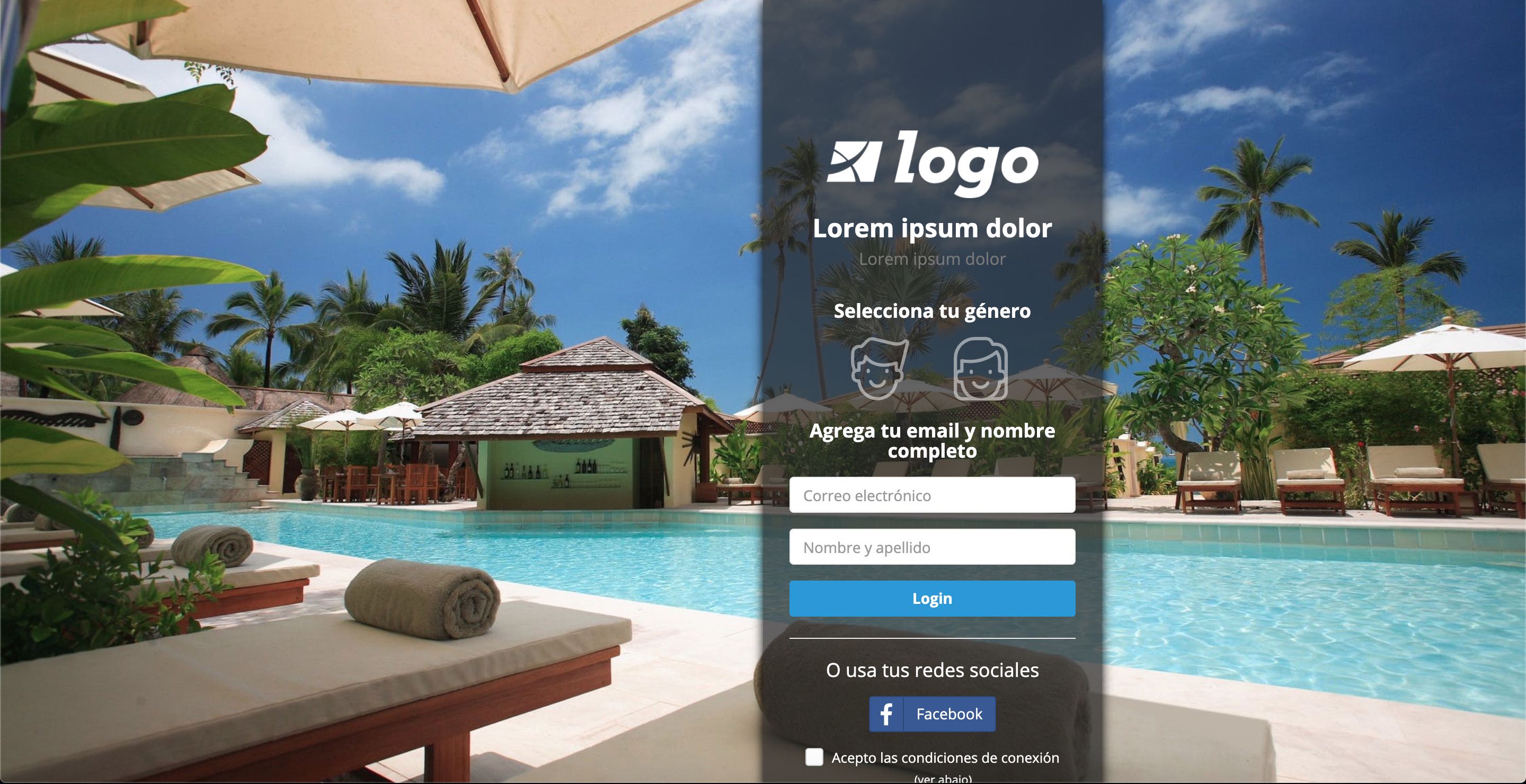
Complete HTML/CSS Code
Below is the complete HTML template code for the Hotel captive portal:
{% extends "page/base.html" %}
{% load admin_static media i18n %}
{% block extrastyle %}
{% if page.variables.favicon %}
<link rel="shortcut icon" type="image/ico" href="{% portal_files '' %}{{ page.variables.favicon }}" />
{% endif %}
<style>
.cc-selector input{
margin:0;padding:0;
-webkit-appearance:none;
-moz-appearance:none;
appearance:none;
}
.cc-selector-2 input{
position:absolute;
z-index:999;
}
.hombre{background-image:url({% portal_files 'templates/img/hombre.svg' %});}
.mujer{background-image:url({% portal_files 'templates/img/mujer.svg' %});}
.cc-selector-2 input:active +.drinkcard-cc, .cc-selector input:active +.drinkcard-cc{opacity: .9;}
.cc-selector-2 input:checked +.drinkcard-cc, .cc-selector input:checked +.drinkcard-cc{
-webkit-filter: none;
-moz-filter: none;
filter: none;
}
.drinkcard-cc{
cursor:pointer;
background-size:contain;
background-repeat:no-repeat;
display:inline-block;
width:60px; height: 60px;
-webkit-transition: all 100ms ease-in;
-moz-transition: all 100ms ease-in;
transition: all 100ms ease-in;
-webkit-filter: brightness(1.8) grayscale(1) opacity(.5);
-moz-filter: brightness(1.8) grayscale(1) opacity(.5);
filter: brightness(1.8) grayscale(1) opacity(.5);
}
.drinkcard-cc:hover{
-webkit-filter: brightness(1.2) grayscale(.5) opacity(1);
-moz-filter: brightness(1.2) grayscale(.5) opacity(1);
filter: brightness(1.2) grayscale(.5) opacity(1);
}
</style>
{% endblock %}
{% block body_tag %}
<body class="blank {% if is_popup %}popup {% endif %}{% block bodyclass %}{% endblock %}"
{% if page.variables.background %}style="background: url('{% portal_files '' %}{{ page.variables.background }}') no-repeat center center fixed; -webkit-background-size: cover; -moz-background-size: cover; -o-background-size: cover; background-size: cover;"{% endif %}
{% if page.variables.background_color %}style="background-color: {{ page.variables.background_color }};"{% endif %}>
{% endblock %}
{% block main %}
{% include "includes/social_detect.html" %}
<div class="row">
<div class="col-md-2 col-md-offset-{{ page.variables.offset|default:'2' }}" style="background-color: {{ page.variables.login_form_color|default:'rgba( 34, 34, 34, .7)' }}; min-height: 100vh; min-width: 320px; box-shadow: 0 0 10px 0px black;">
<div class="row text-{{ page.variables.font_color|default:'white' }}">
<div class="col-md-12">
<div class="hpanel m-l-sm m-r-sm" style="margin-top: 8%">
<div class="hidden-xs hidden-sm" style="min-height: 100px; background: unset; border: 0px;">
</div>
<div class="text-center m-b-sm" style="background: unset; border: 0px;">
<img class="m-b-xs" style="max-width: {{ page.variables.logo_max_width|default:'200' }}px;"
src="{% if page.variables.logo %}{% portal_files page.variables.logo %}{% else %}{% portal_files 'templates/img/logo1-white.png' %}{% endif %}">
<h3>
<strong>{{ page.variables.title|default:'Lorem ipsum dolor'|safe }}</strong><br>
<small>{{ page.variables.sub_title|default:'Lorem ipsum dolor'|safe }}</small>
</h3>
</div>
<div style="background: unset; border: 0px; padding-top: 0px;">
<form method="post" id="register" action="#" class="m-t-lg">
{% csrf_token %}
{% if next %}
<input type="hidden" name="next" value="{{ next }}" />
{% endif %}
<input type="hidden" id="tzoffset" name="tzoffset" value="" />
{% if page.variables.register_form_template %}
{% include page.variables.register_form_template %}
{% else %}
<div class="form-group text-center">
<h4 class="m-b font-extra-bold">Selecciona tu género</h4>
<div class="cc-selector text-center">
<input id="hombre" type="radio" name="gender" value="m"/>
<label class="drinkcard-cc hombre m-r" for="hombre"></label>
<input id="mujer" type="radio" name="gender" value="f"/>
<label class="drinkcard-cc mujer m-l"for="mujer"></label>
</div>
<h4 class="m-b font-extra-bold">Agrega tu email y nombre completo</h4>
<input type="text" id="email" name="email" placeholder="Correo electrónico" class="form-control m-b" value="" autocorrect="off" autocapitalize="none">
<input type="text" id="full_name" name="full_name" placeholder="Nombre y apellido" class="form-control m-b">
<button type="submit" class="btn btn-block btn-{{ page.variables.btncolor|default:'info' }} registerButton"><strong>{% trans 'login'|capfirst %}</strong></button>
</div>
{% endif %}
{% if social_auth %}
<hr/>
<div class="text-center">
<h4 class="m-b">O usa tus redes sociales</h4>
{% if facebook == True %}
<a href="#" class="btn btn-social btn-facebook loginFacebook m-b-xs">
<span class="fa fa-facebook"></span>Facebook
</a>
{% endif %}
{% if google == True %}
<a href="#" class="btn btn-social btn-google loginGoogle m-b-xs">
<span class="fa fa-google"></span>Google
</a>
{% endif %}
{% if twitter == True %}
<a href="#" class="btn btn-social btn-twitter loginTwitter m-b-xs">
<span class="fa fa-twitter"></span>Twitter
</a>
{% endif %}
{% if linkedin == True %}
<a href="#" class="btn btn-social btn-linkedin loginLinkedin m-b-xs">
<span class="fa fa-linkedin"></span>LinkedIn
</a>
{% endif %}
{% if instagram == True %}
<a href="#" class="btn btn-social btn-instagram loginInstagram m-b-xs">
<span class="fa fa-instagram"></span>Instagram
</a>
{% endif %}
{% if yahoo == True %}
<a href="#" class="btn btn-social btn-yahoo loginYahoo m-b-xs">
<span class="fa fa-yahoo"></span>Yahoo
</a>
{% endif %}
<div class="checkbox checkbox-info">
<input type="checkbox" class="socialAcceptCheck" name="accept">
<label>Acepto las condiciones de conexión </label><br>
<small>(ver abajo)</small>
</div>
<div class="hpanel collapsed" style="margin-bottom: 0px; margin-top: 10px;">
<div class="panel-heading hbuilt text-left" style="padding: 5px 10px;">
<a class="showhide">
<div class="panel-tools">
<i class="fa fa-chevron-up"></i>
</div>
<h6><i class="pe-7s-info text-info"></i> Condiciones de social media</h6>
</a>
</div>
<div class="panel-body text-left" style="color: black">
<small>
Al hacer login con tu cuenta de redes sociales aceptas compartir la información pública de tu perfil con Zequenze y sus socios de conectividad
</small>
</div>
</div>
</div>
{% endif %}
</form>
</div>
{% if page.variables.footer_text %}
<div class="m-l-sm m-t-xxl">
{% if page.variables.footer_logo %}
<img class="m-b-xs" style="max-width: {{ page.variables.footer_logo_max_width|default:'50' }}px;" src="{% if page.variables.logo %}{% portal_files '' %}{{ page.variables.footer_logo }}{% else %}{% portal_files 'templates/img/logo1-white.png' %}{% endif %}">
{% endif %}
<p>{{ page.variables.footer_text|default:'Lorem ipsum dolor sit amet, consectetur adipiscing elit sed do eiusmod tempor.'|safe }}</p>
</div>
{% endif %}
</div>
<div class="hpanel" style="margin-top: 10%"></div>
</div>
</div>
</div>
</div>
{{ page.content|safe }}
{% endblock %}
{% block bottom_scripts %}
{% if page.variables.welcome_url %}
<script>
{% if page.variables.welcome_url and request.path|slice:":6" == '/page/' %}
facebook_querystring = '?{{ request.query_string }}&next={{ page.variables.welcome_url | urlencode }}%3F{{ request.query_string | urlencode }}';
{% else %}
facebook_querystring = '?{{ request.query_string }}&next={{ page.variables.welcome_url | urlencode }}';
{% endif %}
twitter_querystring = facebook_querystring;
google_querystring = facebook_querystring;
twitter_querysstring = facebook_querystring;
linkedin_querystring = facebook_querystring;
instagram_querystring = facebook_querystring;
yahoo_querystring = facebook_querystring;
</script>
{% endif %}
{% if social_auth %}{% include "includes/social_auth.html" %}{% endif %}
{% if uam_api %}
{% include "includes/uam_default.html" %}
{% endif %}
<script>
$(function() {
{% get_current_language as LANGUAGE_CODE %}
$('#datepicker').datepicker({
format: 'yyyy-mm-dd',
autoclose: true,
clearBtn: true,
disableTouchKeyboard: true,
startView: 2,
maxViewMode: 2,
language: '{{ LANGUAGE_CODE }}',
templates: {
leftArrow: '<b style="font-size: 22px;">«</b>',
rightArrow: '<b style="font-size: 22px;">»</b>'
}
});
$('.loginButton').click(function() {
$('.splash').addClass('dim').css('display', 'block');
$('#tzoffset').val((new Date()).getTimezoneOffset());
{% if uam_api and uam_api.address %}
var username = document.getElementById('username').value;
var password = document.getElementById('password').value;
uam_login(username, password);
{% else %}
$("#register").submit();
{% endif %}
});
$('.registerButton').click(function() {
$('.splash').addClass('dim').css('display', 'block');
$.ajax({
url : "{{ request.main_path }}/register/?{{ request.query_string }}",
type : "POST",
data: $('#' + this.id).serialize(),
context: $('#' + this.id),
error: function (xhr, textStatus, errorThrown) {
$('.splash').css('display', 'none');
title = xhr.status + " - " + errorThrown;
msg = xhr.status + " - " + errorThrown + " - error received from the backend. Please try again later.";
swal(title, msg, "error");
},
success : function(json) {
$('.splash').css('display', 'none');
if(json.status) {
swal({
title: "",
{% if page.variables.welcome_logo and page.variables.welcome_logo != '' %}
text: "<img class='m-b
Dynamic variables for integration services
Overview
Dynamic variable substitution allows you to insert contextual values into integration service configurations. Variables are referenced using double curly braces syntax: {{ variable_name }}.
Available Variables
The following variables are available for use in integration service configurations:
| Variable Name | Description |
|---|---|
username |
Username entered or assigned to the user |
password |
Password entered or assigned to the user |
email |
Email address entered or configured for the user |
user__first_name |
First name of the user. If the user has both a first and middle name, both will be included |
user__last_name |
Last name of the user. If the user has two last names, both will be included |
user__first_first_name |
First name of the user only |
user__second_first_name |
Middle name of the user |
user__first_last_name |
First last name of the user |
user__second_last_name |
Second last name of the user |
user__external_id |
External ID field for the user |
user__date_joined |
User's join date |
user__aaa_profile |
Name of the first AAA profile configured for the user |
org_short_name |
Short name of the portal page organization |
location |
Name of the current location of the user |
now_formatted |
Current date/time in ISO format: YYYY-MM-DDTHH:MM:SSZ |
Usage Examples
To use a variable in your integration service configuration, enclose the variable name in double curly braces:
User: {{ username }}
Email: {{ email }}
Location: {{ location }}
Timestamp: {{ now_formatted }}
Dynamic Variables in Redirection URLs
TBC
Mobile WiFi Offload
Overview
Mobile WiFi Offload enables UE devices (smartphones) to utilize WiFi-based connectivity instead of cellular mobile connections. This technology serves as a strategic tool for Mobile Network Operators (MNOs) and Mobile Virtual Network Operators (MVNOs) to optimize their network operations and service offerings.
Key Benefits
Lower Cost-per-Bit
Particularly advantageous for MVNOs, this technology dramatically reduces variable costs associated with subscriber mobile data usage by routing traffic through proprietary WiFi networks. This approach is especially effective in low-mobility locations where most data consumption occurs, such as offices and homes.
Enhanced Indoor Coverage
WiFi Offload provides MNOs and MVNOs with a cost-effective solution to improve indoor coverage without the complexity and expense of small-cell deployments.
Service Differentiation
Operators worldwide leverage WiFi Offload to distinguish their service offerings from traditional MNO services by providing innovative features when users connect via WiFi, including:
- Unlimited data usage
- Free Voice over WiFi (VoWiFi)
- Premium content access
- Enhanced streaming capabilities
Architecture Options
There are several ways to implement Mobile WiFi Offload, depending on the level of integration desired with the mobile network infrastructure.
SIM-based WiFi Offload
This architecture leverages SIM card credentials for WiFi network authentication. The UE authenticates using quintuplets stored on the SIM card, which are validated against the mobile network's HSS database.

Note: The diagram above presents a simplified architecture (excluding WAG and WAG integration to mobile network PGW) for clarity.
Implementation Challenges
- UE Configuration Complexity: Requires sophisticated WiFi settings configuration on the device (EAP-AKA, EAP-SIM, and other protocols), typically necessitating a dedicated application or Mobile Device Management (MDM) system
- SIM Credential Management: Demands coordination and setup with both the mobile network HSS and SIM card manufacturer to properly configure quintuplets
Advantages
Once properly configured on the UE, WiFi offload operates seamlessly without requiring additional subscriber intervention.
EAP-based Authentication (UserID/Password)
This alternative approach proves particularly attractive for MVNO light deployments, implementing WiFi Offload through traditional UserID/Password authentication mechanisms.


This architecture replaces SIM-based authentication with conventional UserID/Password validation against MVNO databases (CRM, AAA systems, etc.).
Implementation Challenges
- Manual UE Configuration: Subscribers must manually input UserID/Password credentials from the MVNO database, or rely on application-based or MDM configuration
- Credential Management: Password changes require subscribers to manually update their credentials on their devices
Advantages
- Simplified Setup: Streamlined integration process, particularly beneficial for MVNO light architectures
- Independent Control: Provides MVNOs with complete control over WiFi Offload implementation without requiring MNO coordination
- Flexible Management: Enables direct management of authentication credentials through existing MVNO systems
Testing FCM Push Notification service
Overview
To test Firebase Cloud Messaging (FCM) push notifications in GATE, you'll need two essential components:
- Firebase API Key (obtainable from the FCM console)
- Device registration IDs where notifications will be sent
This guide walks you through the complete testing process within GATE's interface.
Prerequisites
Before beginning, ensure you have:
- Valid Firebase API key from your FCM console
- Target device registration IDs for testing
- Administrative access to GATE's Settings menu
Step-by-Step Testing Process
Step 1: Access Push Notification Service
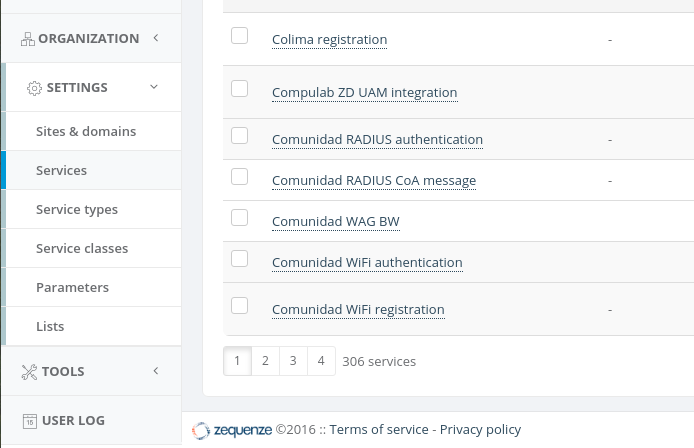
- Search for
pushin the services list - Click on Push notification
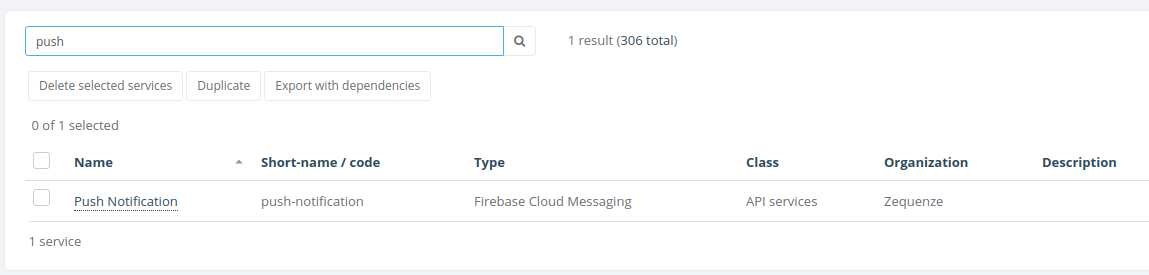
Step 2: Configure API Key
- On the Push Notification Service screen, enter your Firebase API key
- Click the Save and continue editing button to save your configuration

Step 3: Access Service Test Interface
Click on the Service test tab at the top of the Push Notification Service screen to access the testing interface.
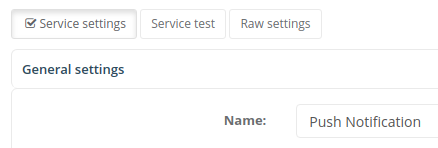
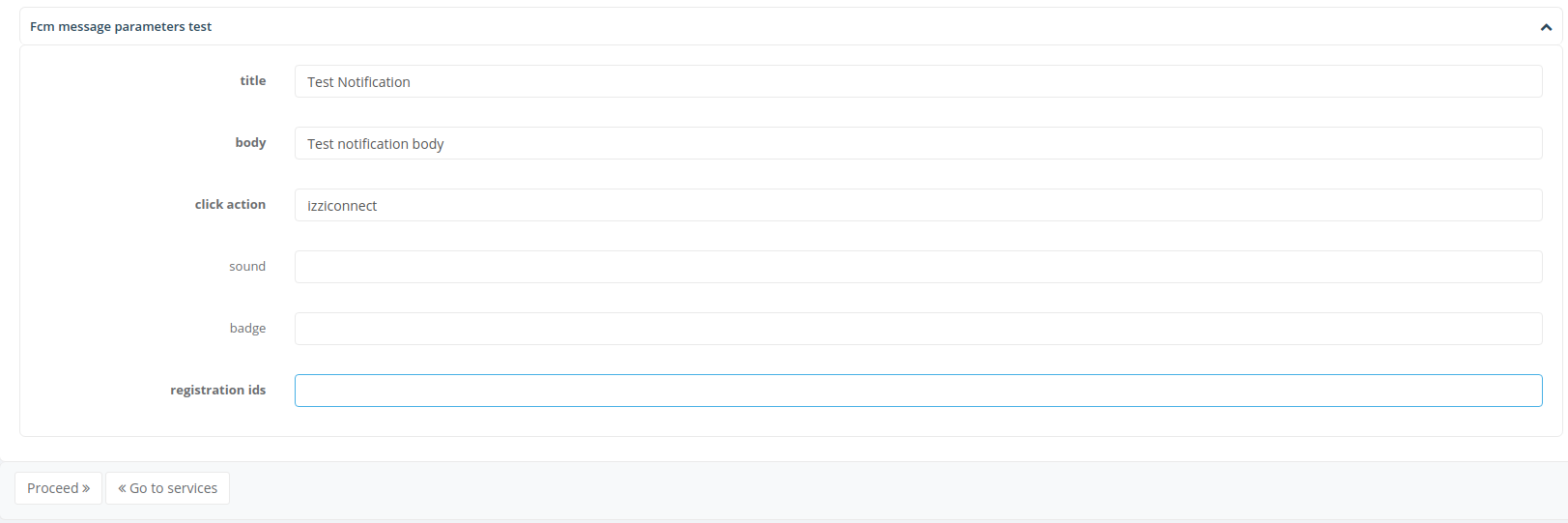
Step 4: Configure Test Notification
Fill in the following required fields:
- Title: The notification headline
- Body: The main notification message
- Click action: Action to perform when notification is tapped
- Registration IDs: Target device registration IDs
Once all fields are completed, click the Proceed button to send the test notification.
Step 5: Verify Results
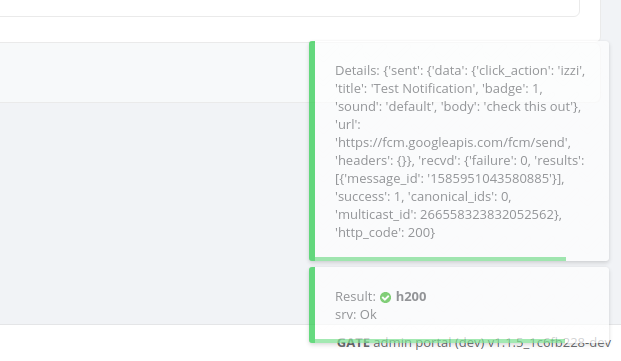
If everything went ok and the test is successful:
- Results will be shown on the lower right corner of the interface
- The notification should be delivered to the specified device(s)
Troubleshooting
If notifications fail to deliver, verify:
- API key is correctly entered and valid
- Registration IDs are current and properly formatted
- Device connectivity and FCM service availability
User Scripts
Overview
User Scripts are Python-based automation tools that execute operations on a predetermined list of users. Users can be selected either through custom filters configured by the administrator or by importing rows from a CSV file. These scripts enable you to:
- Retrieve information about users in bulk
- Perform batch operations on selected users
- Automate repetitive user management tasks
Note: User Scripts must be executed manually by the administrator.
Accessing User Scripts
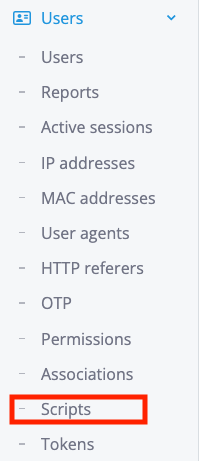
To access the User Scripts configuration screen:
The Users scripts configuration screen can be found under the Scripts sub-menu on the Users main menu:
User Object Reference
Overview
The script execution context provides access to a special User object, referenced as either user or obj. This object allows you to:
- Read and modify user attributes
- Perform operations on the managed user
- Execute special actions related to the user
Attributes
The user object exposes the following attributes:
| Name | Type | Description |
|---|---|---|
obj_id |
integer | Numeric unique identification of the current user |
username |
string | Used to read or change the username field of the current user (read/write) |
username_length |
integer | Used to read or change the username_length field of the current user (read/write) |
first_name |
string | Used to read or change the first_name field of the current user (read/write) |
last_name |
string | Used to read or change the last_name field of the current user (read/write) |
email |
string | Used to read or change the email field of the current user (read/write) |
external_id |
string | Used to read or change the external_id field of the current user (read/write) |
klass |
string | Used to read or change the klass field of the current user (read/write) |
is_active |
boolean | Used to activate or deactivate the current user (read/write) |
date_joined |
datetime | Date/time of user joined (read-only) |
first_login |
datetime | Date/time of user first login (read-only) |
last_login |
datetime | Date/time of user last login (read-only) |
expiration |
datetime | Date/time of user expiration (read/write) |
last_update |
datetime | Date/time of user last update (read/write) |
organization_id |
integer | Numeric identification of the user organization |
avatar_url |
string | Used to read or change the avatar_url field of the current user (read/write) |
description |
string | Used to read or change the description field of the current user (read/write) |
Methods
The user object provides the following methods for managing profiles and attributes:
profile_add()
Adds a specific profile to the user. You can add using the id or the short name of the profile.
Parameters:
id(integer) - Profile ID to addshort_name(string) - Profile short name to add
Note: Use either id OR short_name, not both.
Returns:
updated(boolean) - Whether the operation succeededmessage(string) - Status or error message
Examples:
# Add profile by ID
updated, message = user.profile_add(id=12)

# Add profile by short name
updated, message = user.profile_add(short_name="aaa-01")
profile_remove()
Removes a specific profile from the user. You can remove using the id or the short name of the profile.
Parameters:
id(integer) - Profile ID to removeshort_name(string) - Profile short name to remove
Note: Use either id OR short_name, not both.
Returns:
updated(boolean) - Whether the operation succeededmessage(string) - Status or error message
Examples:
# Remove profile by ID
updated, message = user.profile_remove(id=12)

# Remove profile by short name
updated, message = user.profile_remove(short_name="aaa-01")
attribute_add()
Adds a specific attribute to the user. You must provide the attribute name, value, and optionally an operation.
Parameters:
attr(string, required) - Attribute name to addvalue(string, required) - Value to assign to the attributeoperation(string, optional) - Operator to use (default:=)- Available options:
=,+=,:=
- Available options:
Returns:
updated(boolean) - Whether the operation succeededmessage(string) - Status or error message
Example:
updated, message = user.attribute_add(
    attr='Username',
    value="zequenze",
    operation='+='
)
attribute_remove()
Removes a specific attribute from the user. You must provide the attribute name, value, and optionally an operation.
Parameters:
attr(string, required) - Attribute name to removevalue(string, required) - Value to remove from the attributeoperation(string, optional) - Operator to use (default:=)- Available options:
=,+=,:=
- Available options:
Returns:
updated(boolean) - Whether the operation succeededmessage(string) - Status or error message
Example:
updated, message = user.attribute_remove(
    attr='Username',
    value="zequenze",
    operation='+='
)
check_attribute_add()
Adds a specific check attribute to the user. You must provide the attribute name, value, and optionally an operation.
Parameters:
attr(string, required) - Check attribute name to addvalue(string, required) - Value to assign to the check attributeoperation(string, optional) - Operator to use (default:=)- Available options:
=,+=,:=
- Available options:
Returns:
updated(boolean) - Whether the operation succeededmessage(string) - Status or error message
Example:
updated, message = user.check_attribute_add(
    attr='Max-Daily-Session',
    value=4,
    operation='=='
)
check_attribute_remove()
Removes a specific check attribute from the user. You must provide the attribute name, value, and optionally an operation.
Parameters:
attr(string, required) - Check attribute name to removevalue(string, required) - Value to remove from the check attributeoperation(string, optional) - Operator to use (default::=)- Available options:
:=,+=,==,!=,>,>=,<,<=,=*
- Available options:
Returns:
updated(boolean) - Whether the operation succeededmessage(string) - Status or error message
Example:
updated, message = user.check_attribute_remove(
    attr='Max-Daily-Session',
    value=4,
    operation='=='
)