OpenAI Integration
Introduction
FLUX provides integration with the OpenAI API, enabling you to create elements that leverage artificial intelligence capabilities within your workflows.
Overview
The OpenAI integration is implemented through two key components:
- OpenAI API Profile – Provides the configuration and credentials needed to connect with OpenAI services
- OpenAI Element Group – Contains specialized elements that interact with the OpenAI API to send questions and receive AI-generated responses
You can view the profile configuration here: OpenAI API Profile Example
Available OpenAI Elements
FLUX includes several pre-built elements that demonstrate OpenAI integration capabilities:
Python Helper
- Purpose: Generates Python code to extract variables from files
- Use Case: Used by other models to automatically create Python code that extracts variables from test data into a dictionary format
- Link: View Element
TTP Helper
- Purpose: Generates TTP (Template Text Parser) models from test data
- Use Case: Used by other models to create TTP templates capable of extracting variables from test data into a dictionary format
- Link: View Element
JSON Query
- Purpose: Performs complex queries on JSON data structures
- Use Case: Used by PublicElementConfig to execute advanced JSON queries
- Link: View Element
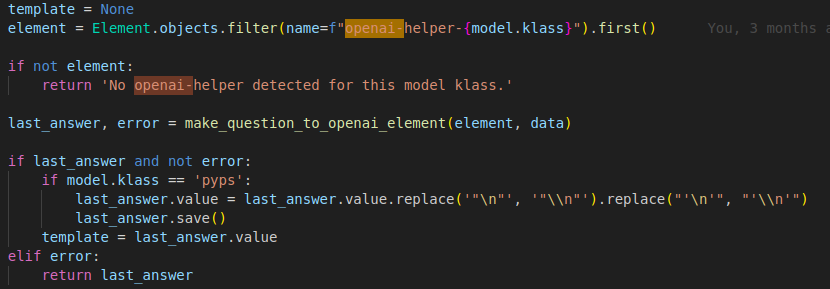
Using OpenAI Elements in Your Code
To integrate OpenAI elements into your code, follow these steps:
- Locate the Element – Search for the Element that contains your desired OpenAI model
-
Invoke the Function – Call
make_question_to_openai_element()with your question as the second parameter - Receive the Response – The function returns the OpenAI-generated answer
How It Works
The make_question_to_openai_element() function executes an OpenAI API call using:
- The base model context
- Previous conversation history (if any)
- Your current question
The function then returns the AI-generated response for use in your application.
Example Implementation
Additional Resources
For detailed information on creating custom models with OpenAI integration capabilities, refer to the Models documentation page.