Scripts with visualization feature
- Sequential flow designer basics
- Available steps for management scripts in task elements
- Available steps table
Sequential flow designer basics
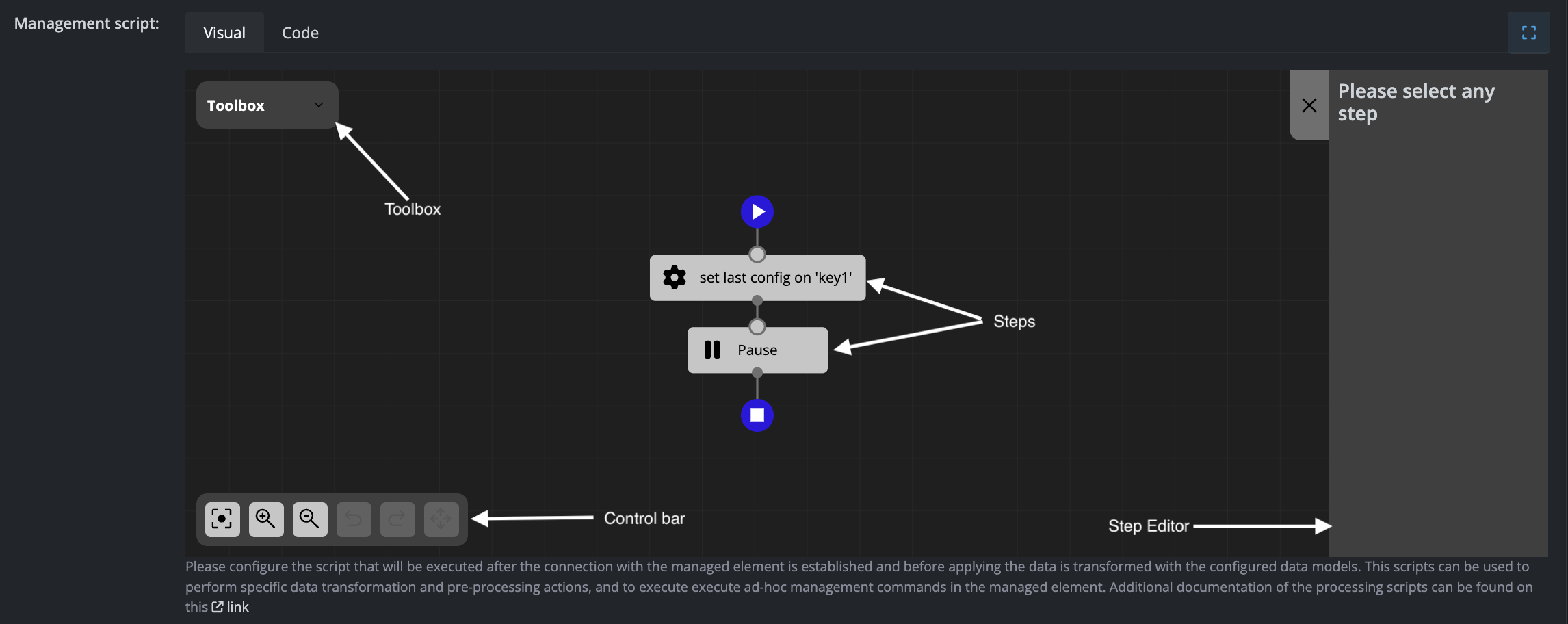
The Scripts configuration allows you to execute Python code with the option of using a visual representation, as shown in the screenshot below:
Interface Components
The sequential flow designer consists of four main components:
Toolbox
Contains all available steps that can be added to your flow. Simply drag and drop steps from the toolbox into the steps diagram to build your sequence.
Control Bar
Provides viewport and editing controls:
- Reset viewport
- Zoom in or zoom out
- Undo or redo changes
- Delete the selected step
Steps Diagram
Displays the flow of steps to be executed in sequence. Click on any step to view and modify its settings in the Step Editor panel.
Step Editor
Shows the configuration settings for the currently selected step. This panel updates dynamically based on which step you have selected in the diagram.
Available steps for management scripts in task elements
Set Value in Objects
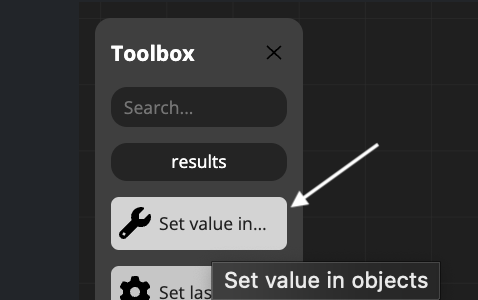
This step allows you to assign different types of values to three available object types within your management scripts.
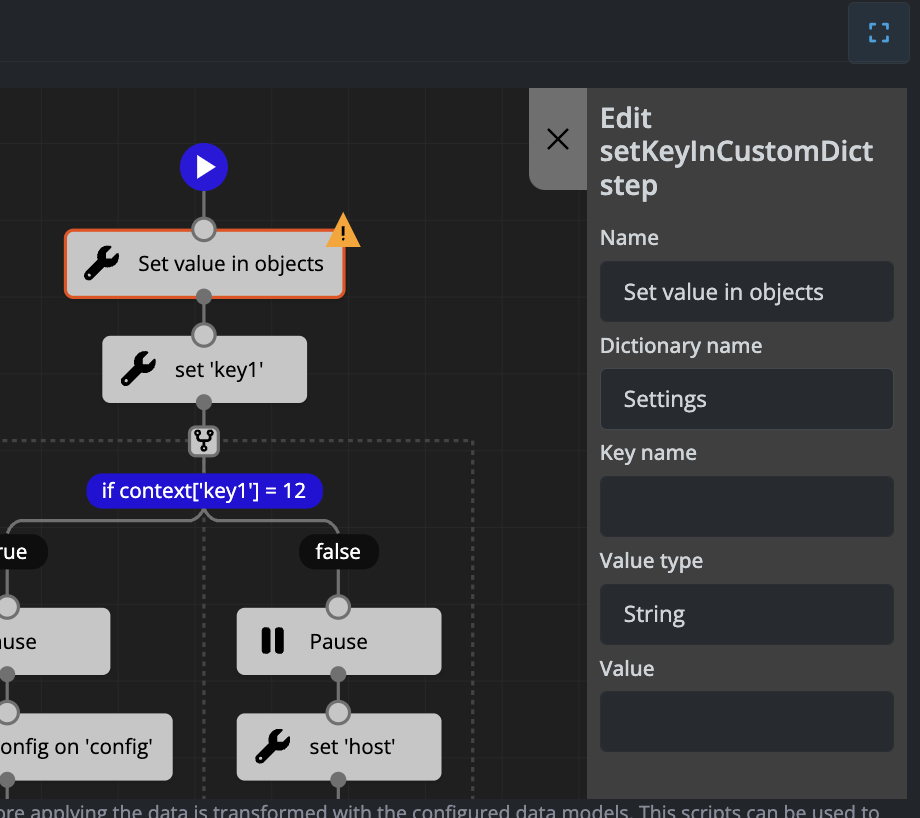
Available Objects
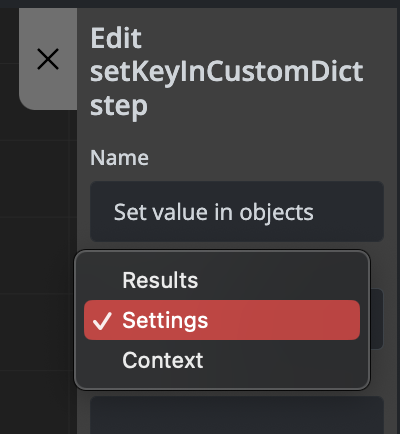
The three available objects where you can set values are:
- data - For storing and manipulating data values
- settings - For configuration and settings parameters
- context - For contextual information and workflow variables
Value Types
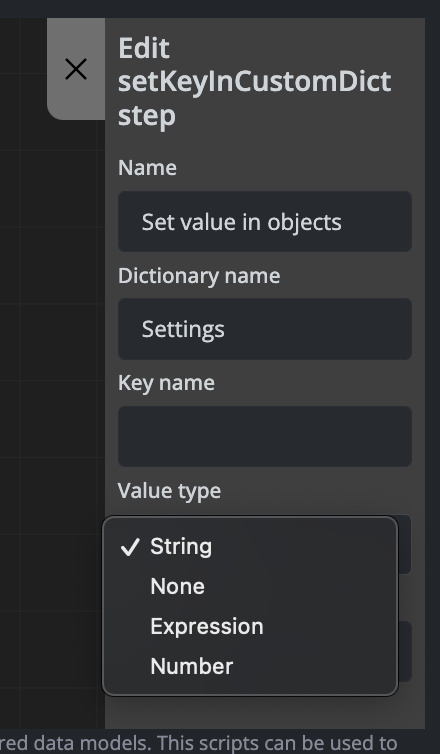
You can set values using different data types and sources depending on your requirements.
Examples
Example 1: Setting a Value in the Settings Object
Setting the uplink_rx_bytes parameter in the settings object using information stored in the data object:
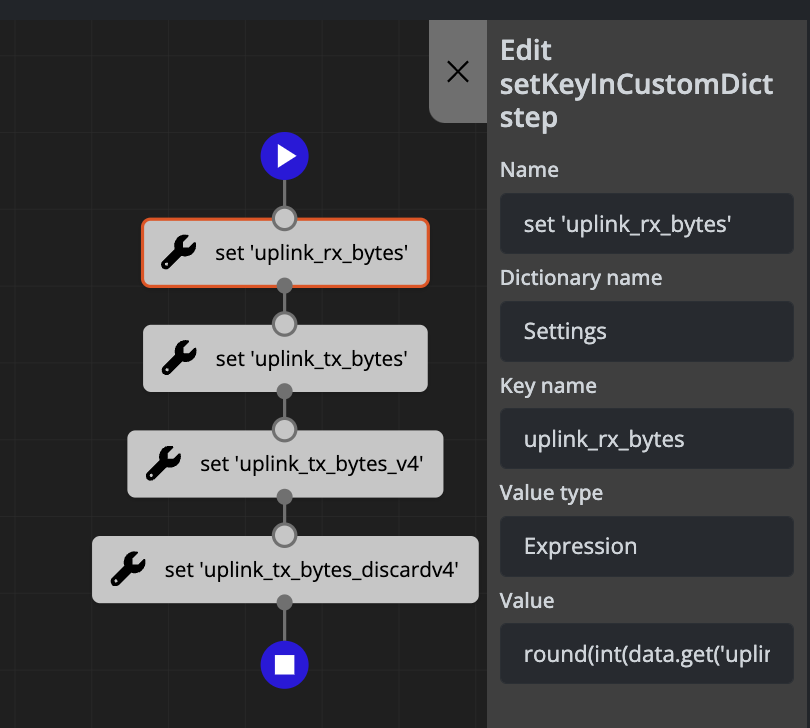
The above configuration generates the following code:
settings['uplink_rx_bytes'] = round(int(data.get('uplink_rx_bytes_val', '0')) * 0.000000001, 3)
Example 2: Adding an Email Destination to the Context Object
Adding an email destination to the context object:
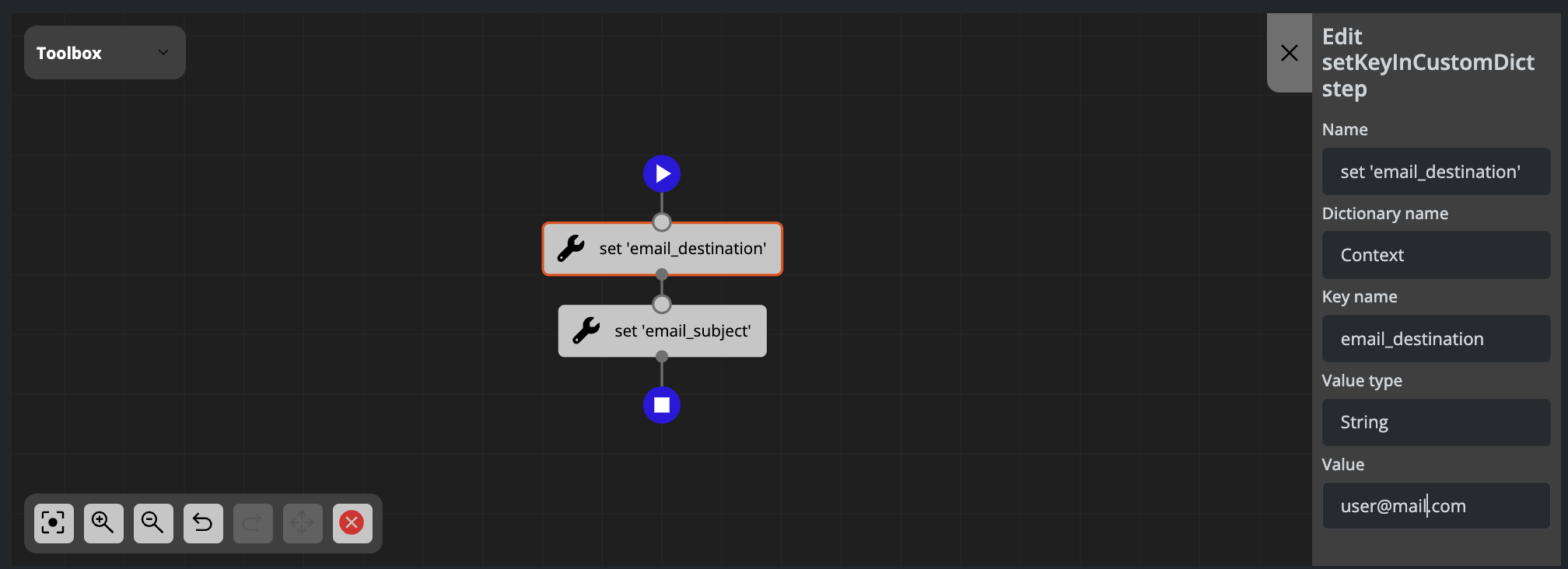
The above configuration generates the following code:
context['email_destination'] = 'user@mail.com'
Set Last Configuration in Object
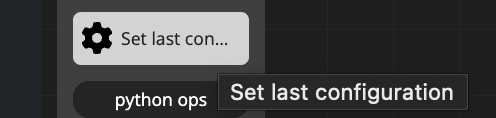
This step allows you to retrieve the last configuration and assign it to one of the available objects. This is useful when you need to access or reference previously saved configuration data within your management scripts.
Examples
Example: Setting Last Configuration in the Context Object
Setting the last configuration in the context object inside the automation_custom_output key:
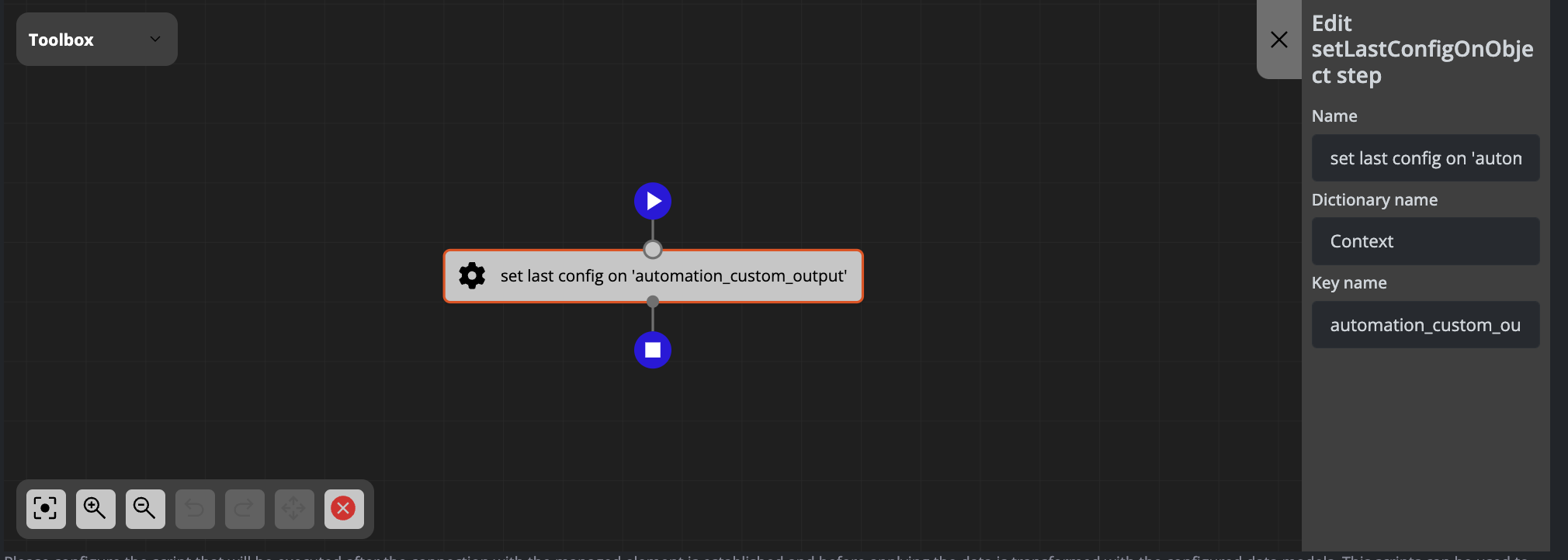
The above configuration generates the following code:
context['automation_custom_output'] = config.get_last_config()
Available steps table
Overview
FLUX provides three types of scripts, each with specific available steps for workflow automation. This page details all available steps and their properties for each script type.
Management Script Steps
The management_script supports the following steps:
Set Value in Objects
Stores different types of values in one of three available objects using a typed key.
Properties:
| Property Name | Type | Label | Options |
|---|---|---|---|
| dictionary name | str | Object Name | Results, Context, Settings |
| key name | str | Name of key | — |
| value type | — | Type of value | str, number, none, expression |
| value | — | — | — |
Set SSH Key Pair in Context
Retrieves an SSH key pair and stores it in one of the defined objects using a custom key.
Properties:
| Property Name | Type | Label | Options |
|---|---|---|---|
| privKeyKey | — | — | — |
| pubKeyKey | — | — | — |
Set Last Configuration
Retrieves the element's last configuration and stores it in one of the available objects using a custom key.
Properties:
| Property Name | Type | Label | Options |
|---|---|---|---|
| dictionary name | str | — | Results, Context, Settings |
| key name | str | — | — |
Processing Script Steps
The processing_script supports the following steps:
Set Value in Objects
Stores different types of values in one of three available objects using a typed key.
Properties:
| Property Name | Type | Label | Options |
|---|---|---|---|
| dictionary name | str | Object Name | Results, Context, Settings |
| key name | str | Name of key | — |
| value type | — | Type of value | str, number, none, expression |
| value | — | — | — |
Set Last Configuration
Retrieves the element's last configuration and stores it in one of the available objects using a custom key.
Properties:
| Property Name | Type | Label | Options |
|---|---|---|---|
| dictionary name | — | — | — |
| key name | — | — | — |
Set Variable on Element Config
Sets an attribute in the element configuration object.
Properties:
| Property Name | Type | Label | Options |
|---|---|---|---|
| key name | — | — | — |
| value type | — | — | — |
| value | — | — | — |
If Condition Simple for Numbers
Checks a simple condition with a numeric variable. Examples: if a=b, if a >= b, if a < 12
Properties:
| Property Name | Type | Label | Options |
|---|---|---|---|
| variable to evaluate | — | — | — |
| operator | — | — | — |
| value | — | — | — |
If Condition Simple for Strings
Checks a simple condition with a string variable. Examples: if a.startswith('device_'), if a in b, if s.endswith(':')
Properties:
| Property Name | Type | Label | Options |
|---|---|---|---|
| variable to evaluate | — | — | — |
| operator | — | — | — |
| value | — | — | — |
If Condition Advanced
Evaluates Python conditions. Examples: if context['host'] == "0.0.0.0.0", if not data.get('apt_upgradable.table')
Properties:
| Property Name | Type | Label | Options |
|---|---|---|---|
| condition | — | — | — |
Pause
Executes a time.sleep(time) operation.
Properties:
| Property Name | Type | Label | Options |
|---|---|---|---|
| time | — | — | — |
Pause with Log
Executes a sleep operation with logging.
Properties:
| Property Name | Type | Label | Options |
|---|---|---|---|
| time | — | — | — |
Update Element Credentials
Reads SSH credentials from context and updates them in the element.
Properties:
| Property Name | Type | Label | Options |
|---|---|---|---|
| privKeyKey | — | — | — |
| pubKeyKey | — | — | — |
Wait for Connect
Waits for a specified time until the connection against the element executes correctly.
Properties:
| Property Name | Type | Label | Options |
|---|---|---|---|
| timeout | — | — | — |
| retry | — | — | — |
| sleep | — | — | — |
Set Variable Value
Note: To be documented.
Properties:
| Property Name | Type | Label | Options |
|---|---|---|---|
| variable_name | — | — | — |
| value_type | — | — | — |
| value | — | — | — |
Execution Script Steps
The Flow execution_script includes all steps from the Processing Script, plus the following additional steps:
Filter Flow Elements
Applies a function to filter the given elements, with support for in-place modification or returning a new list.
Properties:
| Property Name | Type | Label | Options |
|---|---|---|---|
| elements | list | List of elements | elements, ... |
| filter_function | function | Function to filter elements | — |
| inplace | bool | Replace or return | True, False |
Task Execution
Runs a specific task on given elements. If the flow containing the task is serial, the elements parameter is not required.
Properties:
| Property Name | Type | Label | Options |
|---|---|---|---|
| short_name | str | Task short name | — |
| elements | list | List of elements to run the task | elements, ... |
| retry_attempts | int | Retry attempts | — |
| retry_delay | int | Retry delay | — |
Flow Execution
Runs a specific flow on given elements.
Properties:
| Property Name | Type | Label | Options |
|---|---|---|---|
| short_name | str | Flow short name | — |
| elements | list | List of elements to run the flow | elements, ... |
| retry_attempts | int | Retry attempts | — |
| retry_delay | int | Retry delay | — |