# Firmware Management
## Overview
CONTROL ACS provides comprehensive **Firmware Management** functionality to automate firmware updates across your device fleet. The system is configured through two main areas:
- **Device Profile / Types** (`Inventory > Profile / types`)
- **Firmware Library** (`Firmware > Images`)
This page explains how to configure and use these features to manage firmware versions automatically.
---
## Device Profiles / Types
Navigate to **Inventory > Profiles / types** to configure firmware management settings for each device type.
### Enabling Automatic Firmware Upgrades
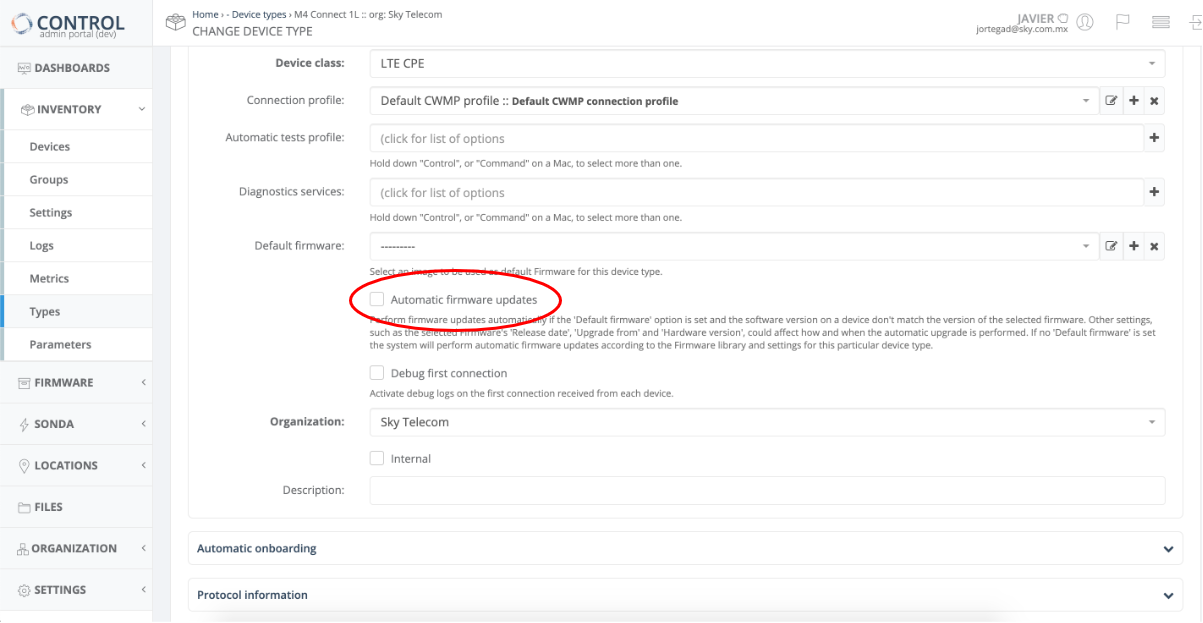
Within any **Device Profile / Type** definition, you can activate automatic firmware upgrades by enabling the **Automatic Firmware Upgrades** checkbox:
### How It Works
Once the **Automatic Firmware Upgrades** checkbox is enabled, CONTROL ACS will automatically manage firmware updates based on your configuration:
**With Default Firmware Image specified:**
- CONTROL ACS checks if a device matches the criteria and selection parameters of the configured *Default firmware* image
- If matched, the system initiates a firmware upgrade (or downgrade) automatically
**Without Default Firmware Image:**
- CONTROL ACS searches the **Firmware Library** (`Firmware > Images`) for applicable firmware images
- Advanced rules and policies configured in the library determine which firmware to apply
---
## Firmware Library
The Firmware Library (`Firmware > Images`) allows you to manage firmware images with granular control over distribution and applicability.
### Firmware Image Configuration
Each firmware image in the library can be configured with the following settings:
- **Image mnemonic** — Friendly name and description for the image
- **Image location** — Storage location options:
- ACS platform (suitable for smaller deployments)
- Local HTTP/FTP server (recommended for large-scale distributions)
- **Firmware applicability rules** — Control when firmware applies based on:
- Device hardware version
- Current device firmware version
- Release date
- Additional criteria
### Adding a Firmware Image
1. Click the **Add Image** button at the top right of the interface:
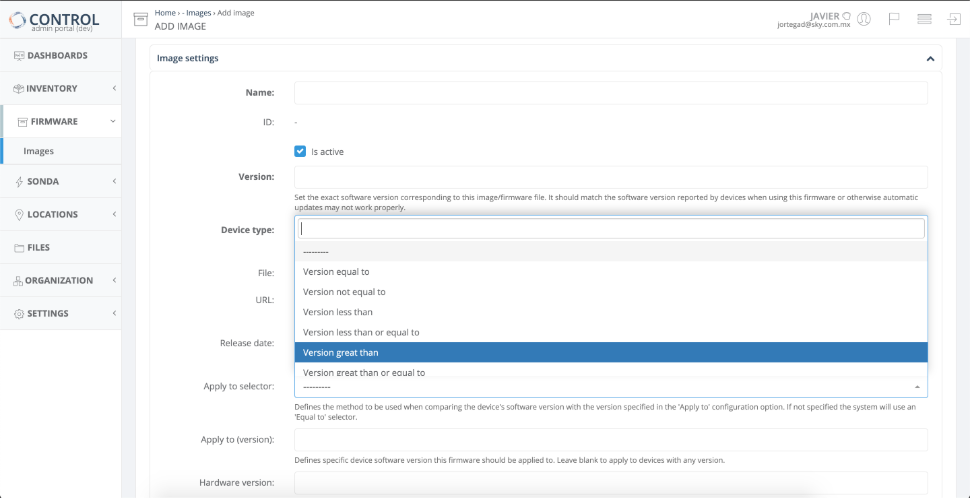
2. Configure the image settings on the **Add Image** page:
### Firmware Image Parameters
| Parameter | Description |
|-----------|-------------|
| **Name** | Mnemonic identifier for the firmware image |
| **Version** | Version number of the firmware image |
| **Device Profile** | Select the Device Profile this image applies to from the dropdown menu |
| **Upgrade Profile** | *To be confirmed* |
| **File or URL** | Upload the firmware file through the GUI or specify an HTTP/FTP URL where the image is located
**Note:** Using a local Service Provider HTTP/FTP server is **STRONGLY recommended** for massive firmware updates |
| **Release Date** | Optional. If specified, automatic updates will only be applied after this date |
| **Apply to Selector** | Comparison method used when matching the device's software version against the 'Apply to' version
Default: 'Equal to' |
| **Apply to (version)** | Target device software version for this firmware
Leave blank to apply to devices with any version |
| **Hardware Version** | Target device hardware version for this firmware
Leave blank to apply to devices with any hardware version |
---
## Version Comparison Algorithm
CONTROL ACS uses a direct character-by-character comparison algorithm to determine version precedence.
### Comparison Examples
The algorithm evaluates versions as follows:
- `v1.0.1` is a **lower** version than `v1.0.10`
- `v1.0.1a` is a **lower** version than `v1.0.1b`
- `v1.0.1a` is a **greater** version than `v1.0.1`
### Important Consideration
The algorithm treats `v1.0.1a` as a higher version than `v1.0.1`, which may not be the desired behavior in all scenarios.
**Workaround:** Add an underscore character to ensure correct version ordering:
- `v1.0.1_` is a **lower** version than `v1.0.1a`
This allows you to maintain the expected version hierarchy when alphabetic suffixes are used.
---
## Firmware Selection Logic
*To be confirmed*
---
## Upgrade Profiles
Navigate to **Firmware > Profiles** to manage upgrade profiles.
*To be confirmed*