Device management through TR-069
- Configuring a CPE to become managed through CWMP/TR-069
- TR-069 Connection Request
- CPE Configuration for XMPP Connection Request
Configuring a CPE to become managed through CWMP/TR-069
Overview
To configure a Customer Premises Equipment (CPE) device for management through the CWMP/TR-069 protocol, you must enable TR-069 management on your CPE device and configure it to communicate with the CONTROL platform.
Required CPE Configuration Fields
The following configuration fields are required for initial setup and should be available in your CPE device settings:
- CWMP/TR-069 Server URL: The URL endpoint of the CWMP/TR-069 Server Platform
- Periodic Inform Interval: The reporting frequency (in seconds) for status updates between the CPE and CWMP/TR-069 Server Platform
- Username: The username credential used to authenticate the CPE to the CWMP/TR-069 Server Platform
- Password: The password credential used to authenticate the CPE to the CWMP/TR-069 Server Platform
Optional CPE Configuration Fields
Some CPE devices may offer additional TR-069 configuration parameters:
- Connection Request URL: The CPE's URL endpoint for receiving connection requests
- Connection Request Username: The username for authenticating connection requests to the CPE
- Connection Request Password: The password for authenticating connection requests to the CPE
Note: These optional parameters are not required for initial CPE setup and can be configured later through the CONTROL platform itself.
Example Configuration
A typical initial TR-069 CPE configuration would look like:
-
URL:
https://control-dev.zequenze.com/cwmp/ -
Periodic Inform Interval:
120(seconds) -
Username:
test-device -
Password:
c0mpl3xpazz
Important Authentication Requirements
The Username and Password fields configured on the CPE must match the credentials defined in the CONTROL platform. These credentials can be configured either:
- For a specific individual device, or
- For a device TYPE (when using auto-onboarding functionality)
Configuration on CONTROL Platform
TBC
TR-069 Connection Request
Overview
TR-069 is a CPE-originated communication protocol, meaning that the CPE (Customer Premises Equipment) initiates connectivity toward the ACS (Auto Configuration Server) using a pre-agreed ACS URL, username, and password.
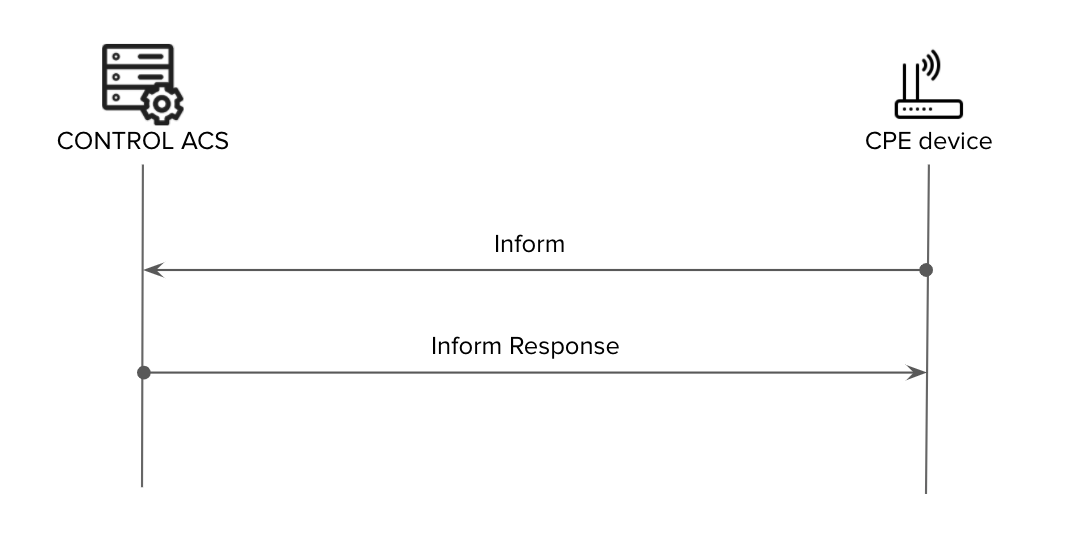
In a standard TR-069 communication flow, the CPE connects to the ACS at regular intervals defined by the Periodic Inform Interval. However, there are scenarios where the ACS needs to update or modify CPE parameters within a shorter timeframe than the configured interval. For example, a customer support agent may need to change a WiFi password immediately rather than waiting for the next periodic connection.
To address this requirement, the TR-069 standard defines a Connection Request functionality.
What is Connection Request?
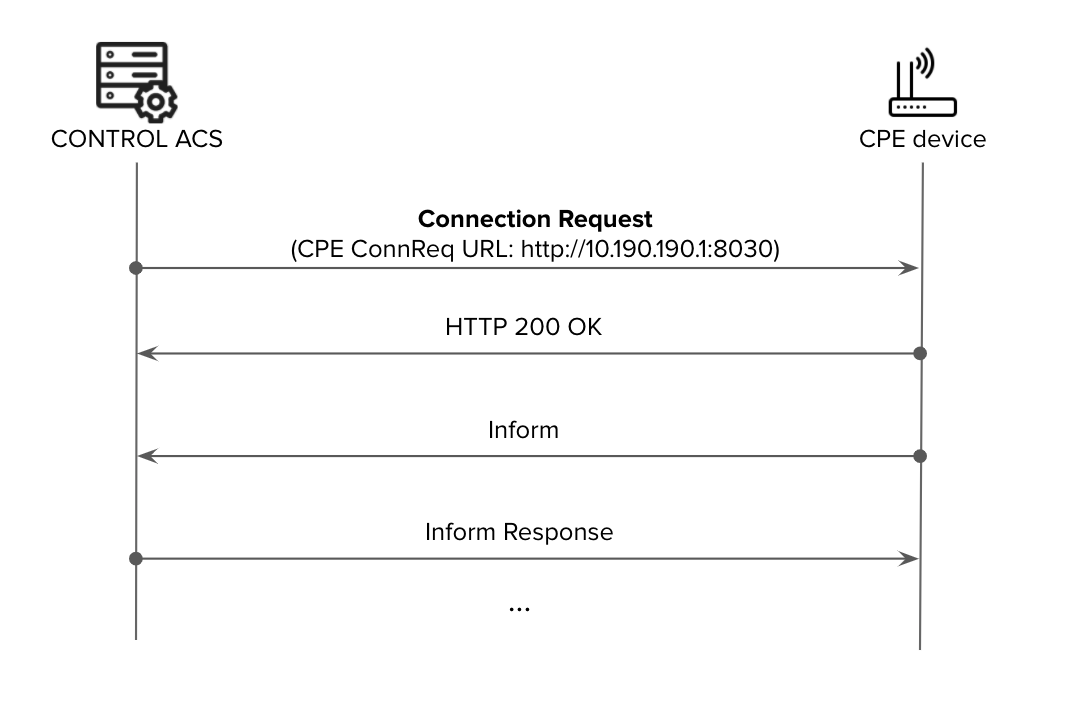
Connection Request is a mechanism that allows the ACS to proactively request (or "poke") a CPE to initiate a TR-069 session at any time, independent of the Periodic Inform Interval.
How It Works
- The ACS sends an HTTP request to the CPE using the CPE Connection Request URL with pre-agreed Connection-Request Username and Connection-Request Password
- The CPE responds with either:
-
Success:
HTTP 200 OKorHTTP 204 No Content -
Failure:
HTTP 401 Unauthorized
-
Success:
- Upon successful acknowledgment, the CPE initiates a standard TR-069 session toward the ACS (beginning with the initial Inform message)
Benefits of Connection Request
By enabling Connection Request between ACS and CPE, service providers can:
- Reduce network overhead: Use longer Periodic Inform Intervals to minimize network management traffic and CPE load
- Maintain flexibility: Retain the ability to make configuration changes or perform tests on-demand whenever required
- Improve operational efficiency: Enable immediate responses to customer support requests without waiting for the next periodic inform
Implementation Challenges
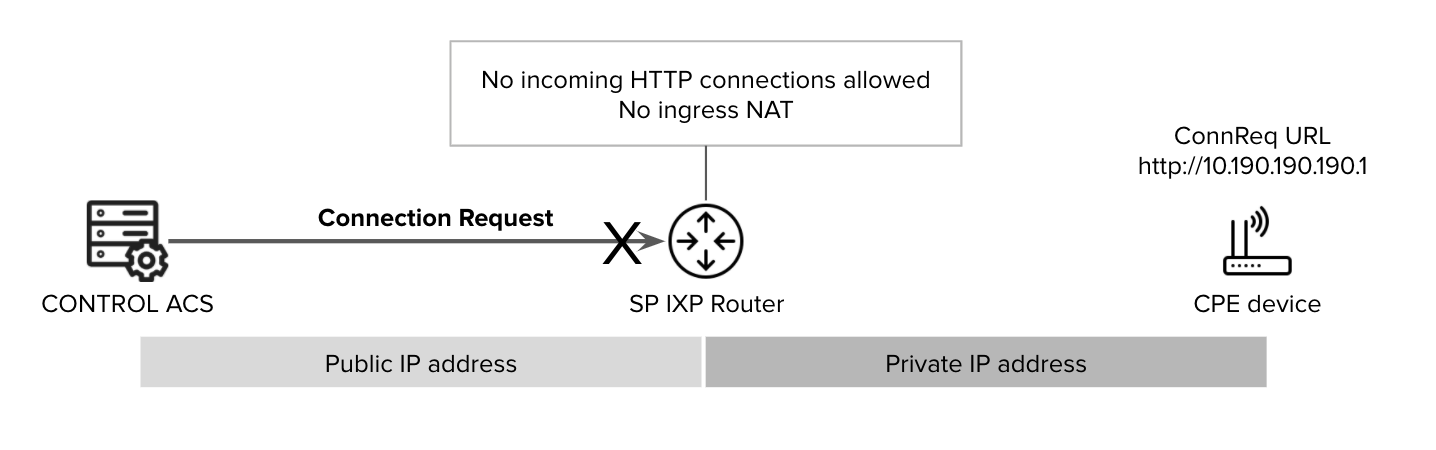
Implementing Connection Request presents challenges primarily related to enabling inbound HTTP connectivity from the ACS to the CPE. These challenges involve:
- IP Reachability: CPE devices are often behind NAT or use private IP addressing, making them unreachable from the ACS
- Security Concerns: Opening inbound connections to CPE devices requires careful security considerations
Connection Request Methods
Several approaches exist to overcome these implementation challenges. The following are the most widely deployed methods:
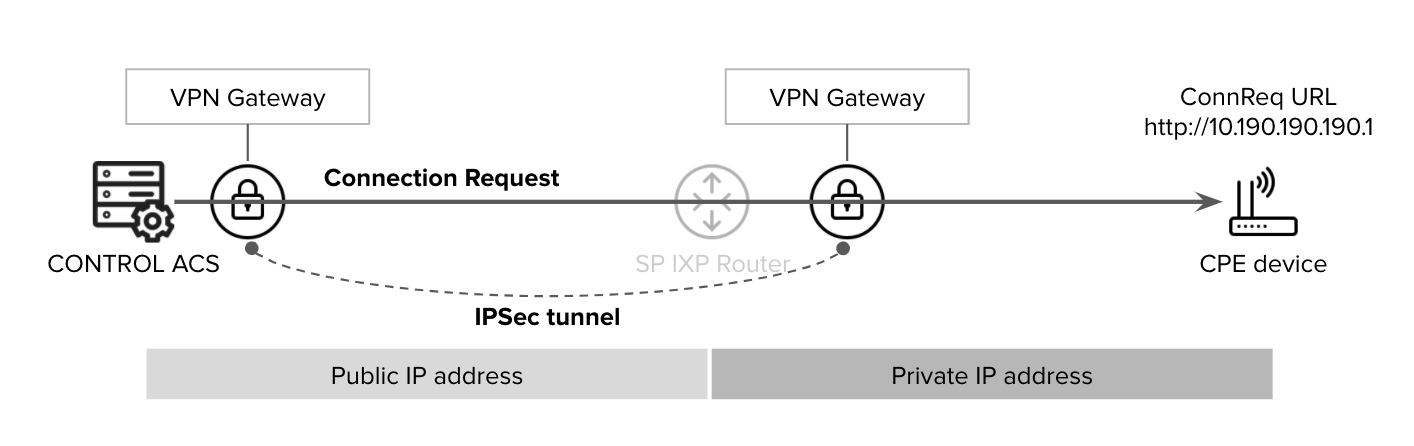
VPN-Based Connection Request
A VPN tunnel can be established to provide direct reachability from the ACS to CPE devices located within the service provider's private IP address space.
XMPP-Based Connection Request
This method uses an intermediate XMPP Broker that:
- Can reach CPE devices
- Is reachable by the ACS
- Can be located inside or outside the service provider's network (e.g., in a DMZ)
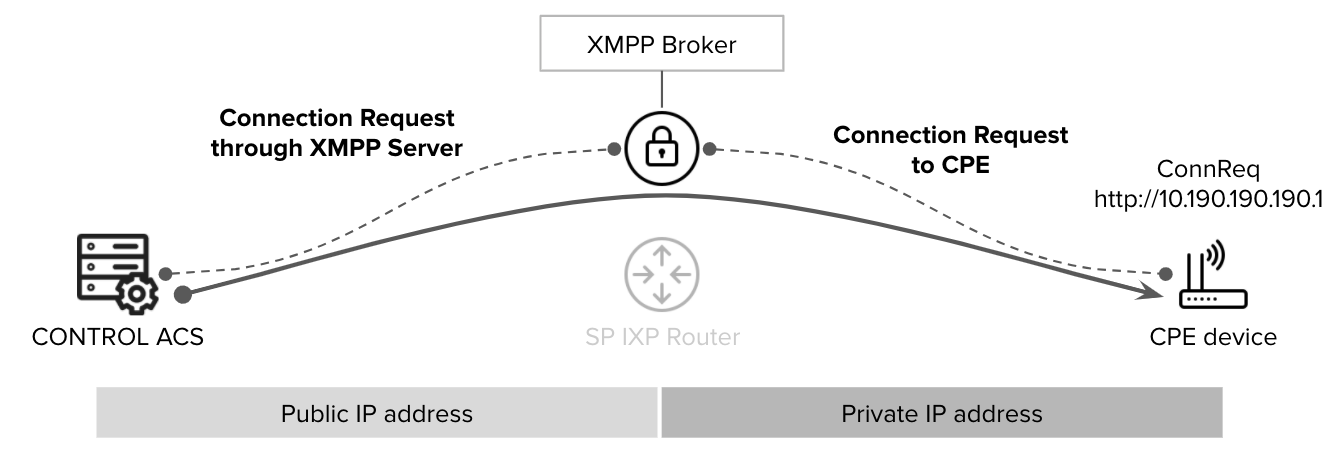
Reference: TR-069 Issue 1 Amendment 6 Annex K provides detailed specifications for this architecture.
STUN/UDP-Based Connection Request
This approach uses an intermediate STUN server to enable inbound UDP-based connection requests:
- The CPE creates a UDP connection (bind) to the STUN server
- The ACS can reach the CPE through the STUN server using the UDP Bind address
- The STUN server can be located inside or outside the service provider's network (e.g., in a DMZ)
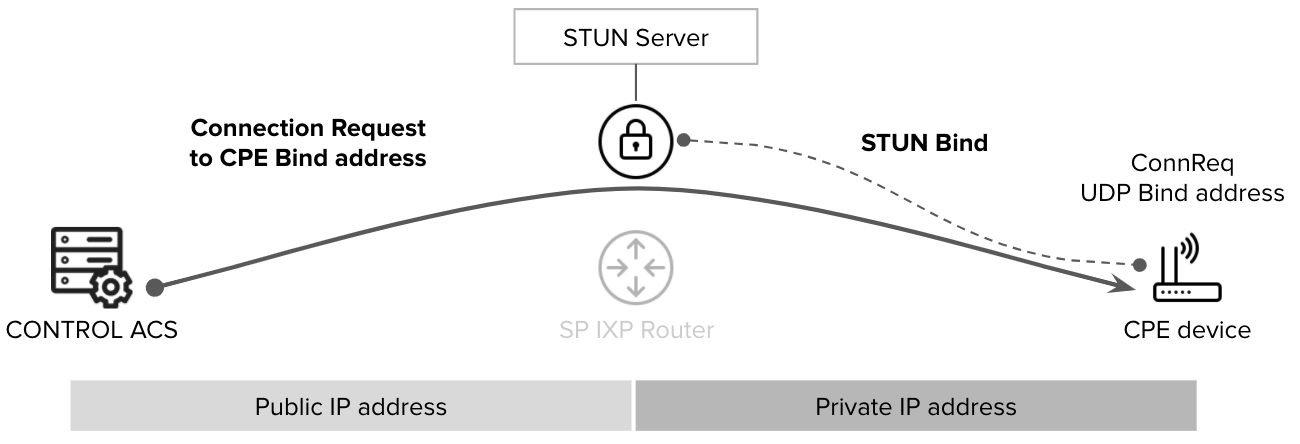
Reference: TR-069 Issue 1 Amendment 6 Annex G provides detailed specifications for this architecture.
Note: CONTROL ACS supports all of the connection request schemes described above.
CPE Configuration for XMPP Connection Request
Overview
The Connection Request feature enables the ACS (Auto Configuration Server) platform to initiate communication with CPE devices to retrieve or modify parameter values and perform OAM (Operations, Administration, and Maintenance) operations.
Prerequisites
Before configuring XMPP Connection Request, ensure that an XMPP Connection instance has been created on the device at the following data model path:
InternetGatewayDevice.XMPP.Connection.1
Configuration Parameters
The following sections detail the required TR-069 parameters for XMPP Connection Request configuration in different environments.
Development/Testing Environment
Use these configuration values when connecting to the CONTROL development environment:
| TR-069 Parameter | Value/Description | Type | Access |
|---|---|---|---|
| InternetGatewayDevice.XMPP.Connection.1.Enable | 1 | boolean | RW |
| InternetGatewayDevice.XMPP.Connection.1.Domain | control-xmpp-dev.zequenze.com | string | RW |
| InternetGatewayDevice.XMPP.Connection.1.Username | sample_username | string | RW |
| InternetGatewayDevice.XMPP.Connection.1.Password | sample_password | string | RW |
| InternetGatewayDevice.XMPP.Connection.1.Resource | ConnReq | string | RW |
| InternetGatewayDevice.XMPP.Connection.1.UseTLS | 1 | boolean | RW |
| InternetGatewayDevice.XMPP.Connection.1.TLSEstablished | 1 | boolean | RO |
| Device.ManagementServer.ConnReqJabberID | sample_username@control-xmpp-dev.zequenze.com/ConnReq | string | RO |
| Device.XMPP.Connection.1.ServerConnectAlgorithm | DNS-SRV | string | RW |
| Device.XMPP.Connection.1.KeepAliveInterval | 300 | integer | RW |
Note: Replace sample_username and sample_password with your actual credentials.
Production Environment
Use these configuration values when connecting to the CONTROL production environment:
| TR-069 Parameter | Value/Description | Type | Access |
|---|---|---|---|
| InternetGatewayDevice.XMPP.Connection.1.Enable | 1 | boolean | RW |
| InternetGatewayDevice.XMPP.Connection.1.Domain | control-xmpp.zequenze.com | string | RW |
| InternetGatewayDevice.XMPP.Connection.1.Username | sample_username | string | RW |
| InternetGatewayDevice.XMPP.Connection.1.Password | sample_password | string | RW |
| InternetGatewayDevice.XMPP.Connection.1.Resource | ConnReq | string | RW |
| InternetGatewayDevice.XMPP.Connection.1.UseTLS | 1 | boolean | RW |
| InternetGatewayDevice.XMPP.Connection.1.TLSEstablished | 1 | boolean | RO |
| Device.ManagementServer.ConnReqJabberID | sample_username@control-xmpp.zequenze.com/ConnReq | string | RO |
| Device.XMPP.Connection.1.ServerConnectAlgorithm | DNS-SRV | string | RW |
| Device.XMPP.Connection.1.KeepAliveInterval | 300 | integer | RW |
Note: Replace sample_username and sample_password with your actual credentials.
Parameter Descriptions
-
Enable: Activates the XMPP connection (set to
1for enabled) - Domain: The XMPP server domain for the respective environment
- Username: Authentication username for the XMPP connection
- Password: Authentication password for the XMPP connection
-
Resource: XMPP resource identifier (typically
ConnReqfor Connection Request) -
UseTLS: Enables TLS encryption for the connection (set to
1for enabled) - TLSEstablished: Read-only status indicator showing whether TLS is successfully established
- ConnReqJabberID: Read-only Jabber ID used for connection requests
- ServerConnectAlgorithm: Connection method (DNS-SRV uses DNS service records)
- KeepAliveInterval: Time in seconds between keep-alive messages (default: 300)